The highly anticipated moment is finally here, as the free youtube picture in picture expands its reach beyond the borders of the United States to users around the globe. For years, iPhone and iPad users outside the U.S. had to keep the YouTube app open and active to watch their favorite videos, or pay for a Premium subscription to unlock background viewing. In a massive update for 2026, YouTube has officially confirmed that non-Premium users worldwide will now be able to use Picture-in-Picture (PiP) for longform, non-music content on both iOS and Android platforms.
This expansion represents a significant shift in how audiences consume media on their mobile devices, prioritizing multitasking and user convenience. Whether you are taking notes during an educational tutorial or scrolling through social media while watching a podcast, the global rollout of this feature bridges a long-standing gap in the user experience.
What Exactly is Picture-in-Picture (PiP)?
Picture-in-Picture is a highly sought-after multitasking feature that shrinks your playing video into a small, movable floating player. When you swipe up to exit the YouTube app to check a message or browse the web, the video does not pause. Instead, it transitions seamlessly into this miniaturized window. You can drag the player to different corners of your screen, resize it, or temporarily swipe it to the edge of your display to hide the video while keeping the audio running.
“Picture-in-Picture allows users to multitask effortlessly, transforming mobile devices into true productivity powerhouses by letting them watch their favorite longform content while browsing other apps.”
Feature Availability and Subscription Tiers
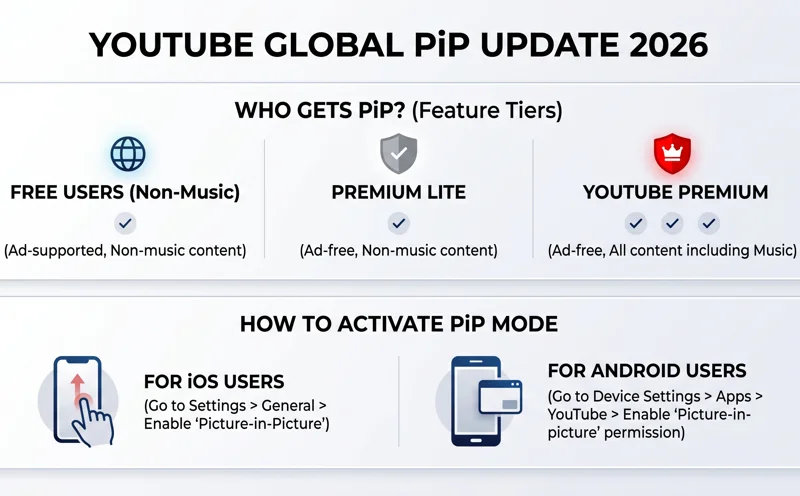
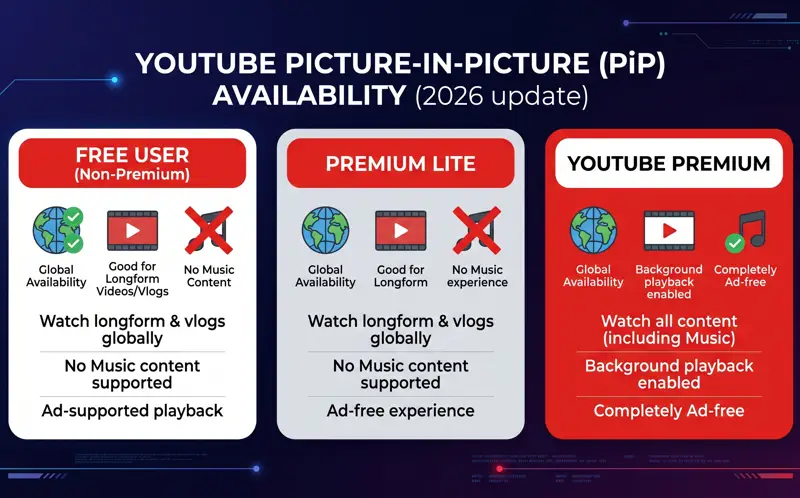
With this new update rolling out over the coming months, it is essential to understand what features are available to you based on your current YouTube account status. While the free PiP feature is expanding globally, certain restrictions still apply to protect music licensing agreements.
| Subscription Tier | Longform/Non-Music PiP | Music Content PiP | Region Availability |
|---|---|---|---|
| Free (Non-Premium) | Yes | No | Global |
| Premium Lite | Yes | No | Global (Where Available) |
| YouTube Premium | Yes | Yes | Global |
For more detailed technical guidelines on feature rollouts, you can always check the Official YouTube Blog for direct announcements from the developers.
How to Activate PiP on Your Device
Enabling this feature is incredibly straightforward, though the steps differ slightly depending on whether you are utilizing an Apple iOS device or an Android smartphone. Ensure your application is updated to the latest 2026 version via the App Store or Google Play Store before attempting to use PiP.
| Operating System | Activation Steps |
|---|---|
| iOS (iPhone/iPad) | 1. Open YouTube Settings > General. 2. Toggle on “Picture-in-Picture”. 3. Play a non-music video and swipe up to go home. |
| Android | 1. Go to device Settings > Apps > YouTube. 2. Enable “Picture-in-picture” permission. 3. Play a non-music video and press the home button. |
Understanding Content Limitations
The most common point of confusion regarding this free expansion is the classification of “music” versus “non-music” content. YouTube relies heavily on advertising and premium subscriptions to pay artists for music rights. Because of this, free users attempting to put a music video into PiP mode will find that the video simply closes and playback stops.
“While longform video lovers rejoice, music fans will still need a Premium subscription for background listening to support artists and licensing agreements.”
This means gaming videos, educational documentaries, tech reviews, and daily vlogs will work perfectly. However, official music videos, lyric videos, and album streams will remain locked behind the Premium paywall for PiP functionality.
Supported Devices in 2026
To ensure a smooth multitasking experience, your device must meet certain minimum hardware and software requirements. Picture-in-Picture relies on system-level background processing, which older legacy operating systems may not support effectively.
| Device Type | Minimum OS Requirement | Expected Performance |
|---|---|---|
| Apple iPhone | iOS 15.0 or later | Seamless transition, resizable window |
| Apple iPad | iPadOS 15.0 or later | Excellent multitasking capability |
| Android Smartphones | Android 11.0 or later | Smooth background playback |
Maximizing Your Viewing Experience
As this update continues its gradual rollout, users should routinely check the App Store or Google Play Store for the latest version of the YouTube app. If you reside outside the United States and still cannot access the feature, remain patient, as global server-side updates typically happen in phases over several weeks or months.
Frequently Asked Questions
Is YouTube Picture-in-Picture free everywhere now?
Yes, YouTube is currently rolling out the free PiP feature for non-music content to all users globally, removing the previous U.S.-only restriction.
Can I listen to music using free PiP?
No, free PiP is strictly limited to non-music, longform content. You will still need a YouTube Premium subscription to use PiP for music videos.
Why isn’t PiP working on my iPhone even though I live in a supported region?
Ensure you have enabled the PiP setting within the YouTube app’s General settings, that your iOS is updated, and that you are not trying to play a flagged music video.
Does using PiP drain the battery faster?
Multitasking with PiP can use slightly more battery than standard single-app usage because your device is rendering video while simultaneously running another foreground application.
Is the PiP feature available on Android tablets?
Yes, as long as the Android tablet is running a compatible operating system (Android 11.0 or newer) and has the latest version of the YouTube app.
How do I resize the PiP window on my screen?
You can use a two-finger pinch gesture on the floating window to make it larger or smaller, depending on your device’s operating system capabilities.
Will this feature include YouTube Kids?
This specific global rollout announcement pertains to the main YouTube application. YouTube Kids operates under different functionality and compliance guidelines.
Disclaimer: This article is for informational purposes only. Features, rollout timelines, and subscription requirements are determined by YouTube and Google, and are subject to change without prior notice.