If you have ever lost hours of your day to the endless void of social media feeds, a new viral browser app forces you to stop scrolling with a giant cat you cant remove. In 2026, the battle against doomscrolling has evolved beyond simple notifications and basic website blockers. Instead of relying on your sheer willpower to close a tab, developers are taking a much more intrusive—and adorable—approach to digital wellness.
The Feline Solution to Doomscrolling
Developed by the creator ZOKUZOKU, the Cat Gatekeeper extension is taking the internet by storm. For years, productivity experts have warned about the negative mental health impacts of infinite scrolling. Traditional screen time management tools typically send a small, easily ignored notification or redirect you to a blank screen that can be bypassed with a single click. The Cat Gatekeeper takes a drastically different route by physically obstructing your view with a massive, unyielding orange tabby.
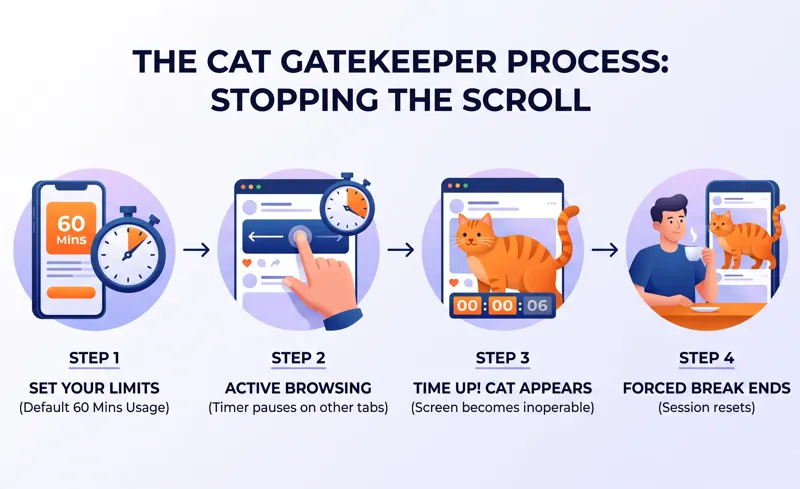
When your pre-set social media time limit expires, the giant cat literally walks onto your screen and sits down right in the middle of your feed. It makes the underlying website completely inoperable. You cannot scroll past it, you cannot click around it, and you certainly cannot ignore it. The app forces a genuine break, ensuring that your eyes are off the content and your mind gets a moment to reset.
“Willpower is a finite resource, but a giant digital cat sitting on your timeline is an undeniable physical boundary.”
This humorous yet highly effective method caught fire on platforms like X (formerly Twitter). The developer’s initial demo video showcased the sheer absurdity of trying to read tweets while a massive feline blocked the text, prompting thousands of users to download the extension immediately.
| Feature | Traditional Blockers | Cat Gatekeeper |
|---|---|---|
| Intervention Method | Pop-up notification or redirect | Giant unremovable cat overlay |
| Bypass Difficulty | Easy (Click “Ignore limit”) | Hard (Must wait for timer to end) |
| User Experience | Frustrating, clinical | Humorous, charming, effective |
How It Works & Why Users Love It
The brilliance of the Cat Gatekeeper lies in its simplicity and user-friendly design. It operates entirely as a browser extension, currently available on the Chrome Web Store, and requires zero complex setup. Users are raving about the app because it addresses a very modern problem—mindlessly opening apps—with a solution that doesn’t feel like a punishment.
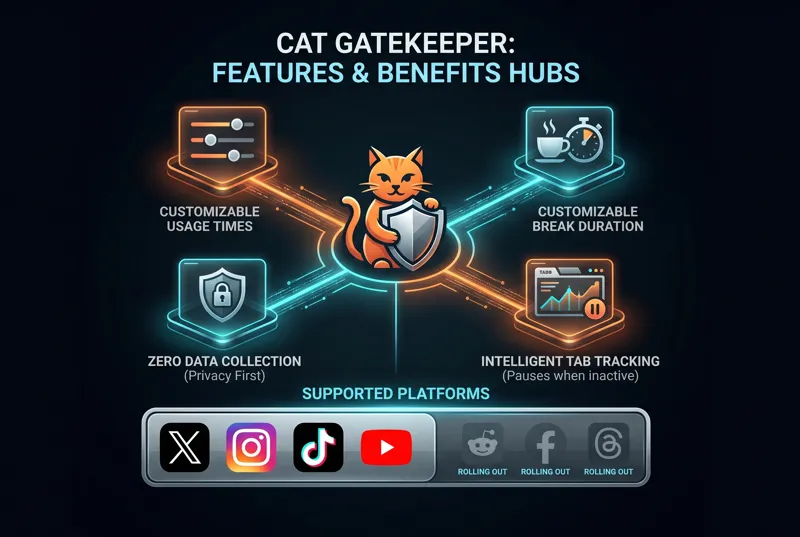
By default, the extension gives users a generous 60 minutes of browsing time before the cat intervenes. Once the cat appears, it enforces a 5-minute break. These parameters are entirely customizable. If you only want 15 minutes of TikTok time before a 10-minute break, you can easily adjust the sliders in the extension’s settings. Importantly, the timer only counts down while the specific social media tab is active. If you switch to your email or a work document, the timer pauses, ensuring you aren’t penalized for being productive.
“I designed it because I needed it. When you suddenly realize an hour has passed on a timeline, a cute but stubborn intervention is the best medicine.”
Privacy is another major reason for the app’s viral success. In an era where user data is constantly harvested, ZOKUZOKU has explicitly stated that the extension collects zero personal data. The page access permissions are utilized strictly to render the cat graphic over the website’s HTML body. Nothing is transmitted externally, and the application is entirely free of advertisements.
| Setting | Default Value | Customization Range |
|---|---|---|
| Usage Limit Timer | 60 Minutes | 1 Minute to Unlimited |
| Forced Break Duration | 5 Minutes | 1 Minute to 60 Minutes |
| Background Tracking | Disabled (Pauses when inactive) | Fixed (Cannot run in background) |
Expanding Support Across the Web
Initially designed for X, the developer quickly realized the demand spanned across the entire internet. The extension currently boasts official support for X, Instagram, TikTok, and YouTube. Furthermore, recent updates and developer screenshots indicate that support is rolling out for Facebook, Reddit, Threads, and Bluesky. This widespread platform coverage ensures that no matter your doomscrolling vice, the giant orange cat will be there to stop you.
“The internet is designed to keep you engaged forever. Sometimes, you need a giant cat to break the spell.”
As we continue to navigate a highly digitized world in 2026, finding balance is crucial. Tools like Cat Gatekeeper prove that managing screen time doesn’t have to be a miserable, restrictive experience. It can be a funny, lighthearted moment that gently nudges you back into the real world. By turning a frustrating habit into an amusing encounter, this viral extension is reshaping how we approach digital wellness.
| Supported Platforms | Status |
|---|---|
| X, Instagram, TikTok, YouTube | Fully Supported |
| Reddit, Facebook, Threads | Rolling Out / Beta |
| General Websites | Not currently supported |
Frequently Asked Questions
What is the Cat Gatekeeper extension?
It is a browser extension that helps manage screen time by placing a giant, unremovable cat overlay on your screen when you exceed your set social media limits.
Can I just close the cat overlay?
No, the app is designed as a forced-break tool. You must wait for the break timer to expire before the cat disappears and you can resume scrolling.
It currently supports X, Instagram, TikTok, and YouTube, with support for Reddit, Facebook, Threads, and Bluesky in development.
Does the timer run if I switch to another tab?
No. The extension only counts time while the specific social media tab is actively open and being viewed.
Can I change the time limits?
Yes. Users can fully customize both their usage limit (e.g., 30 minutes) and their mandatory break time (e.g., 10 minutes) in the extension settings.
Does the extension collect my browsing data?
According to the developer, the extension does not collect or transmit any external data. It only uses local page permissions to display the cat graphic.
Is the Cat Gatekeeper extension free?
Yes, the app is completely free to download and use, and it does not contain any advertisements.
Disclaimer: This article is for informational purposes only. App features, platform support, and privacy policies are based on developer descriptions and may change over time. Users should review extension permissions before installation.