iOS 27 Home introduces a massive leap forward for smart home technology, fundamentally changing how users interact with their connected devices. Apple has integrated its powerful Apple Intelligence into the core of the ecosystem, vastly improving the functionality of HomeKit Secure Video cameras. Homeowners can now experience a smarter, more intuitive, and highly responsive smart home environment.
For years, managing smart home notifications and camera feeds has been a tedious task. However, the newly updated interface solves these pain points by utilizing advanced on-device AI. The system no longer just records footage; it actively understands what is happening in your house. The iOS 27 Home platform allows users to spend less time scrolling through endless video timelines and more time enjoying peace of mind.
The AI Revolution in iOS 27 Home Security
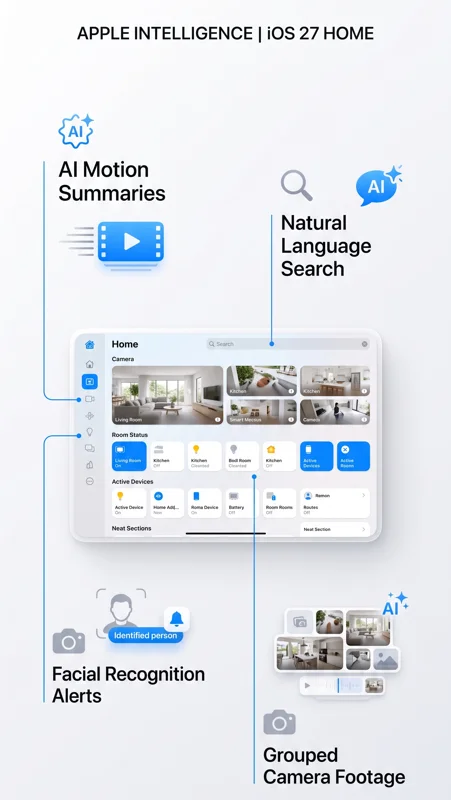
One of the most impressive additions is the generation of written summaries for motion alerts. Using Apple Intelligence, the app can accurately determine the contents of a video clip. It recognizes people, animals, vehicles, and even packages. Instead of a generic alert, the iOS 27 Home interface provides detailed notifications like “a dog sat on the floor” or “a package was delivered.”
Furthermore, facial recognition ties directly into your Photo Library. This means your smart home can send alerts explicitly naming the person at your door. Grouped footage is another game-changer. If a person walks past your front door camera and then appears on your backyard camera, the system automatically groups these related events.
| Apple Intelligence Feature | Functionality in the App |
|---|---|
| Written Summaries | AI generates text descriptions of camera events. |
| Facial Recognition | Uses Photo Library to identify specific people. |
| Grouped Footage | Links continuous movement across multiple cameras. |
The Home app no longer just records video; it actively understands and summarizes your entire home’s activity using Apple Intelligence.
Natural Language Search and Notifications in iOS 27 Home
Searching through days of camera footage is now incredibly fast. The iOS 27 Home app supports natural language search for camera recordings. You can simply search for “when was the red package delivered?” and the system will instantly locate the exact clip. This natural language functionality works both within the app and directly through Spotlight search.
Notification fatigue is also a thing of the past. The Reduce Notifications toggle combines related activities into a single alert. For instance, if someone arrives home and unlocks the smart door, you will receive one combined notification rather than two. This feature makes the iOS 27 Home ecosystem significantly less intrusive and much more helpful.
Massive Hardware Upgrades Introduced by iOS 27 Home
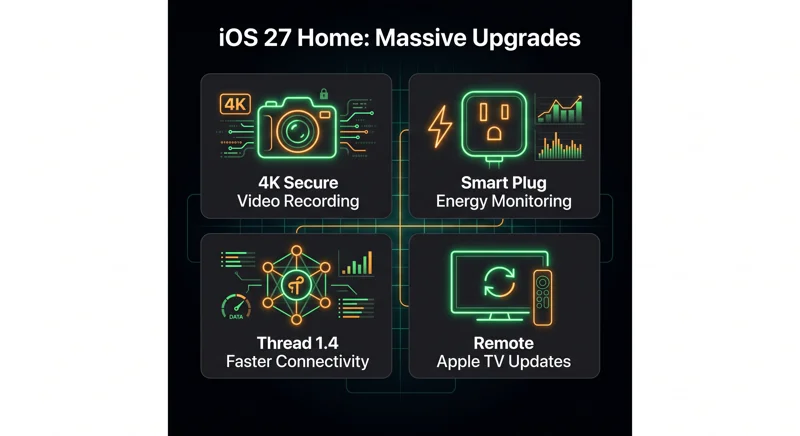
Beyond artificial intelligence, Apple has finally upgraded the baseline hardware capabilities for smart home enthusiasts. The most requested feature has arrived: HomeKit Secure Video cameras are no longer limited to 1080p resolution. If your camera hardware supports it, you can now stream and record video in stunning 4K quality directly through the iOS 27 Home platform.
Energy management is another major focus. Smart plugs and other energy-tracking accessories now display their data directly within the iOS 27 Home energy tab. While automations based on energy usage are not yet available, having this data integrated directly into the main dashboard is a massive step forward for eco-conscious homeowners.
| Hardware Upgrade | Benefit to Homeowners |
|---|---|
| 4K Video Recording | Crystal clear footage for supported security cameras. |
| Energy Monitoring | Track power usage directly from the main dashboard. |
| Thread 1.4 Support | Faster pairing and more reliable accessory connections. |
Breaking the 1080p barrier, the addition of 4K recording ensures that your security footage is as sharp and detailed as possible.
Faster Connectivity with Thread 1.4 in iOS 27 Home
The underlying infrastructure of your smart home is getting a speed boost. With the adoption of Thread 1.4, connecting new Matter accessories is faster and more reliable than ever before. The iOS 27 Home architecture reduces the friction of adding new devices with a highly simplified configuration interface.
Device maintenance has also been streamlined. You can now push firmware updates to your Apple TV remotely, right from the app. This mirrors the seamless update process already available for HomePod devices, ensuring your home hub is always running the latest software without requiring you to turn on the television.
iCloud+ Requirements for iOS 27 Home Video Features
It is important to note the specific requirements for these premium features. To access HomeKit Secure Video, an active iCloud+ subscription is mandatory. A 50GB plan supports one camera, a 200GB plan supports up to five, and the 2TB plan offers unlimited camera support. For more details on these tiers, you can visit Apple’s official iCloud page.
Fortunately, you do not need an Apple Intelligence-compatible device to utilize 4K recording. However, to access the advanced AI summaries and natural language search within the iOS 27 Home interface, you will need an iPhone 15 Pro or a newer model, alongside an Apple TV or HomePod running version 27 software.
Frequently Asked Questions
What is the biggest feature in the iOS 27 Home update?
The integration of Apple Intelligence, which provides written summaries of camera events and natural language search for recorded footage.
Does iOS 27 Home support 4K security cameras?
Yes, HomeKit Secure Video now fully supports 4K streaming and recording for compatible camera hardware.
Do I need a new iPhone to use Apple Intelligence features?
Yes, you need an iPhone 15 Pro or later to utilize the Apple Intelligence features in the app.
Can I monitor my electricity usage in the new app?
Yes, the update includes a new Energy tab that displays power consumption data from compatible smart plugs.
What is Thread 1.4?
It is an upgraded connectivity protocol that makes pairing new smart home accessories, especially Matter devices, significantly faster and more reliable.
Can I update my Apple TV from my phone now?
Yes, remote Apple TV software updates are now supported directly through the smart home interface.
Do I need iCloud+ to use iOS 27 Home video features?
Yes, HomeKit Secure Video requires an active iCloud+ plan, with camera limits based on your specific storage tier.
Disclaimer: This article is for informational purposes only. Features, compatibility, and iCloud subscription requirements are based on Apple’s official software release notes and may be subject to future updates.