If you want to reclaim hours of your life and stop doing manual work, you need to use these gemini scheduled actions to automate week routines and transform how you manage your time in 2026. With the massive rollout of Scheduled Actions, Google Gemini has officially evolved from a casual, reactive chatbot into an active, proactive operator. It now handles the heavy lifting of my week before I even sit down at my desk, pour my morning coffee, or open my laptop. Instead of manually digging for weather reports, organizing my daily briefings, or staying on top of my task lists, I have entirely offloaded those repetitive, low-value tasks to artificial intelligence.
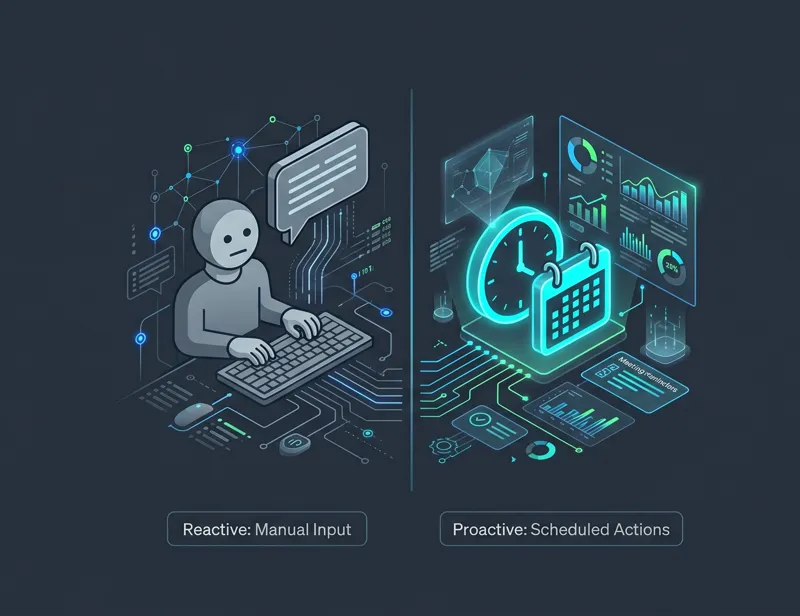
We are living in an era where working hard is no longer enough; you have to work smart by leveraging digital leverage. Automation is the key to unlocking higher productivity and maintaining your mental energy for deep, creative work. Let me break down the specific Gemini Scheduled actions I use to reclaim my time, eliminate decision fatigue, and keep my professional and personal workflow running completely on autopilot.
The Evolution: From Chatbot to Proactive Operator
For years, our relationship with AI was strictly transactional. You typed a prompt, and the AI gave you an answer. If you didn’t prompt it, the AI sat dormant. This reactive model was helpful, but it still required manual intervention, memory, and cognitive load from the user. You had to remember to ask the AI for help.
The introduction of Scheduled Actions changed the paradigm entirely. Now, Gemini functions as a true executive assistant. By combining advanced Large Language Models (LLMs) with chron-job-like scheduling capabilities, Gemini can execute complex, multi-step prompts at specific times, on specific days, without any human prompting required at the moment of execution. This proactive approach is the ultimate Google Gemini productivity hack.
“The greatest shift in personal productivity in the 2020s is moving from an AI that waits for your command to an AI that anticipates your needs and delivers solutions before you even ask.”
To understand the sheer scale of this upgrade, let us compare the old way of using AI with the new, automated reality we have in 2026.
| Feature | Reactive AI (Pre-2026) | Proactive AI (Scheduled Actions) |
|---|---|---|
| Execution Trigger | Manual user input required every time. | Time-based or event-based triggers. |
| Mental Load | High. User must remember to run the prompt. | Zero. The system delivers the output automatically. |
| Context Awareness | Limited to the current session window. | Deeply integrated with user memory and preferences. |
| Best Use Case | One-off questions, coding help, quick drafts. | Daily briefings, recurring content pipelines, lifestyle management. |
Now, let us dive into the specific workflows you can set up right now to automate your life.
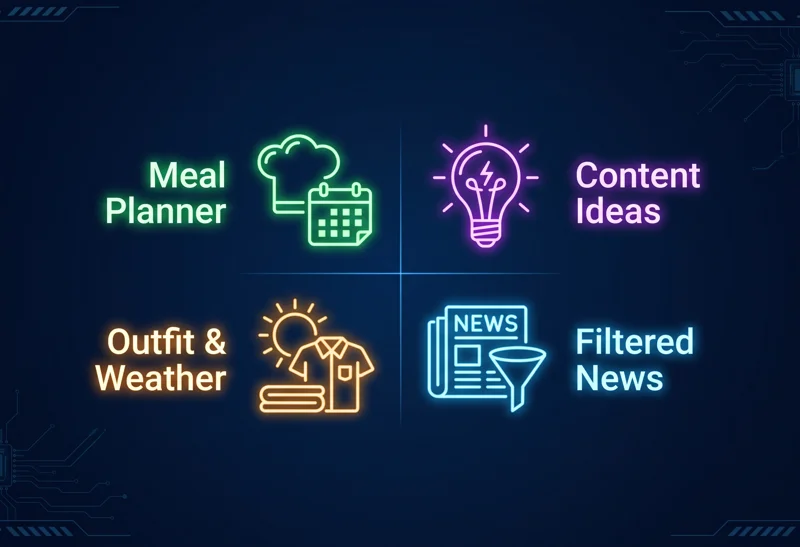
Action 1: Creating a “Digital Chef” Weekend Meal Plan
By Friday night, the absolute last thing I want to do is stare into a stubbornly blank fridge and try to piece together a meal plan. After a long, grueling week of writing, managing business portfolios, and dealing with client meetings, making another decision about what to eat is exhausting. I want to eat healthy, I want it to be vegetarian, and I absolutely do not want to spend an hour scrolling through ad-cluttered food blogs.
This is where I let Gemini take over the role of my digital chef. I have set up a scheduled action that hits my phone just as I am winding down for the week. It gives me a highly curated weekend menu that perfectly fits my specific dietary needs without me having to lift a single finger.
The Automation Setup
I have asked Gemini to execute this specific prompt: “Suggest two healthy vegetarian dishes for me every Friday at 11:00 PM. Include a step-by-step recipe and a categorized grocery list.”
The absolute best part about this workflow is the consistency and the memory integration. Because Gemini remembers my persistent preferences—like the fact that I am a vegetarian who strictly avoids eggs and prefers high-protein meals—I do not have to repeat my dietary restrictions every single week. The AI already knows.
“By offloading routine decisions to an AI, you preserve your cognitive bandwidth for the creative and strategic tasks that actually move the needle in your career.”
By the time I reach the grocery store on a Saturday morning, I already have a complete, categorized grocery list waiting for me in a fresh Gemini conversation. It categorizes items by produce, dairy, and dry goods, allowing me to get in and out of the store in record time.
| Meal Planning Workflow | Settings & Parameters |
|---|---|
| Trigger Schedule | Every Friday at 11:00 PM local time. |
| Core Prompt | Generate 2 vegetarian recipes with a categorized grocery list. |
| Memory Integration | No eggs, high protein, maximum 30-minute prep time. |
| Output Format | Push notification to mobile device with a link to the chat. |
Action 2: Busting Writer’s Block on Monday Mornings
Monday morning is when the realities of the work week hit hard. As a tech writer and content strategist, this is the exact moment I need to shift gears from a relaxing weekend into catching up on the latest industry trends and generating fresh, engaging blog post ideas. It is notoriously the hardest time of the week to be creative.
Instead of staring at a blinking cursor or doom-scrolling through tech Twitter (or X) for inspiration, I have set up Gemini to act as my virtual editorial board. By scheduling this action, I ensure that my content pipeline is always full of fresh, viable ideas before I even finish my morning tea.
The Automation Setup
I have configured Gemini to run the following action every Monday at 6:00 AM: “Generate five SEO-friendly blog post ideas for a technology website focusing on AI and open-source software. Include a suggested highly-clickable headline, primary keyword, and a two-sentence outline for each.”
Having this rich, structured data land in my notifications at the very start of the week completely eliminates that dreaded mid-morning creative block. I can entirely skip the painful, agonizing brainstorming session and go straight into the research, outlining, and writing process. It saves me at least two hours of mental friction every single week.
| Content Ideation Workflow | Settings & Parameters |
|---|---|
| Trigger Schedule | Every Monday at 6:00 AM local time. |
| Core Prompt | Generate 5 SEO blog ideas on AI and open-source tech. |
| Required Elements | Clickable title, target keyword, and brief outline. |
| Business Value | Saves 2+ hours of brainstorming; ensures content consistency. |
“The secret to prolific content creation is not waiting for inspiration to strike, but building automated systems that force inspiration to show up on schedule.”
Action 3: Planning My ‘Weather-Ready’ Outfit
Living in a volatile climate—whether you are dealing with the soaring afternoon heat and sudden humidity shifts of Florida, or the unpredictable rainstorms of the Pacific Northwest—the weather is not just a conversation starter; it is a daily logistical challenge. Picking the right outfit is the first major decision of the day, and frankly, it is one I would rather not make.
To solve this, I have turned Gemini into my personal stylist. I have a scheduled action that does the critical thinking for me while I am still waking up and brushing my teeth.
The Automation Setup
I have set a scheduled action with this specific prompt: “Check the weather forecast for today in my current city. Based on my preference for breathable bamboo polo shirts and casual business attire, suggest a comfortable outfit for today’s humidity level and explicitly tell me if I will need an umbrella for my commute.”
Gemini runs this complex query every single day at 7:00 AM. It pulls live meteorological data, compares it against my stated wardrobe preferences in its memory, and synthesizes a recommendation. It is a small automation, but it removes one more micro-decision from my morning routine. By the time I walk into my dressing room, the plan is already set.
Gemini gives me outfit suggestions with fabric recommendations, fit types, and environmental protection details. It even displays wind speeds and UV index details, ensuring I am perfectly prepared for whatever the day throws at me.
| Daily Stylist Workflow | Settings & Parameters |
|---|---|
| Trigger Schedule | Daily at 7:00 AM local time. |
| Core Prompt | Cross-reference local weather with wardrobe preferences. |
| Data Pulled | Live temperature, humidity, precipitation chance, UV index. |
| Actionable Advice | Specific clothing layers and umbrella/sunglasses reminders. |
Action 4: Receiving a Highly-Filtered Personalized News Digest
Staying informed is critical for any professional, but the modern news cycle is an absolute nightmare of clickbait, outrage algorithms, and irrelevant noise. Gemini’s default News Digest template is a great foundational tool, but I do not use it as-is. I have deeply customized it with a personal touch to protect my mental focus.
Instead of a random list of sensationalized headlines, I receive a highly structured breakdown of the three specific worlds that I am genuinely interested in: Artificial Intelligence advancements, Open-Source software updates, and major macroeconomic shifts. For the latest developments on how Google is updating these capabilities, you can always check Google’s official AI updates.
The Automation Setup
Here is the exact prompt I use to receive personalized news headlines right on my phone and desktop every weekday at 8:00 AM: “Compile a news digest of the top 5 most important stories from the last 24 hours regarding Artificial Intelligence, open-source tech, and US economic policy. Summarize each story in two bullet points. Strictly exclude any news related to celebrity gossip, sports, or entertainment.”
The twist here is the aggressive filtering. By giving Gemini specific negative guidelines (what *not* to include), I have entirely eliminated the noise of celebrity drama or international fluff that usually clutters a standard news aggregator app. I get exactly what I need to be informed for my industry, and nothing else.
“In the information age, true luxury is not having access to more data; it is having an intelligent filter that ruthlessly eliminates irrelevant noise from your life.”
| News Digest Workflow | Settings & Parameters |
|---|---|
| Trigger Schedule | Monday through Friday at 8:00 AM local time. |
| Core Prompt | Summarize top 5 stories in AI, Tech, and Economy. |
| Negative Constraints | Strictly exclude sports, entertainment, and celebrity news. |
| Format | Two concise bullet points per news story. |
Put a Stop to Manual Tasks Today
By setting up these Gemini Scheduled actions, I have successfully turned a series of repetitive, annoying micro-tasks into a seamless, invisible workflow that operates quietly in the background of my life. I no longer waste willpower on deciding what to eat, what to write, what to wear, or what to read.
Whether you want to start small with a simple morning weather briefing or go all-in on a fully automated weekly schedule that manages your entire business pipeline, the shift from using a reactive chatbot to a proactive AI operator is a total game-changer. So, what are you waiting for? Give these specific routines a try, get creative with building your own new ones, and automate your week in no time. Your future self will thank you for the hours of reclaimed time.
Frequently Asked Questions
Are Gemini Scheduled Actions available on the free tier?
Scheduled Actions are typically rolled out as a premium feature for users on Google One AI Premium plans (Gemini Advanced), though basic reminders may be available to all users. Check your current tier settings for availability.
How do I set up a scheduled action in Gemini?
You can set them up by typing your prompt and explicitly adding time constraints (e.g., “Run this every Monday at 8 AM”). Alternatively, use the new “Automations” or “Routines” dashboard within the Gemini interface to visually manage your schedules.
Can Gemini interact with my other Google apps autonomously?
Yes, when you enable Workspace extensions, Gemini can pull data from your Gmail, Google Calendar, and Google Docs to make its scheduled actions highly personalized to your actual schedule.
What happens if my phone is off when an action is scheduled?
The action is processed on Google’s cloud servers, not locally on your device. The output will be waiting for you in your Gemini chat history and as a pending notification as soon as your device reconnects to the internet.
Can I pause or edit a scheduled action once it is created?
Absolutely. You can view all your active routines in the Gemini settings menu, where you can easily edit the prompts, change the delivery times, or toggle them on and off as needed.
Is it safe to let AI read my personal calendar and preferences?
Google implements strict privacy controls for Workspace data. Your personal data accessed via extensions is used solely to generate your responses and is not used to train public AI models, but you should always review privacy terms.
Will Gemini notify me when it completes a scheduled task?
Yes, if you have notifications enabled for the Gemini app, you will receive a push notification on your mobile device or browser when the scheduled action has been successfully completed and is ready for your review.
Disclaimer: This article is for informational purposes only. Features, interface elements, and capabilities of Google Gemini are subject to change based on Google’s continuous software updates and regional availability.