For millions of users who rely on seamless productivity across their favorite devices, a major disruption is officially on the horizon because the samsung notes microsoft onenote sync will stop working soon. Recent in-app notifications popping up on flagship devices have confirmed the end of a highly celebrated tech partnership. This abrupt termination of cross-platform integration means that everyday users, students, and professionals must act quickly to secure their workflows and find alternative synchronization methods before the summer deadline.
Back in August 2020, Samsung and Microsoft announced a groundbreaking collaboration designed to bridge the gap between mobile and desktop environments. The integration allowed users to effortlessly sync their Samsung Notes directly to the Microsoft OneNote feed. This feature became a staple for individuals using Galaxy smartphones for on-the-go note-taking while relying on Windows PCs for deep work and organization. Unfortunately, as we progress through 2026, this era of effortless interoperability is coming to an unexpected close.
The Timeline of the Sync Shutdown
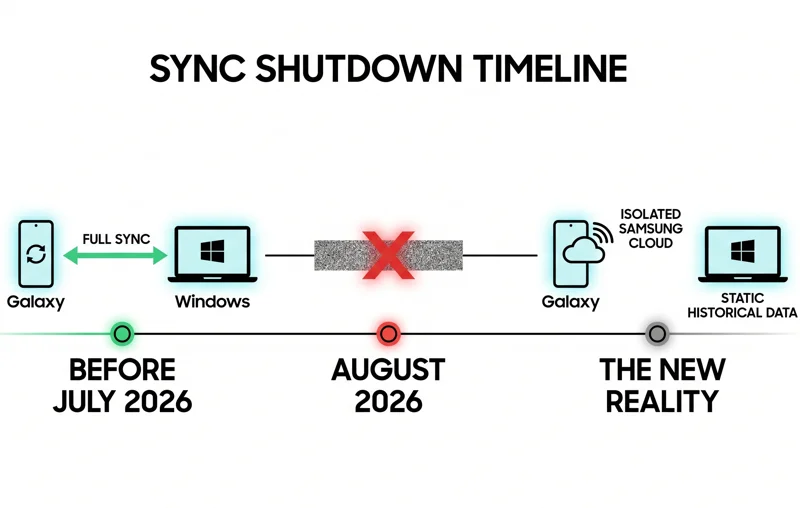
According to recent reports and user verifications across social media, the synchronization feature is scheduled to be completely discontinued in July 2026. Users opening the default note-taking application on newer devices, such as the Galaxy S26 Ultra, are now being greeted with a definitive warning banner at the top of their screens. The message clearly states: “After July, Samsung Notes will no longer support syncing with OneNote.”
| Partnership Phase | Date Range | Feature Status |
|---|---|---|
| Initial Launch | August 2020 – May 2026 | Active and fully supported |
| Warning Period | June 2026 – July 2026 | Active but with banner warnings |
| Post-Shutdown | August 2026 Onward | Sync completely permanently disabled |
This timeline gives users only a brief window to adjust their digital organization habits. Starting in August, any new notes created on a Galaxy device will remain isolated on the Samsung Cloud ecosystem and will absolutely not appear in the Microsoft environment, and vice versa.
“The sudden end to this integration leaves countless professionals and students scrambling to find a new cross-platform note-taking workflow.”
Why is the Partnership Ending?
At this moment, neither Samsung nor Microsoft has released a formal press statement explaining the exact reasoning behind dissolving this specific feature. Tech analysts speculate that it could be related to server maintenance costs, shifting corporate strategies, or a push by both companies to force users to adopt their respective exclusive cloud ecosystems rather than bridging them. With Microsoft pushing heavily into AI integrations within its own 365 suite, maintaining third-party sync APIs might no longer align with their core development goals.
Regardless of the corporate reasons, the impact on the end consumer is undeniable. To understand the broader scope of how these applications interact, you can review the technical documentation on the Microsoft OneNote Support page.
| Hardware Ecosystem | Immediate Impact After July 2026 |
|---|---|
| Samsung Galaxy Phones | Notes remain local and back up only to Samsung Cloud. |
| Windows 11 PCs | The OneNote feed will no longer pull mobile updates from Samsung apps. |
| Galaxy Tablets | Stylus-written notes will no longer sync directly to desktop OneNote modules. |
What Users Should Do Now to Prepare
If you rely heavily on this synchronization, you should not wait until the last minute to migrate your data or change your habits. Your existing synced notes will likely remain in your OneNote feed as historical data, but they will no longer update if you edit the original file on your phone. To maintain cross-platform capabilities, users will have to make a definitive choice between ecosystems.
“Without official communication on the reasons behind this split, users are left wondering if future collaborations between these tech giants might also be at risk.”
Exploring Alternative Workflows
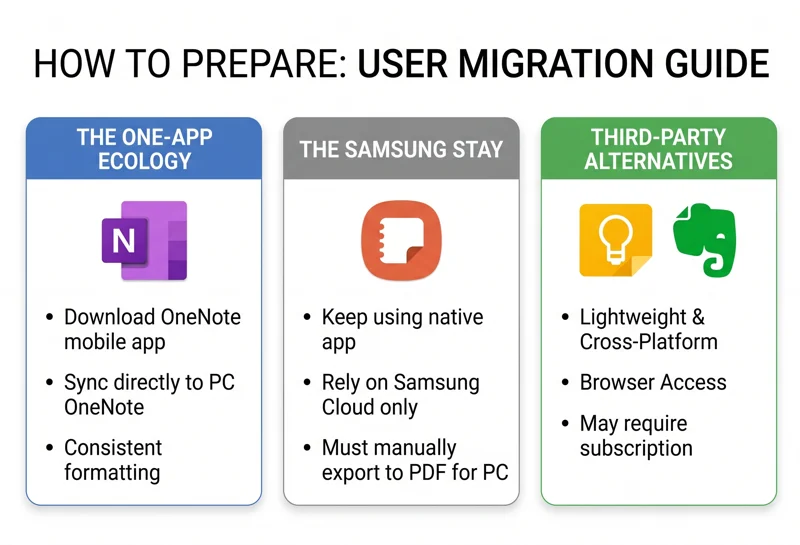
The most straightforward solution for users who need their mobile notes to appear on their Windows PC is to completely migrate to the dedicated Microsoft OneNote app available on the Google Play Store. By abandoning the native Samsung app and exclusively using Microsoft’s mobile application, your notes will continue to sync flawlessly to your desktop.
| Alternative App | Pros | Cons |
|---|---|---|
| Microsoft OneNote Mobile | Perfect sync to Windows PCs, rich text formatting | Heavier app, less optimized for the S-Pen |
| Google Keep | Lightweight, fast, works in any web browser | Lacks complex folder structures and deep formatting |
| Evernote | Excellent cross-platform support, web clipping | Premium features require a paid subscription |
For those who deeply prefer the interface and S-Pen optimization of Samsung’s native application, you can continue using it, but you will have to rely on Samsung Cloud integrations, or manually export vital notes as PDFs or text files to share them with your PC.
Frequently Asked Questions
Exactly when will the sync stop working?
In-app notifications indicate that the synchronization feature will officially end in July 2026. From August onward, it will no longer function.
Will my old notes be deleted from OneNote?
No, the notes that have already been synced to Microsoft OneNote should remain there as historical files, but they will not receive any further updates if you edit them on your phone.
Can I still use Samsung Notes on my phone?
Yes, the app will continue to function perfectly on your mobile device; it simply will not push its data to Microsoft’s servers anymore.
How can I keep my notes synced to my Windows PC now?
The best method is to download the Microsoft OneNote app directly onto your Galaxy phone and use that as your primary note-taking tool instead of the native app.
Did either company explain why they are removing this feature?
As of right now, neither Samsung nor Microsoft has provided an official public statement detailing the specific reasons for ending the partnership.
Will this affect my calendar or photo syncing between Samsung and Microsoft?
No, this current warning specifically targets the note-taking application sync. Other integrations, like OneDrive gallery syncing, remain unaffected at this time.
Do I need to manually backup my notes before July?
While old notes shouldn’t disappear from either platform, it is always a highly recommended practice to perform a manual backup of crucial documents before any major software transition occurs.
Disclaimer: This article is for informational purposes only. Service timelines, feature availability, and app functionality are determined by Samsung and Microsoft and are subject to change based on corporate software updates.