microsoft rolls out revamped windows insider program
For years, power users, developers, and tech enthusiasts have eagerly signed up to test the bleeding edge of operating system development, only to be met with a convoluted system of delayed updates and hidden features. That era ends today. In a sweeping overhaul aimed at restoring trust and usability, Microsoft has fundamentally changed how testing works. The technology giant has officially acknowledged the long-standing complaints from its community, admitting that the previous structure had become unnecessarily complicated and opaque. By streamlining the experience, Microsoft hopes to accelerate the development of Windows 11 and its successors, ensuring that those who want to test the newest features actually get to see them in action on their machines.
This massive shift in philosophy represents one of the most significant changes to the testing ecosystem since its inception. By stripping away the layers of confusion and putting control back into the hands of the users, the company is aiming to foster a much healthier and more productive feedback loop. Let’s dive deep into exactly what is changing, why it matters, and how you can take advantage of the newly structured testing environment in 2026.
The Core Frustration Addressed: The Death of the Confusing Channel Structure
To understand the magnitude of this update, we must look at the history of the testing ecosystem. The Insider Program used to be relatively simple when Microsoft originally replaced the old “Insider Rings” with “Channels,” adopting a model similar to the Chromium project with its Beta, Dev, and Canary tiers. However, over time, the structure became increasingly convoluted. The lines between Dev and Canary blurred, and Beta sometimes received features before Dev. There was absolutely no clarity on what channel a user should pick if they genuinely wanted to be on the absolute edge and test new capabilities as they developed internally.
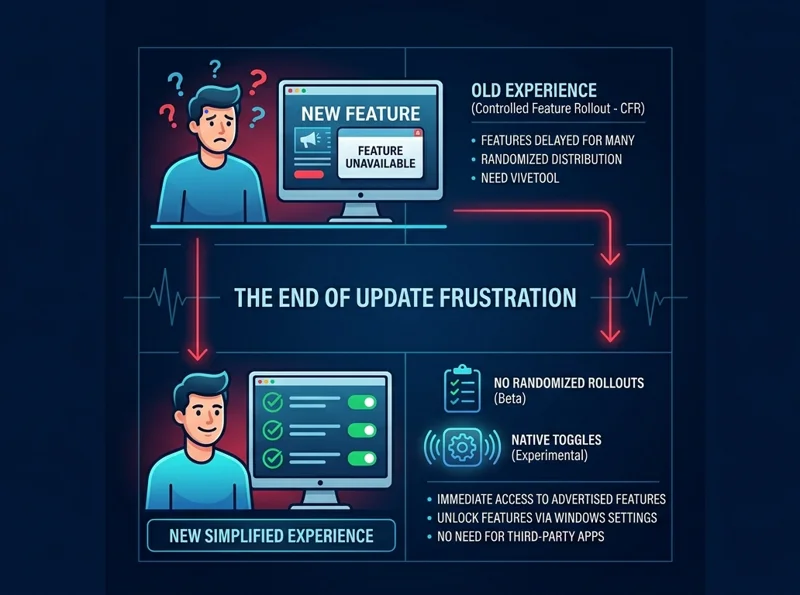
Furthermore, the biggest pain point was arguably Microsoft’s Controlled Feature Rollout (CFR). This mechanism meant that even if a feature was officially announced for a specific channel, only a small subset of users in that channel would actually receive it. The rest were left waiting, sometimes for weeks or months, for a server-side switch to be flipped.
“That experience, where features are announced but only some of you receive them due to how we gradually roll things out, is the single biggest frustration we hear.”
This quote from Alec Oot, who manages the Windows Update experience at Microsoft, perfectly encapsulates the problem. Users would read about a highly anticipated feature on tech blogs, spend an hour updating their PC, and then boot up only to find the feature completely absent. This A/B testing approach alienated the very people volunteering their time and hardware to help Microsoft improve its flagship product.
| Feature / Aspect | Old Insider Program (Pre-2026) | New Revamped Program (2026) |
|---|---|---|
| Channel Structure | Canary, Dev, Beta, Release Preview | Experimental, Beta (Simplified) |
| Feature Availability | Controlled Feature Rollout (CFR) lottery | Immediate access or Native Toggle |
| Clarity of Purpose | Highly confusing, overlapping builds | Clear distinction between bleeding-edge and stable beta |
| User Control | Required 3rd-party tools (ViveTool) | Native settings UI for feature flags |
The New Simplified Era: Welcome to “Experimental” and “Beta”
Microsoft is making all channels simpler by condensing the program into just two primary lanes. The first new lane is the ‘Experimental’ channel. This completely replaces the old Dev and Canary channels. The naming convention here is a massive improvement; it makes it immediately obvious that this is the lane you should sign up for if your sole purpose is to test highly unstable, unproven features that may ultimately never ship in a final production build.
The second lane retains the ‘Beta’ moniker but functions as a vastly improved version of its predecessor. In this newly updated Beta Channel, Microsoft is officially ending gradual feature rollouts. This is a monumental victory for testers. It means that moving forward, all new features mentioned in the official release notes for a Beta build will be immediately and universally available to everyone who downloads that build.
The Power of the Native Feature Toggle
In the past, power users who were frustrated by the CFR lottery resorted to utilizing third-party command-line applications like ViveTool. While ViveTool is a fantastic piece of software created by the community, having to hack your own operating system to test a feature you officially signed up to test was an incredibly disjointed experience. Microsoft recognized this friction.
“We are empowering our most dedicated users by baking feature flags directly into the operating system, eliminating the need for third-party workarounds.”
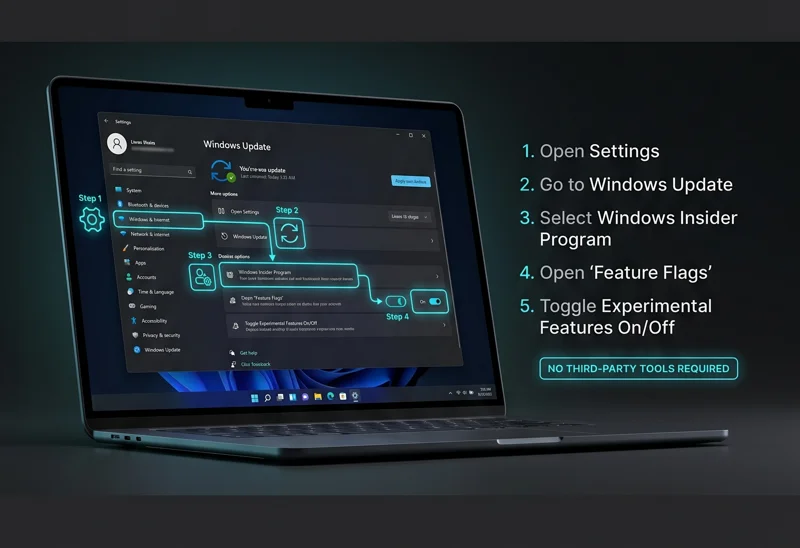
In the new Experimental channel, some features will be available out of the box, just like the new Beta. However, others will still be locked behind a flag. The incredible news is that you can now manually toggle these experimental features directly from the native Windows Settings app. For example, if you want to try out the newly developed haptic feedback features for compatible mice, but it hasn’t defaulted to ‘on’ for your machine, the solution is simple. You navigate to Windows Settings > Windows Update > Windows Insider Program > Feature flags, and simply flip the switch. This level of transparency and control is unprecedented in the history of Windows 11 development.
| Channel Name | Target Audience | Feature Access Method |
|---|---|---|
| Experimental | Hardcore enthusiasts, Developers testing APIs | Native Feature Flags Menu (Settings App) |
| Beta | Early adopters wanting stable pre-release software | Immediate access upon updating (No CFR) |
The Migration Plan: How Microsoft is Moving Insiders
Transitioning millions of users across different server rings is no small task. Microsoft has stated that it is moving users to the new channels in carefully managed phases. This process starts with current Dev Channel users, who will automatically be migrated to the new Experimental channel. If you are currently in Dev and do not see the new Experimental channel UI immediately, Microsoft has provided a manual override. You can turn it on yourself by going to Settings > Windows Update > Windows Insider Program > Feature flags and enabling the new experience.
Over the next few weeks, the migration will expand to Canary users. This group will be moved to specific, targeted versions of the Experimental channel depending on their current build. Those residing on the Canary 28000 series will transition to Experimental (26H1). Meanwhile, users who took the plunge and installed the optional 29500 series update will be migrated to the cutting-edge Experimental (Future Platforms) branch.
Current Beta Channel users will smoothly transition into the new, CFR-free Beta experience. However, Microsoft has warned that some minor feature fluctuations may occur during this transitional period as the backend servers are updated. Crucially, if you are currently in Beta but want to ensure you keep access to highly experimental, unreleased features, Microsoft strongly recommends switching your enrollment from Beta to Dev right now, before the automatic transition locks you into the stable Beta path.
| Current Enrollment | Future Destination | Assigned Build Number (Rollout Day) |
|---|---|---|
| Beta Channel | New Beta Channel | Build 26220.8283 |
| Dev Channel | Experimental | Build 26300.8289 |
| Canary (28000 Series) | Experimental (26H1) | Build 28020.1873 |
| Canary (29500 Series) | Experimental (Future Platforms) | Build 29576.1000 |
A Better Windows Update Experience
Beyond the architectural changes to the testing rings, today’s massive update also includes early access to a fundamentally redesigned Windows Update experience. For years, Windows users have fought against forced reboots interrupting critical workflows. The new update screen rolling out to the Experimental channel introduces highly requested granular controls. Testers will now be able to easily pause updates for specific durations with a single click, completely avoid forced reboots during extended active hours, and view a much more detailed breakdown of exactly what a patch contains before installing it.
“The revamp is not just about how we deliver code, but respecting the user’s time and workflow when that code is installed.”
This comprehensive overhaul is a massive step in the right direction for the Windows 11 development team. By prioritizing transparency, eliminating the dreaded A/B testing lottery in Beta, and providing native tools to unlock features, Microsoft is finally treating its testers like true partners in the development process rather than just passive telemetry nodes.
| Update Experience Feature | Benefit to User |
|---|---|
| Granular Pause Controls | Stop updates for specific days or weeks easily. |
| No Forced Reboots | Intelligent active hour detection prevents unexpected restarts. |
| Detailed Patch Notes UI | See exactly what is changing before committing to an installation. |
For more detailed technical documentation regarding these changes and how to manage your device enrollment, you can read the official guidelines on the Windows Insider Blog.
Frequently Asked Questions
What happens to the Dev and Canary channels?
They are being merged and replaced by a single, comprehensive “Experimental” channel designed for bleeding-edge feature testing.
Will I still have to wait for features to roll out gradually in the Beta channel?
No, Microsoft has officially ended Controlled Feature Rollouts (CFR) for the new Beta channel. All announced features will be available immediately upon updating.
You no longer need third-party tools. You can navigate to Settings > Windows Update > Windows Insider Program > Feature flags to manually toggle them on.
I am in the Dev channel right now. Do I need to do anything?
You will be automatically migrated to the Experimental channel. If you don’t see it, you can manually force the update via the Feature flags menu in Settings.
What build number is the new Beta channel starting on?
As part of this initial rollout, the new Beta experience begins with Build 26220.8283.
Can I still pause my updates in these new channels?
Yes, in fact, the update includes a brand new Windows Update experience that makes pausing updates and avoiding forced reboots much easier and more intuitive.
If I want to test features that might never release to the public, which channel should I choose?
You should enroll in the new Experimental channel, as it is designed specifically for testing unproven and highly volatile concepts.
Disclaimer: This article is for informational purposes only. The information regarding software updates, build numbers, and feature rollouts is based on recent announcements and is subject to change by Microsoft at any time without prior notice.