The tech community is buzzing with excitement today because Microsoft announces major Windows 11 search overhaul that prioritizes clearer local results and removes ads. For years, users have complained about a cluttered, web-heavy search experience, and it seems the software giant has finally listened.
This massive update is designed to drastically improve how you find apps, files, and settings on your PC. By stripping away unnecessary promotional material, Windows 11 is returning to its roots as a productivity powerhouse.
This change is a highly anticipated part of the broader Windows K2 effort. This initiative aims to fix the most glaring issues within the operating system and elevate it against competitors like macOS and Linux.
Why Microsoft announces major Windows 11 search overhaul that prioritizes clearer local results and removes ads
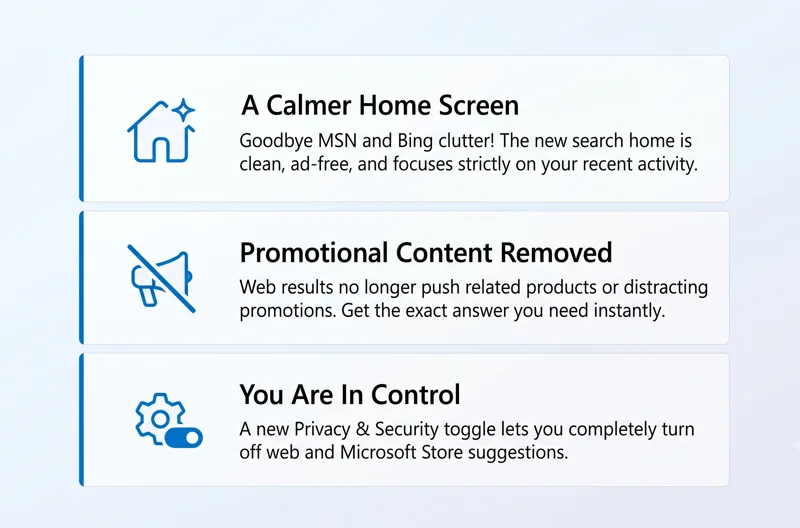
The core philosophy behind this update is user-centric design. The search home pane has historically been flooded with MSN news snippets, Bing web results, and distracting advertisements.
Users simply wanted to find a local document or launch an application without being pitched a product or directed to a web search. Now, the home screen is significantly calmer, reducing visual clutter immensely.
“You’ve have been asking for search that is faster, more relevant, and easier to use—whether you’re opening an app, finding a file, or changing a setting.”
With this update, you are firmly in control. A new toggle in the Privacy & Security settings allows you to completely turn off web and Microsoft Store suggestions.
Key Features: Microsoft announces major Windows 11 search overhaul that prioritizes clearer local results and removes ads
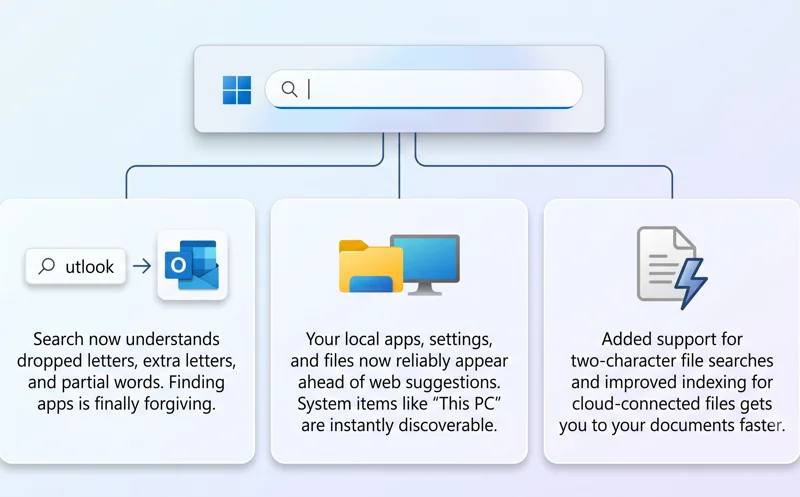
One of the most requested features is typo forgiveness. Search is now incredibly adept at handling dropped letters, extra characters, and partial words.
For example, if you accidentally type “utlook,” the system is smart enough to instantly present the Microsoft Outlook application. This alone will save users countless hours of frustration.
Additionally, system items like ‘This PC’ and the ‘Recycle Bin’ have been re-indexed. They will now reliably appear ahead of any web suggestions if they match your query.
| Feature | Previous Experience | New 2026 Update |
|---|---|---|
| Web Results | Prominent, mixed with ads | Ad-free, toggleable in settings |
| Typo Handling | Strict exact match required | Forgiving, understands partial words |
| Home Screen | Cluttered with MSN and Bing content | Clean, focused on recent activity |
What to Expect After Microsoft announces major Windows 11 search overhaul that prioritizes clearer local results and removes ads
The underlying architecture of the search function has also received a massive boost. Reliability is vastly improved, meaning the likelihood of crashes and loading delays is drastically reduced.
Finding local files is also faster, with added support for two-character file searches. Cloud and connected files will also surface intelligently when they are the strongest match.
“Because the Windows Search Box is where many people start, we focused first on making results more dependable, easier to scan, and clearer before you click.”
Settings searches have received a first round of ranking adjustments. If you need to change your display resolution, the exact setting menu will appear immediately at the top of the list.
Testing When Microsoft announces major Windows 11 search overhaul that prioritizes clearer local results and removes ads
These exciting upgrades are currently rolling out to early testers. Those enrolled in the Experimental Channel will be the first to experience this streamlined workflow.
The rollout will happen in waves to ensure stability. For more information on how to join testing programs, you can visit the official Windows Insider Blog.
| Rollout Phase | Target Audience | Status |
|---|---|---|
| Phase 1 | Experimental Channel Insiders | Rolling Out Now |
| Phase 2 | Beta Channel Insiders | Coming Soon |
| Phase 3 | General Global Release | Expected Later This Year |
Ultimately, these improvements mark a significant turning point for the operating system, finally delivering the fast, localized experience users have demanded for years.
FAQ Section
Can I completely turn off web results in the new update?
Yes, Microsoft has added a dedicated setting under Privacy & Security that allows you to disable web and Microsoft Store suggestions entirely.
Will I still see news and ads on the search home screen?
No. The update removes MSN content, Bing news, and all promotional material from the search home pane for a calmer experience.
How does the new search handle spelling mistakes?
The updated system is far more forgiving. It can intelligently recognize dropped letters, extra letters, and partial words to find the correct app or file.
What is the Windows K2 effort?
The Windows K2 effort is a large-scale initiative by Microsoft to fix major underlying problems in Windows 11 and make it more competitive with macOS and Linux.
Are cloud files included in the new local search prioritization?
Yes, connected cloud files will appear in your search results more reliably when they are considered the strongest match for your query.
Who gets to try this update first?
The update is currently rolling out in waves to users enrolled in the Windows Insiders Experimental Channel.
When will this be available for all Windows 11 users?
While early testing is underway now, the final public release is expected to roll out to all general Windows 11 users later this year.
Disclaimer: This article is for informational purposes only. Features in early Insider builds are subject to change before final public release. Always ensure your system is backed up before joining experimental software channels.