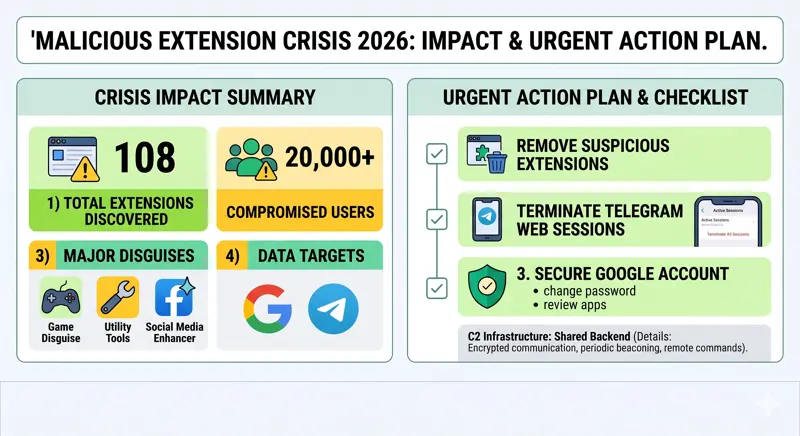
When malicious chrome extensions steal your most sensitive information, the consequences can be devastating, and a massive 2026 cybersecurity campaign has just proven how vulnerable web browsers remain. Cybersecurity researchers have uncovered a highly coordinated cluster of 108 Google Chrome extensions actively communicating with a unified command-and-control (C2) infrastructure. Their primary goal is aggressive browser extension data theft, specifically targeting Google account identities and Telegram Web sessions. With over 20,000 unsuspecting users already compromised, taking immediate action to audit your browser is more critical than ever.
The Threat Exposed: Disguised Malware in the Chrome Web Store
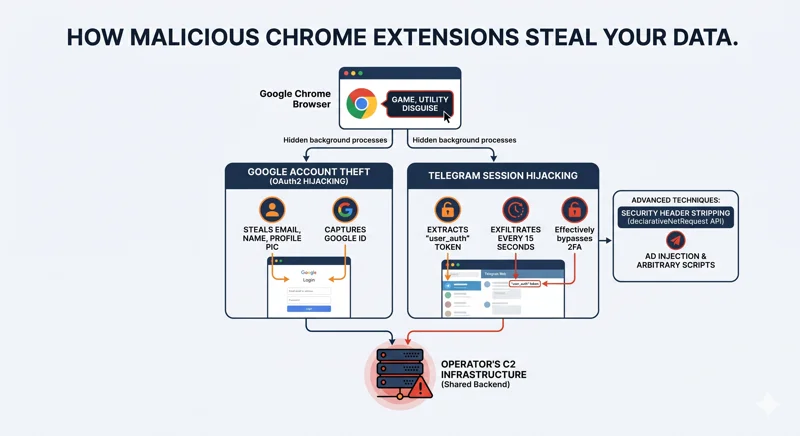
To avoid immediate detection by Google’s automated security scanners, these cybersecurity malicious add-ons masquerade as harmless, everyday utilities. Users are tricked into downloading what appear to be simple Telegram sidebar clients, slot machine games, Keno games, YouTube enhancers, TikTok video downloaders, text translation tools, and page utilities. However, running silently in the background, these extensions execute arbitrary JavaScript code on every web page the user visits.
“All 108 route stolen credentials, user identities, and browsing data to servers controlled by the same operator.”
According to security researchers, this Chrome Web Store malware was distributed under five distinct publisher identities. Despite having different names and offering varied functionalities, they all share the exact same malicious backend infrastructure, acting as a massive, synchronized data-harvesting net.
| Malicious Publisher Identity | Common Extension Disguise | Estimated Reach |
|---|---|---|
| Yana Project & GameGen | Racing Games, Slot Machines | Thousands of active installs |
| SideGames & Rodeo Games | Keno, Casual Web Games | Broad casual gamer demographic |
| InterAlt | Telegram Web Clients, Utilities | High-value messaging targets |
Impact and Immediate Action: How Your Accounts Are Breached
The technical sophistication of this attack is alarming. Of the 108 identified extensions, exactly half (54 add-ons) are purpose-built for Google account identity theft. They achieve this by hijacking the OAuth2 authentication process. For example, the “Formula Rush Racing Game” extension waits patiently until a victim clicks any Google “Sign-in” button across the web. The moment they do, the extension steals their email address, full name, profile picture URL, and unique Google account identifier.
Simultaneously, another subset of these extensions focuses on Telegram Web session hijacking. Add-ons like “Telegram Multi-account” extract the user_auth token used by the Telegram Web interface. They then exfiltrate this sensitive token to a remote server every 15 seconds. The attackers can even overwrite the victim’s local storage, replacing the active Telegram session with one controlled by the threat actor.
| Malicious Action | Number of Extensions | Direct User Impact |
|---|---|---|
| Google OAuth2 Theft | 54 Add-ons | Loss of Google identity and account control |
| Universal Backdoor | 45 Add-ons | Forced redirects to attacker-controlled URLs |
| Security Header Stripping | 5 Add-ons | Injection of unauthorized gambling overlays |
The Advanced Techniques Used by Attackers
To execute these attacks, the developers abused core browser functionalities. Notably, researchers found that five specific extensions utilized Chrome’s declarativeNetRequest API to strip crucial security headers from target sites—including Content Security Policy (CSP), X-Frame-Options, and CORS—before the web pages even finished loading. This allowed the attackers to bypass normal browser protections and inject unauthorized gambling overlays and tracking scripts onto platforms like YouTube and TikTok. For official guidance on reporting these issues, users should consult the Chrome Web Store Help Center.
“Five extensions use Chrome’s declarativeNetRequest API to strip security headers from target sites before the page loads. All 108 malicious extensions share the same backend, hosted at a centralized IP address.”
While the exact identity of the threat actors remains unconfirmed, code analysis has revealed extensive Russian language comments buried within the source code of several add-ons, hinting at the geographical origin of the developers.
| Security Checklist | Required Action | Priority Level |
|---|---|---|
| Audit Extensions | Remove any unrecognized games or Telegram tools | Critical / Immediate |
| Secure Telegram | Terminate all active Web sessions via the mobile app | Critical / Immediate |
| Protect Google | Review connected third-party apps and change passwords | High |
Frequently Asked Questions
How do these malicious chrome extensions steal my data?
They operate silently in the background, injecting arbitrary JavaScript into the websites you visit and intercepting authentication tokens when you log into services like Google or Telegram.
What is Telegram Web session hijacking?
It is a technique where an extension steals your specific “user_auth” token, allowing a remote attacker to log into your Telegram account without needing your password or phone number.
How many users are affected by this Chrome Web Store malware?
Cybersecurity researchers estimate that approximately 20,000 users have installed these malicious add-ons before they were exposed.
How can I tell if my Google account identity was stolen?
Check your Google account security settings for unauthorized third-party apps, unrecognized device logins, or alerts regarding compromised passwords.
What publishers should I watch out for in this specific attack?
The extensions were published under the names Yana Project, GameGen, SideGames, Rodeo Games, and InterAlt.
Why do these cybersecurity malicious add-ons look like normal games?
Disguising malware as casual games or simple utilities is a common tactic to bypass automated store security checks and trick average users into downloading them.
What is the first thing I should do if I installed one of these extensions?
You must immediately delete the extension from Chrome, log out of all active Telegram Web sessions from your mobile app, and change your Google account passwords.
Disclaimer: This article is for informational purposes only. Cybersecurity threats evolve rapidly. Always consult official security advisories and professional IT support for definitive guidance on securing your devices.