The newly released google photos classic search toggle brings back user control by letting everyone switch between traditional keyword searches and generative AI answers.
Google has officially completed the full rollout of this long-awaited quality-of-life feature, giving users the freedom to choose their preferred navigation style.
While artificial intelligence offers impressive natural language understanding, many users still prefer the speed and precision of simple image query algorithms.
This update bridges the gap between traditional media retrieval and modern conversational assistants within the application interface.
Understanding the google photos classic search toggle Rollout
The implementation of the google photos classic search toggle marks a significant shift in how tech giants introduce generative AI tools to public software.
Instead of forcing users into a single search method, the update provides a visible switcher at the top of the search results screen.
This physical switch allows immediate toggling between standard indexing on the left and the Gemini-powered Ask Photos assistant on the right.
The feature was first previewed earlier in the year, but the complete worldwide rollout ensures every active device now enjoys this dual experience.
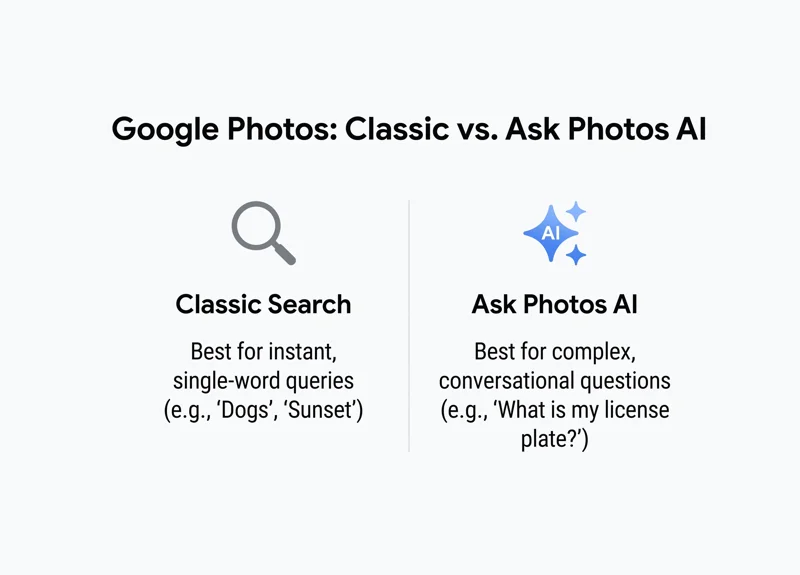
| Search Experience | Primary Strength | Best Used For |
|---|---|---|
| Classic Search | Instant results & precise tags | Single-word queries (e.g., “Dogs”, “Beach”) |
| Ask Photos AI | Contextual understanding | Complex queries (e.g., “What is my license plate?”) |
“You can now seamlessly integrate both classic and Ask Photos search experiences which makes it easier to shift between them based on your query.”
How the google photos classic search toggle Operates Under the Hood
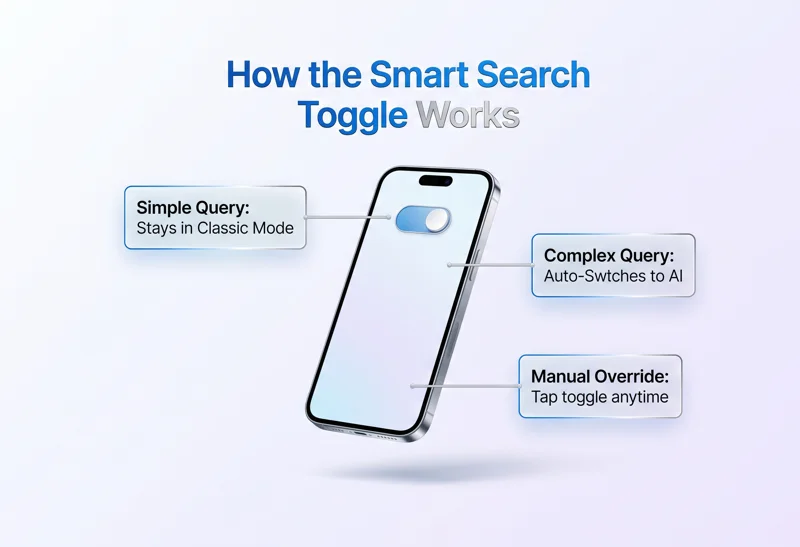
Recent testing reveals that the behavior of the google photos classic search toggle dynamically adapts based on the complexity of your input.
When you enter straightforward, single-word queries like “cats” or “sunset,” the app respects your choice and maintains the classic grid view.
However, when you ask detailed or conversational questions, the application automatically engages Ask Photos to deliver contextually rich answers.
You can always manually override this choice by tapping the switcher at the top of your screen at any moment during your session.
| User Action | App Behavior | State Persistence |
|---|---|---|
| Simple Word Search | Stays on Classic Search | Remains until complex query is entered |
| Natural Language Prompt | Switches to Ask Photos AI | Remains active until manually changed |
| Manual Switcher Tap | Forces selected view mode | Immediate active session update |
“Providing user control over AI features ensures a smoother transition for millions of daily active users worldwide.”
Onboarding and Encouraging AI Adoption with the google photos classic search toggle
This new design update serves a dual purpose for developers looking to boost engagement with new artificial intelligence features.
For users who have not yet enabled Ask Photos, the presence of the google photos classic search toggle acts as a subtle prompt to explore the tool.
Tapping the prompt guides users directly into the simple opt-in onboarding flow without interrupting their regular gallery navigation.
According to official details on the Google Photos Help Center, users retain complete freedom to opt in or out at any point.
By prioritizing user comfort and flexibility, this subtle interface enhancement delivers an improved search experience for everyone in 2026.
Frequently Asked Questions About the google photos classic search toggle
What is the google photos classic search toggle?
It is a top-screen interface feature that allows users to seamlessly switch between traditional keyword searching and the Ask Photos AI assistant.
How do I enable the Ask Photos feature in Google Photos?
You can opt in by tapping the prompt at the top of your search results page and following the simple onboard instructions.
Will simple searches automatically trigger Ask Photos AI?
No, simple single-word queries will generally remain in classic search mode unless you manually switch to the AI view.
Can I switch back to traditional search after asking a complex question?
Yes, you can manually tap the toggle at the top of your search results to return to the classic grid layout at any time.
Is the new switcher feature available for both Android and iOS?
Yes, the complete rollout applies to updated versions of the application across both major mobile operating systems.
Do I have to use Ask Photos if I prefer traditional gallery search?
Not at all, users who prefer traditional search can keep the toggle set to classic and perform their standard searches as usual.
Why did Google add the google photos classic search toggle?
Google added the switcher to give users complete control over their search experience while providing an easy path to try AI features.
Disclaimer: This article is for informational purposes only, and we are not affiliated with any financial or governmental institution mentioned.