Just as google brings gemini in chrome to users in asia and the pacific, the tech giant is making massive strides in the domestic sphere by fundamentally upgrading how we interact with our living spaces. In 2026, the artificial intelligence landscape is shifting toward frictionless user experiences, and Google has officially answered the call. Today, Google announced a major upgrade to its Gemini for Home service: the highly anticipated “continued conversations” feature. This rollout marks the beginning of the end for the repetitive, often frustrating “Hey Google” wake phrase, allowing users to interact with their smart home ecosystems as naturally as they would with a human being.
Introduction and The Big Upgrade
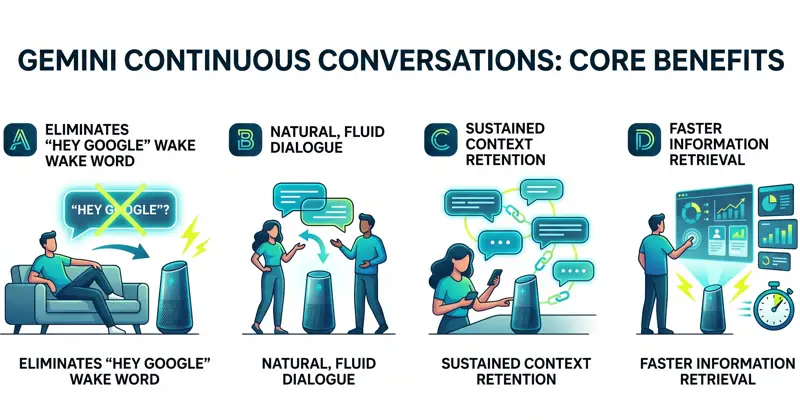
For years, interacting with smart home assistants required a rigid, robotic cadence. You had to preface every single command, question, or follow-up with a wake word. If you asked for the weather, you had to say the wake word again to ask about traffic. With the new Gemini for Home update, that friction is entirely removed. Continued conversation allows a user to have a fluid, natural discussion with the Gemini platform. Once activated, the microphone remains active on your smart device for a brief, critical window of a few seconds after the Gemini AI assistant provides its initial reply. This effectively turns a command-response interaction into an actual dialogue.
The evolution of the smart home relies entirely on reducing friction; moving away from rigid commands toward contextual, flowing conversations is the definitive leap forward for Gemini.
What makes this update so powerful is context retention. As the conversation progresses, Gemini is designed to remember the subject matter. If you ask about dinner recipes involving chicken, and then follow up with, “How long should I bake it?”, the AI immediately understands that “it” refers to the chicken. This contextual awareness significantly speeds up information retrieval and eliminates the tedious need for users to repeat key details. It is a massive step forward in Google’s ongoing effort to position Gemini as the absolute replacement for the aging Google Assistant platform, a transition that has been actively underway since last fall.
| Feature Comparison | Legacy Google Assistant | Gemini for Home (2026) |
|---|---|---|
| Wake Word Requirement | Required for almost every turn | Only required to initiate dialogue |
| Context Retention | Basic and often forgetful | Deep, sustained contextual awareness |
| Conversation Flow | Stilted, command-based | Natural, flowing human-like interaction |
How to Enable the Feature
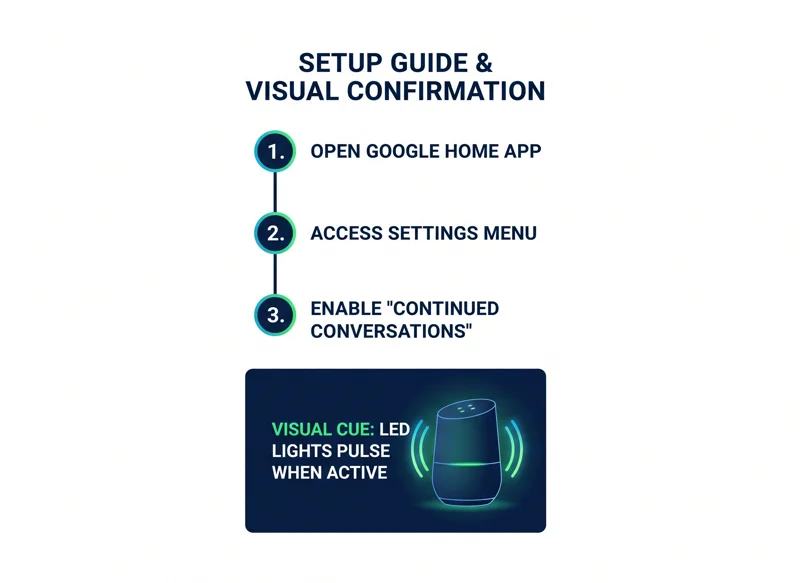
Despite rolling out today for all Gemini for Home voice assistant languages and supported regions, this magical new capability does not turn on automatically. Users must actively opt-in to experience seamless chatting. This manual requirement is a smart move by Google, giving users control over how their devices operate. To turn on this capability, you will need to navigate through the Google Home app on your smartphone or tablet. If you want to learn more about the broader ecosystem, you can visit the Official Google Nest Blog for ongoing updates.
| Step Number | Action Required in Google Home App |
|---|---|
| Step 1 | Open the latest version of the Google Home application on your device. |
| Step 2 | Navigate to the main Settings menu. |
| Step 3 | Scroll down and tap on “Gemini for Home voice assistant.” |
| Step 4 | Toggle the switch for “Continued Conversations” to the active position. |
Visual Cues and Hardware Behavior
A common question is how users will know the device is actually listening for a follow-up. Google has integrated clear visual cues to address this. During that brief window when the microphone is still active, the LED lights on your smart hardware (whether it is a smart speaker or a smart display) will pulse or glow softly. This light acts as a visual confirmation that you can keep chatting normally. Once the lights fade, the conversation window has closed, and a new wake word will be required to start a new thread.
By incorporating distinct visual pulsing cues, Google ensures users are never left guessing whether their smart speaker is actively listening to their follow-up questions.
| Hardware Status | LED Light Indicator | User Action Required |
|---|---|---|
| Idle / Asleep | No Lights | Say the wake word to start. |
| Actively Processing | Spinning or solid colors | Wait for the AI response. |
| Continued Conversation Active | Pulsing or soft glowing lights | Speak normally without the wake word. |
Privacy Concerns and Background Noise
Any feature that keeps a microphone active longer than usual inevitably raises privacy concerns. Tech companies have a rocky history of voice assistants unintentionally eavesdropping on private household moments. Google has stated that Gemini is equipped with advanced audio-processing algorithms capable of distinguishing between follow-up questions addressed directly to the chatbot and standard background chatter happening in the same room. While the tech promises high accuracy in filtering out irrelevant background conversations, cybersecurity and privacy advocates will undoubtedly be tracking the success rate of this filtering in the coming months. Users who are highly sensitive to microphone activity might choose to leave the feature disabled, leaning on the manual settings toggle provided in the app.
Frequently Asked Questions
What exactly is the continued conversation feature?
It is a smart home update that lets you ask follow-up questions to your Gemini assistant without having to repeat the wake word for every single request.
Is this feature turned on by default?
No, you must manually enable it through the settings menu in your Google Home app to begin using it.
Will Gemini understand what I am talking about if I do not repeat the subject?
Yes, the AI retains the context of your ongoing conversation, allowing for natural use of pronouns and implied subjects.
How do I know if the assistant is still listening for my next question?
The LED lights on your smart home hardware will pulse or glow to indicate that the active listening window is still open.
What happens if I talk to someone else in the room while the microphone is active?
Google claims the Gemini AI is trained to distinguish between commands directed at it and general background conversations happening in your home.
Is this available in all languages?
Yes, Google is rolling this out for all currently supported Gemini for Home voice assistant languages and regions.
Does this mean the old Google Assistant is gone?
Google has been actively preparing Gemini to completely replace the legacy Google Assistant platform since last fall, and this feature cements that transition.
Disclaimer: This article is for informational purposes only. Features, availability, and settings within the Google Home app are subject to change based on updates provided by the manufacturer.