The official fitbit air blueprints have just been released to the public, marking a massive shift in how we customize wearable technology. Google is leaning heavily into the swappable pebble design of its latest tracker, allowing independent designers and artisan makers to create their own personalized gear.
This incredibly “Google-y” move is highly reminiscent of the tech giant’s early, open-source days. The maker community has already shown immense creativity since the tracker’s launch last month. Fans were quick to invent custom bicep bands and unique mounts. Recognizing this passion, the company decided to officially support these creative innovations.
Why Google Released the fitbit air blueprints to the Public
Typically, a Google hardware specifications release is strictly reserved for third-party, enterprise-level accessory companies. However, Google noticed how quickly owners wanted to make the device their own. By officially dropping these documents, they are removing the barriers to entry for 3D printing enthusiasts and small creators.
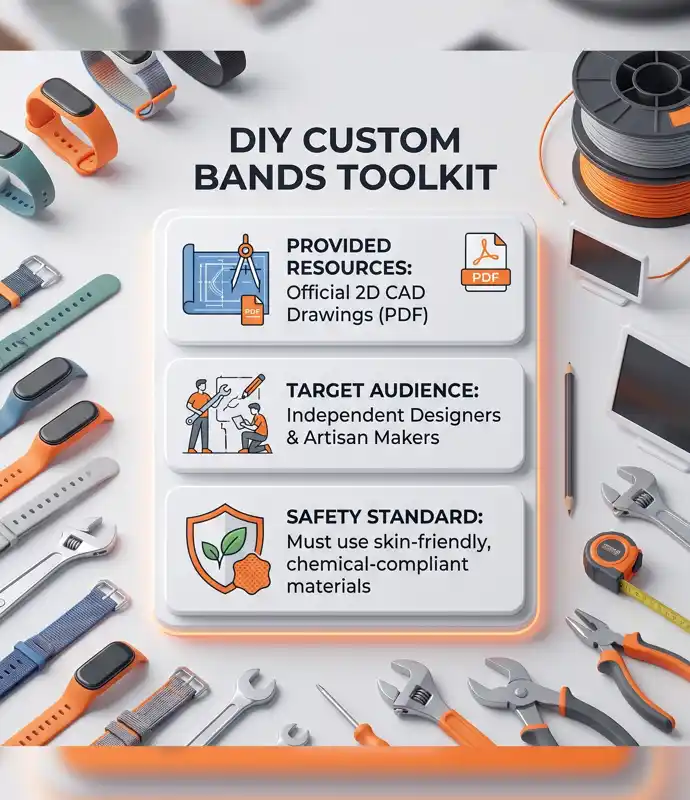
Now, anyone with the right tools can utilize the fitbit air blueprints to design bands, clips, and mounts. The documentation includes highly detailed Fitbit Air 2D CAD drawings of the pill-shaped pebble. It also features the specifications for the original “sleeve” used by the standard Performance Loop Band.
“Opening up the hardware ecosystem empowers everyday makers to innovate, turning a simple fitness tracker into a canvas for infinite wearable creativity.”
Designing DIY fitness tracker bands with fitbit air blueprints
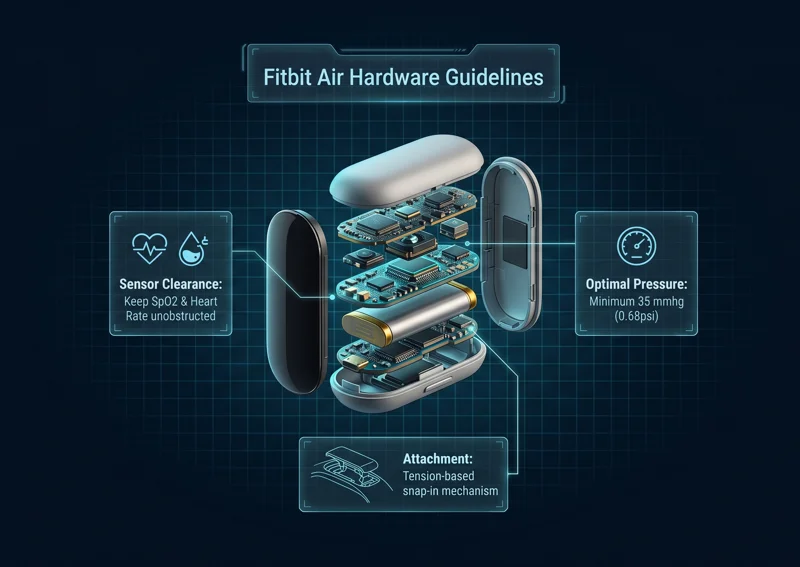
Creating your own Fitbit Air custom accessories requires precise measurements. The tracker uses a unique tension-based snap-in mechanism. If your enclosure does not follow the provided CAD tolerances, the sensor could fall out during rigorous exercise. It must be perfectly balanced to remain securely locked in place while remaining easy to pop out.
To help makers understand the precise physical requirements, here is a quick breakdown of the core design constraints provided in the documentation:
| Design Element | Specification Details | Maker Priority Level |
|---|---|---|
| Attachment Style | Tension-based snap-in mechanism | High – Crucial for security |
| File Types Provided | Fitbit Air 2D CAD drawings (PDF) | Medium – Used for 3D modeling |
| Target Audience | Independent designers and artisan makers | Low – General information |
Following the fitbit air blueprints for Sensor Accuracy
When you examine the fitbit air blueprints, it becomes clear that aesthetics must not interfere with functionality. The Fitbit Air relies heavily on optical heart rate and SpO2 sensors located on the base of the pebble tracker. If these are blocked, the device becomes virtually useless.
Google has outlined strict Fitbit Air sensor clearance guidelines. The sensors must remain entirely unobstructed and maintain flush, consistent contact with the skin. To achieve the best performance while a user is moving, any custom band must maintain a steady, gentle pressure against the sensing area.
Understanding Pressure Guidelines in the fitbit air blueprints
Optimal PPG (photoplethysmography) performance requires sustained contact pressure. The fitbit air blueprints specifically recommend a minimum pressure of 35 mmhg (0.68psi) for nominal wear. If your DIY fitness tracker bands are too loose, the heart rate readings will be wildly inaccurate during motion.
“Accurate health tracking relies on precise engineering; balancing skin comfort with a required 35 mmhg minimum pressure is the key to a perfect custom band.”
Furthermore, Google emphasizes the critical importance of using skin-friendly materials. To help prevent allergic reactions or skin irritation, they provided a list of chemical limits and environmental standards. For full compliance lists, makers can review the Google Store developer guidelines pages.
| Sensor & Safety Guideline | Google Recommendation |
|---|---|
| Sensor Clearance | Keep SpO2 and Heart Rate sensors completely unobstructed. |
| Skin Pressure | Maintain 35 mmhg (0.68psi) minimum pressure for PPG accuracy. |
| Material Safety | Adhere to chemical limits to prevent skin irritation or allergies. |
Getting Started with Your fitbit air blueprints
The release of these fitbit air blueprints is a major win for the DIY tech community. Whether you want to 3D print a rugged protective case, sew a comfortable fabric loop, or design a custom necklace mount, the official schematics make it possible. By adhering to the CAD tolerances, you can ensure a professional, secure fit every time.
As the community gets its hands on these files, we are bound to see an explosion of third-party Etsy shops and open-source 3D printable files. It is an exciting time to be a Fitbit owner, as the possibilities for personalization are now truly limitless.
Frequently Asked Questions
What exactly are the fitbit air blueprints?
They are official 2D CAD drawings and hardware specifications released by Google, allowing anyone to design and manufacture custom bands and accessories for the Fitbit Air.
Are the fitbit air blueprints free to use?
Yes, Google has officially released these guidelines and specifications to the public for independent designers and artisan makers to use freely.
What file format are the Fitbit Air CAD drawings in?
The current release includes detailed 2D CAD drawings provided in a PDF format, detailing the exact dimensions of the pebble and performance loop sleeve.
Why do the fitbit air blueprints mention a 35 mmhg pressure?
This specific pressure (0.68psi) is required to ensure the optical heart rate and SpO2 sensors maintain flush skin contact for accurate PPG health readings during movement.
Can I use any material to make my DIY fitness tracker bands?
While you can be creative, Google strongly advises following their provided environmental standards and chemical limits to ensure your materials are skin-friendly and do not cause irritation.
How does the tracker stay inside custom accessories?
The Fitbit Air pebble utilizes a tension-based snap-in mechanism. Your custom designs must strictly follow the fitbit air blueprints tolerances to keep the device securely locked in place.
Where can I find the official fitbit air blueprints?
The PDF documents and hardware specification guidelines are available directly through Google’s developer resources and the Google Store informational pages.
Disclaimer: This article is for informational purposes only. When designing or creating your own custom wearable accessories, always ensure you follow the manufacturer’s official safety, material, and hardware guidelines to avoid damaging your device or causing physical harm.