The new gemini overlay bubble android system is officially arriving in 2026 to fix one of the most frustrating limitations of modern mobile AI interfaces. Until now, navigating away from your active assistant window meant losing your immediate text conversation entirely.
Following the integration of Dynamic Color earlier this month, this latest framework expansion transforms the standard static panel into a highly persistent floating tool. Users can now maintain an active workspace across multiple heavy application panels simultaneously.
By bringing floating notification architecture directly into the generative ecosystem, Google is optimizing the mobile virtual assistant layout for genuine productivity and zero-latency access.
How the New Gemini Overlay Bubble Android Feature Operates
Operating the newly deployed gemini overlay bubble android ecosystem is completely intuitive for long-time mobile device users. You initiate an assistant prompt directly from your standard contextual home panel or gesture macro.
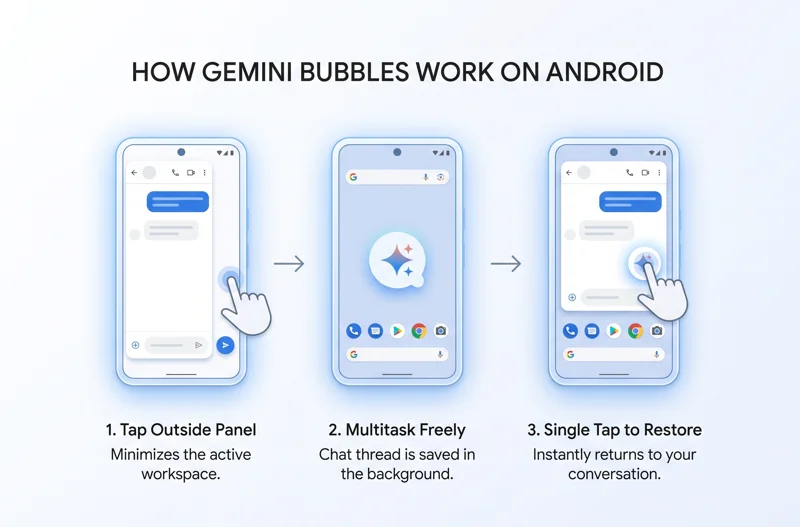
Once the intelligent panel generates its contextual response text or media data block, tapping anywhere outside that focus window automatically collapses the assistant framework. Instead of shutting down, it shrinks into a dense floating bubble sporting the official spark brand logo.
Gemini is still available while you multitask. Tap to expand. Drag to move or dismiss.
This dynamic contraction guarantees you can compose an email, read an article, or audit data records without wiping out your previous conversation history. Returning to your active conversation requires just a single quick gesture tap on the active spark icon.
A Shift Away From Legacy Screen Architecture Limitations
The launch of the gemini overlay bubble android feature addresses an ongoing workflow bottleneck. Previously, exiting the interface meant the application would completely drop the temporary chat thread cache.
Users were forced to manually launch the full standalone system to recover past discussions. The new persistent layout allows for continuous text-based workspace continuity across your device.
| User Gesture Action | System Result Lifecycle |
|---|---|
| Tap Outside Panel | Minimizes the assistant workspace down into a compact floating circle icon. |
| Single Tap Bubble | Instantly restores the full visual interface along with all cached response text blocks. |
| Drag Icon Down | Dismisses the active floating notification asset and clears the local chat cache. |
Comparing the Gemini Overlay Bubble Android to Gemini Live Features
This layout shift directly mimics aspects of the premium voice-centric ecosystem. The text experience is receiving a massive utility boost to better match the flowing nature of oral interactions.
The goal is to provide a unified experience across all modes of artificial intelligence engagement. It mirrors how voice tools operate quietly in the background during normal daily smartphone use cycles.
The text-based chat experience is getting a floating bubble layout quite similar to the familiar voice-centric floating waveform circle.
For additional details regarding official assistant software updates and interface design maps, visit the official Google Android Product News Portal.
The Impact of System-Level Upgrades on the AI Interface
The presence of the gemini overlay bubble android framework relies heavily on core changes in underlying firmware. With the commercial deployment of the new platform generation, global app handling is receiving an overhaul.
Users running the latest operating system builds can also transition the main app framework directly into a continuous system panel. This delivers deep, uncompromised productivity integration.
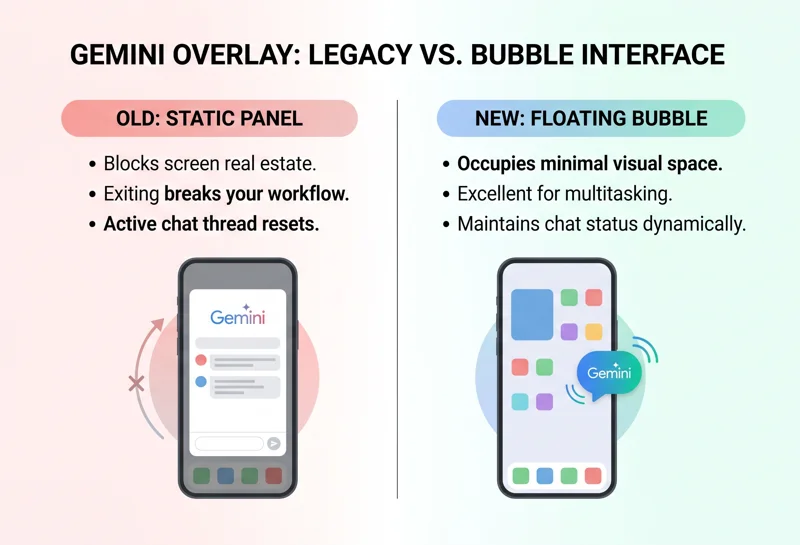
| Feature Attribute | Legacy Interface Model | 2026 Bubble Interface Model |
|---|---|---|
| Multitasking Utility | Poor. Exiting the app breaks workflow. | Excellent. Persistent icon remains visible. |
| Chat Thread Persistence | Resets unless saved to full app history. | Maintains status dynamically on screen. |
| Visual Screen Real Estate | Blocks the bottom half of local windows. | Occupies a minimal, movable floating asset. |
Current Availability Status of the New System Architecture
If you are looking for the gemini overlay bubble android feature on your retail smartphone today, you might need to wait for a wider rollout phase to hit your carrier network profile.
The upgraded interface assets have only been actively flagged in early development channels. Specifically, it is appearing inside specialized developer system profiles like the Android 17 QPR1 Beta pipeline.
It is not yet widely visible across standard consumer production builds. However, the update proves that a shift toward deep multi-window productivity and flexible desktop utility is the primary focus for engineers this year.
Frequently Asked Questions
What is the new gemini overlay bubble android feature?
It is an operating system interface upgrade that allows the assistant window to minimize into a floating icon, letting users multitask without losing active chat threads.
How do I minimize my active workspace session into a bubble?
Simply tap anywhere outside the assistant response box, and the system automatically collapses the active workspace window into a floating spark logo.
Can I move the floating circle icon around my phone display panel?
Yes, you can easily drag the bubble asset across any edge of your viewport or pull it down toward the bottom center zone to dismiss it completely.
Is this multitasking update available to all global consumers right now?
No, the feature has currently only been documented within the early Android 17 QPR1 Beta channel and is not yet running on standard consumer builds.
Does this functionality replace the voice-activated wave circle system?
No, it complements it by bringing a very similar persistent floating asset behavior to text-based interactions instead of voice sessions.
Can I use this specific interface update on tablet form factors?
Yes, the multi-window focus of the new firmware means the utility is highly optimized for large displays and tablet split-screen arrangements.
Do I lose my discussion notes if I accidentally close the floating asset?
Dragging the bubble to close it dismisses the active view, but permanent session histories can still be recovered inside the primary application journal.
Disclaimer: This article is for informational purposes only. System interfaces, developer features, and rolling software upgrade components are based on early 2026 beta test cycles and are subject to change before final consumer market distribution.