The highly anticipated youtube shorts feed limit zero minutes setting has officially arrived, bringing massive relief to users suffering from endless doomscrolling fatigue in 2026. For years, users have complained about the aggressive push of short-form vertical videos on a platform originally built for long-form content. Now, the video-sharing giant is finally giving control back to its audience. By tweaking a simple setting within your time management options, you can effectively wipe the Shorts tab clean and remove these bite-sized videos from your Home screen entirely.
The Evolution of YouTube’s Time Management Tools
This massive update did not happen overnight. The journey to a zero-minute limit began back in October, when YouTube first introduced a Shorts timer to help users manage their screen time. However, that initial release felt like a half-measure to many, as the lowest available limit was capped at 15 minutes. While helpful for some, 15 minutes is still plenty of time to get sucked into the infinite algorithmic scroll.
By January, YouTube expanded these features specifically focusing on parental controls, allowing guardians to restrict how much time their children spent on the app. The promise of a “zero minutes” option was teased as “coming soon” for kids’ accounts. Thankfully, the company realized that adults wanted this functionality just as much. According to YouTube spokesperson Makenzie Spiller, the option to set the timer to zero is now live for all parents and is actively rolling out to everyone, including regular adult accounts.
“The option to set the timer to zero is now live for all parents, and is currently being rolled out to everyone.” – Makenzie Spiller, YouTube Spokesperson
How to Turn Off YouTube Shorts Completely
If you are ready to reclaim your attention span and focus purely on traditional, long-form YouTube videos, enabling this feature is incredibly straightforward. The setting is buried slightly within the app’s digital wellbeing section, but once activated, the effects are immediate across both iOS and Android devices.
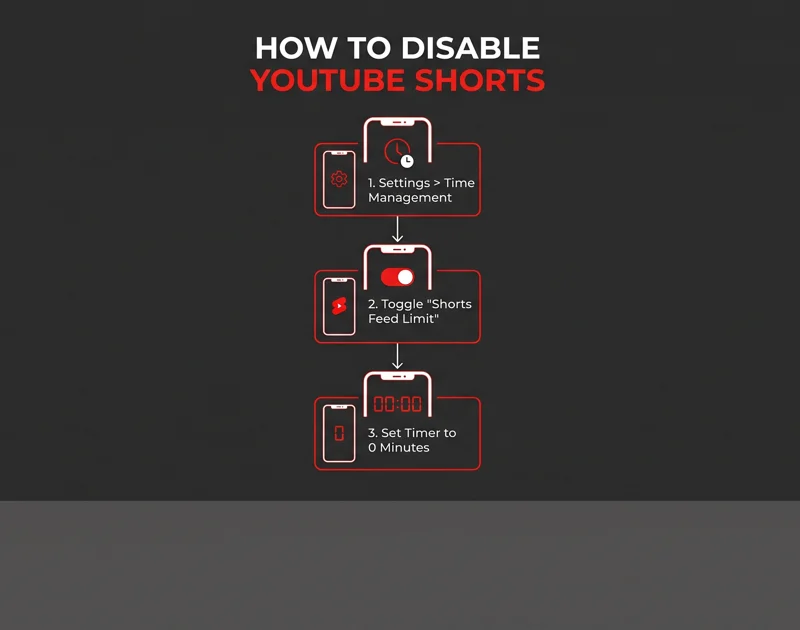
To turn on the timer and disable Shorts, simply open your YouTube app and tap on your profile picture. Navigate to the general settings menu and look for the “Time Management” or “Digital Wellbeing” section. Here, you will find the toggle for the “Shorts feed limit.” Turn this on, and when prompted to select a duration, scroll all the way down to zero minutes.
| App Version Status | Previous Minimum Limit | New Minimum Limit (2026) |
|---|---|---|
| Pre-October Update | None (Infinite Scroll) | N/A |
| October to January Release | 15 Minutes | N/A |
| Current 2026 Rollout | 15 Minutes | 0 Minutes (Complete Removal) |
What Happens When You Hit the Limit?
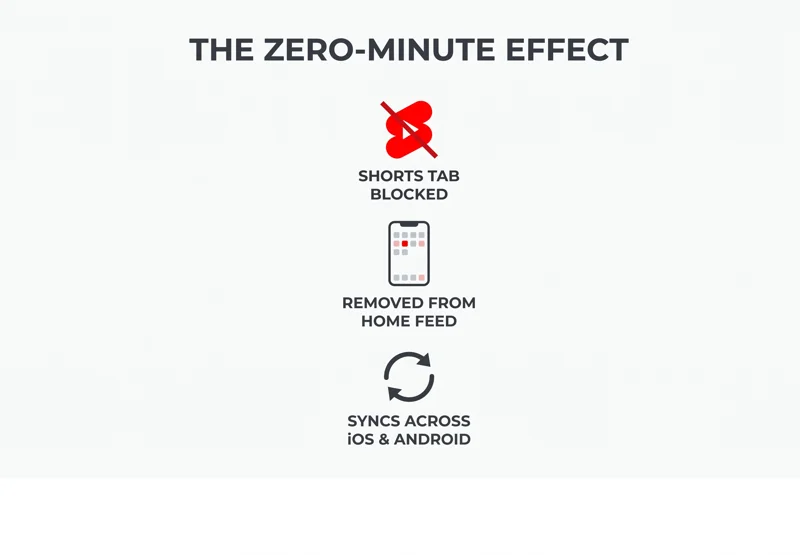
The beauty of the zero-minute limit is its uncompromising nature. The moment you apply this setting, the Shorts tab essentially shuts down. Instead of a grid of endless vertical thumbnails, you will be greeted by a simple notification stating that you have “reached your Shorts feed limit.”
More importantly, our recent testing confirms that this restriction extends beyond just the dedicated Shorts tab. Hitting the zero-minute time limit actively purges Shorts recommendations from your primary Home screen feed. This means no more accidental clicks and no more visual clutter when you are trying to find educational content, documentaries, or your favorite long-form creators. It is a brilliant step forward for Google’s Digital Wellbeing initiatives, giving users the ultimate opt-out button.
“Regardless of age, this is a phenomenal tool for anyone who wants to spend a little less time scrolling and a lot more time intentionally engaging with the media they actually want to watch.”
Platform Availability and Future Updates
Currently, this feature is focused entirely on the mobile experience, which makes sense given that Shorts are inherently designed for vertical mobile consumption. Users on Android and iOS will see the most benefit. The rollout is happening server-side, meaning you might not even need a direct app update to see the new feature populate in your settings menu, though keeping your app up to date is always recommended.
| Platform / Device | Zero-Minute Limit Availability | Home Screen Removal Feature |
|---|---|---|
| iOS (iPhone / iPad) | Yes (Live/Rolling Out) | Yes |
| Android Smartphones | Yes (Live/Rolling Out) | Yes |
| Desktop / Web Browser | Currently Limited | Varies via Browser Extensions |
As 2026 progresses, it will be fascinating to see if YouTube introduces this hard limit to its smart TV applications and desktop interfaces natively. Until then, mobile users can finally breathe a sigh of relief. The era of forced short-form consumption is finally coming to an end for those who choose to opt out.
Frequently Asked Questions
Where do I find the YouTube Shorts zero-minute setting?
Open the YouTube app, tap your profile picture, go to Settings, select “Time management,” toggle on “Shorts feed limit,” and set the duration to zero minutes.
Does setting the limit to zero completely delete the Shorts tab?
The tab icon will still exist at the bottom of your app, but tapping it will not load any videos; it will only display a message saying you have reached your limit.
Will turning this on remove Shorts from my main YouTube Home page?
Yes\! Testing shows that setting the limit to zero minutes successfully prevents the Shorts shelf from appearing as you scroll through your standard Home feed.
Is this feature only for kids’ accounts?
No. While it started as a parental control feature, YouTube has officially confirmed that the zero-minute limit is rolling out to all users, including regular adult accounts.
Why don’t I see the zero-minute option yet?
The feature is currently rolling out globally. If you only see the 15-minute option, ensure your app is fully updated or wait a few days for the server-side update to reach your specific account.
Does this setting sync across all my devices?
Yes, if you are logged into the same Google account, your time management settings should sync across your iOS and Android devices automatically.
Can I easily change the limit back if I want to watch Shorts again?
Absolutely. You can return to the Time Management settings at any point to increase the timer or toggle the Shorts feed limit off completely.
Disclaimer: This article is for informational purposes only. App features, UI navigation, and settings availability are subject to change based on YouTube’s software updates and regional rollout schedules.