The wait is finally over for Apple users as google rolls out a native gemini app for mac, marking a significant milestone in the 2026 desktop artificial intelligence landscape. For months, power users have been relying on browser tabs to access Google’s flagship AI, watching as competitors like OpenAI and Anthropic deeply integrated their assistants into the macOS environment. Now, Google has answered the call, delivering a robust, system-level application designed to supercharge productivity without breaking your workflow.
Bridging the Gap in the Desktop AI Wars
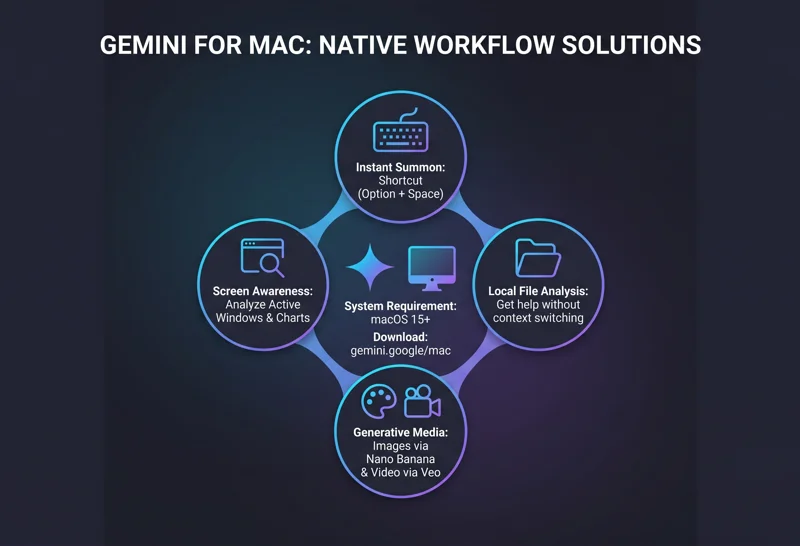
Google’s official announcement on Wednesday confirmed what many tech enthusiasts were hoping for: a frictionless AI experience on Apple silicon. By introducing a native application, Google is aggressively closing the gap with its biggest rivals. The standout feature of this new integration is the global keyboard shortcut. By simply pressing “Option + Space” from anywhere on your Mac, you can instantly summon the Gemini overlay.
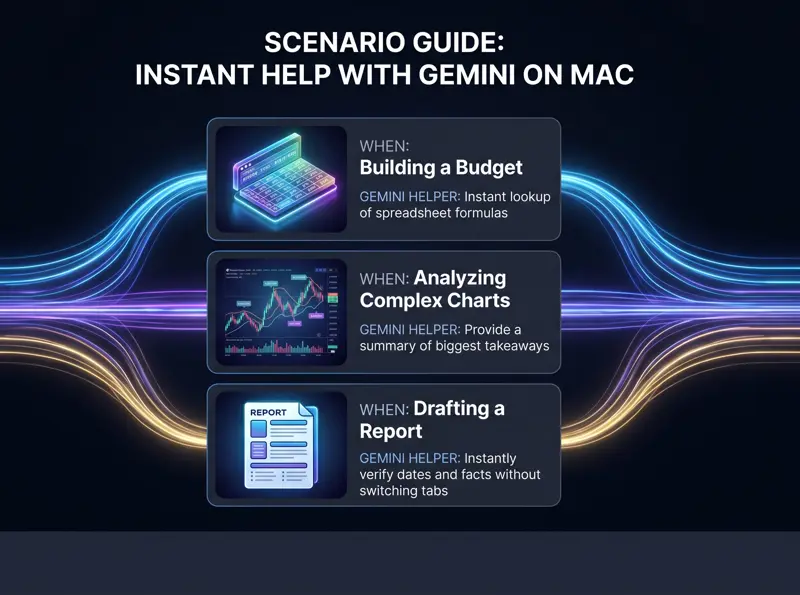
This means whether you are deep into a complex coding session, writing an extensive market report, or balancing a complex spreadsheet, you no longer need to switch contexts or open a web browser. You can ask a quick question, verify a date, or request a formula, and immediately return to your primary task.
| AI Assistant | Mac Native App Status (2026) | Primary Summon Shortcut |
|---|---|---|
| Google Gemini | Available (macOS 15+) | Option + Space |
| OpenAI ChatGPT | Available | Option + Space (Configurable) |
| Anthropic Claude | Available | Command + Space (Configurable) |
Seamless Screen Awareness and Local File Integration
A desktop app is only as good as its context awareness. The new native Gemini app excels by reading what is currently on your screen (with user permission, of course). If you are looking at a dense, complex financial chart or a lengthy PDF, you can simply bring up the overlay and ask, “What are the three biggest takeaways here?” Gemini will analyze the on-screen information and provide a concise summary.
“The ability to analyze local files and on-screen content instantly transforms Gemini from a simple chatbot into a true, context-aware digital colleague.”
Furthermore, this integration extends to your local file system. Users can drag and drop local files directly into the Gemini prompt window, allowing the AI to read, summarize, or cross-reference documents stored directly on the Mac’s hard drive.
Next-Gen Media: Upgrading to Nano Banana 2 and Veo
While early press releases mentioned image generation via “Nano Banana,” it is important to clarify the exact technology powering this app in 2026. The macOS app actually leverages the highly advanced Nano Banana 2 model (officially known as Gemini 3 Flash Image). This state-of-the-art model completely replaces the older Nano Banana and Nano Banana Pro versions. It grants Mac users incredible power, supporting text-to-image creation, image editing, and multi-image composition right from the desktop.
Additionally, the app supports high-fidelity video generation using Google’s “Veo” model. Users can generate video content with natively generated audio, utilize text-to-video with audio cues, and even extend existing videos, making the app an indispensable tool for content creators.
| Media Type | Powering Model (2026) | Key Capabilities |
|---|---|---|
| Image | Nano Banana 2 | Text-to-image, style transfer, composition |
| Video | Veo | High-fidelity rendering, native audio generation |
| Text & Logic | Gemini 3.1 Pro | Complex reasoning, coding, screen analysis |
System Requirements and Global Availability
To ensure optimal performance and security, Google has set specific hardware and software baselines for this release. The app is deeply tied to modern Apple frameworks to provide that seamless “Option + Space” experience.
“By requiring macOS 15, Google ensures that Gemini can securely interface with the system’s screen-recording and accessibility APIs without compromising user privacy.”
The native app is available globally starting today. For more technical details and to initiate your installation, you can visit the Official Gemini for Mac Download Page.
| Requirement | Specification |
|---|---|
| Operating System | macOS 15 and up |
| Availability | Global |
| Cost | Free download (Subscription required for advanced models) |
Frequently Asked Questions
What is the keyboard shortcut to open the Gemini Mac app?
You can bring up the Gemini app from anywhere on your Mac using the shortcut “Option + Space”.
Can the Gemini app see my screen?
Yes, with your permission, you can share your current screen with Gemini to ask contextual questions about charts, images, or text you are actively viewing.
Which macOS version do I need?
The native macOS application requires macOS 15 or higher to function properly.
Can I generate images directly in the Mac app?
Absolutely. The app supports image generation powered by the state-of-the-art Nano Banana 2 model.
Does the app support video generation?
Yes, it integrates Google’s Veo model, allowing you to generate high-fidelity videos with native audio right from your desktop.
Do I need to open a browser tab to use it?
No, the primary benefit of this release is that it is a standalone, native application that works independently of your web browser.
Where can I download the Gemini app for Mac?
It is officially available for download globally at [gemini.google.com/mac](https://www.google.com/search?q=https://gemini.google.com/mac).
What are your thoughts on integrating AI shortcuts directly into your daily desktop workflow?
Disclaimer: This article is for informational purposes only. Features, availability, and system requirements for software applications are subject to change by the developer.