It is officially confirmed: WhatsApp to drop support for these older iOS and iPadOS versions later this year. As we rapidly approach November 30, 2026, Meta has announced critical software updates to its minimum system requirements. Millions of users must verify their current Apple device settings to maintain access to this essential messaging platform.
If you ignore this crucial system warning, you might find yourself entirely locked out of your daily chats, business groups, and shared family media files. The upcoming software cutoff is strict. Fortunately, Meta provides this notice well in advance so every user has ample time to prepare and update their hardware.
Why WhatsApp to drop support for these older iOS and iPadOS versions later this year
Meta regularly reviews which smartphones and operating systems are the oldest and have the fewest active daily users. This routine, industry-standard evaluation is necessary to ensure the messaging platform remains secure, incredibly fast, and packed with modern communication features.
Older devices simply do not receive the latest, most robust security patches from Apple. This glaring vulnerability makes them highly susceptible to new cyber threats. Furthermore, legacy hardware often lacks the baseline processing power required to run the newest app functionalities effectively.
“To keep up with the latest advances in technology, we routinely stop supporting older operating systems to point our resources to supporting the latest ones securely.”
By enforcing a new baseline, the development team can focus entirely on optimizing the app for modern operating systems rather than spending resources patching obsolete code.
| Software Metric | Previous Requirement (2025) | New Requirement (Nov 2026) |
|---|---|---|
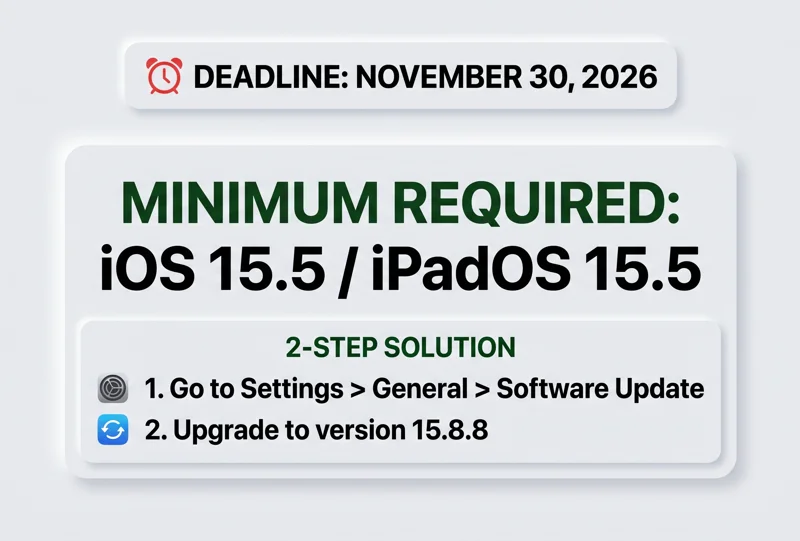
| Minimum iPhone OS | iOS 15.1 | iOS 15.5 or newer |
| Minimum iPad OS | iPadOS 15.1 | iPadOS 15.5 or newer |
The Impact When WhatsApp to drop support for these older iOS and iPadOS versions later this year
Last year, the app raised its minimum requirement to iOS 15.1, effectively killing support for older models like the iPhone 5s and iPhone 6. The upcoming November 30 deadline raises the bar yet again, specifically targeting devices that have neglected recent software patches.
The excellent news is that every Apple iPhone and iPad capable of running iOS 15.1 can seamlessly install the 15.5 update. This means the actual hardware cutoff is not as severe as previous years, but completing an active software update is absolutely mandatory.
If you are still utilizing legacy hardware daily, you must act now. Popular legacy devices are in the crosshairs, and you must check your internal settings immediately to avoid a sudden service disruption.
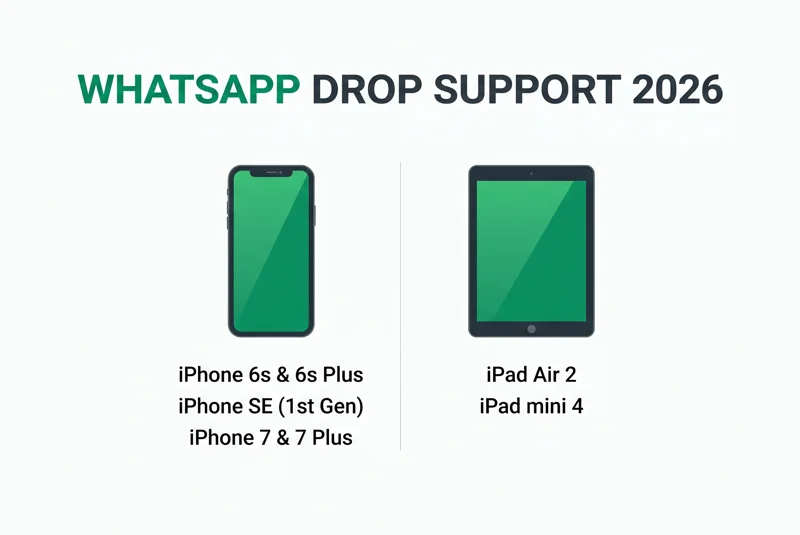
| Device Type | Affected Models | Action Required |
|---|---|---|
| Smartphones | iPhone 6s, 6s Plus, SE (1st Gen), 7, 7 Plus | Update to iOS 15.8.8 |
| Tablets | iPad Air 2, iPad mini 4 | Update to iPadOS 15.8.8 |
What to Do Since WhatsApp to drop support for these older iOS and iPadOS versions later this year
You do not necessarily need to rush out and purchase a brand-new, expensive phone to keep using the application. You simply need to ensure your current, older device is running the highest possible software iteration available to it.
Navigating to your mobile device settings and forcing a manual software installation is the easiest, fastest way to prevent a sudden loss of service. Always remember to securely back up your phone to iCloud before initiating any major software installation.
For comprehensive technical details regarding device compatibility, you can always visit the official WhatsApp Help Center to verify your specific model’s exact status.
| Step | Action | Expected Outcome |
|---|---|---|
| 1 | Open ‘Settings’ > ‘General’ > ‘Software Update’ | Locates the newest available iOS patch |
| 2 | Tap ‘Download and Install’ | Upgrades device to iOS 15.8.8 |
“Do not wait until November 29th to update your iPhone. Secure your valuable chat history today by downloading the latest iOS patch available for your specific device.”
Final Thoughts: WhatsApp to drop support for these older iOS and iPadOS versions later this year
Modern communication technology moves incredibly fast, and maintaining highly secure encryption standards requires leaving obsolete, vulnerable software behind permanently. While it can undoubtedly be frustrating to constantly update older devices, these changes are implemented entirely for your ultimate digital safety and privacy.
Please make sure to proactively assist older family members who might still be using an iPad mini 4 or an iPhone 7 Plus. They represent the demographic most likely to accidentally ignore software update notifications and tragically lose access to their family groups unexpectedly.
Frequently Asked Questions
Why is WhatsApp to drop support for these older iOS and iPadOS versions later this year?
Meta routinely discontinues support for deeply outdated operating systems to focus their engineering resources on newer platforms, ensuring significantly better user security and highly advanced features.
What is the exact deadline date of the software cutoff?
The new minimum system requirements will be strictly and globally enforced starting on November 30, 2026.
What is the new minimum iOS requirement for the app?
All users will explicitly need an Apple device running at least iOS 15.5 or iPadOS 15.5 to continue using the messaging application.
Will my old iPhone 7 suddenly stop working forever?
Your iPhone 7 hardware will still function normally, but you must actively update its internal software to at least iOS 15.5 (preferably iOS 15.8.8) to keep the messaging app functioning.
What exactly happens if I decide not to update my software?
You will be completely locked out of the application interface. You will not be able to read, send, or receive any messages until the required software is successfully updated.
Can the older iPad Air 2 still run the messaging application?
Yes, it can, but only if you immediately navigate to your device settings and manually update the operating system to iPadOS 15.5 or higher.
How do I know what specific iOS version I currently have installed?
Simply open your iPhone Settings app, tap on General, and then select the About section to instantly view your current iOS version number.
Disclaimer: This article is for informational purposes only. System requirements, software update availability, and device compatibility are subject to change based on official decisions made by Meta and Apple.