For years, enthusiasts diving into Windows 11 beta testing have voiced a common complaint: the testing tiers had become a convoluted mess. What started as a simple way to test upcoming software evolved into a confusing web of channels where experimental features were hidden, delayed, or selectively distributed. Recognizing this widespread frustration, Microsoft is taking a massive step backward to move forward. The tech giant is officially streamlining its entire testing ecosystem to address reliability concerns and rebuild trust with its most dedicated power users.
The End of Update Frustration: Killing Controlled Feature Rollouts
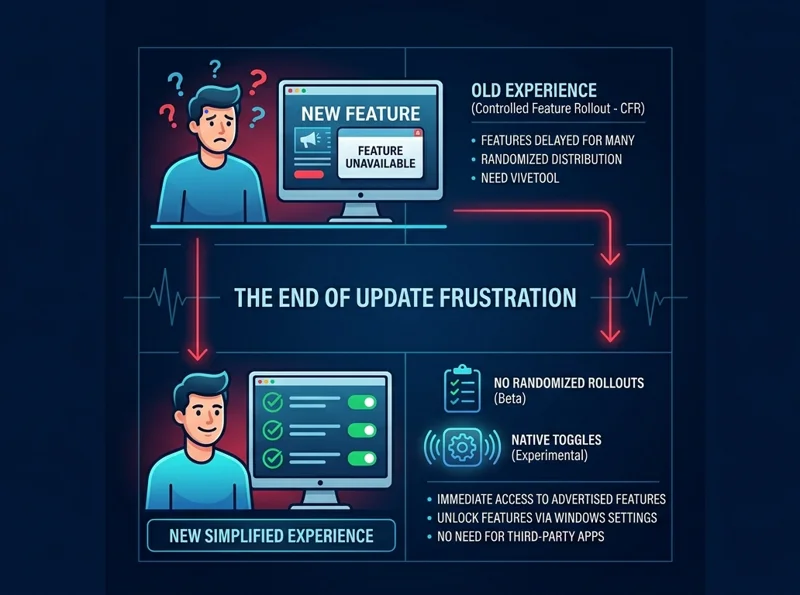
If you have ever participated in the program, you likely know the sting of reading about a highly anticipated feature in the official release notes, diligently updating your PC, and then realizing the feature is completely missing from your machine. This was due to Microsoft’s Controlled Feature Rollout (CFR) system, a process that gradually pushed new updates to a randomized subset of users to test stability.
Microsoft has finally admitted that this channel structure was deeply flawed and actively contributed to a poor user experience. By acknowledging this pain point, the company is making a bold move in the revamped Beta Channel: the complete elimination of gradual feature rollouts. Now, if a new feature is documented in the release notes for the Beta Channel, every single tester will have immediate access to it right out of the box.
“That experience, where features are announced but only some of you receive them due to how we gradually roll things out, is the single biggest frustration we hear.”
This level of transparency is a breath of fresh air for those who felt alienated by the unpredictable nature of the old system. The Beta Channel is once again the definitive place for reliable, immediate testing of upcoming production-ready features.
| Program Aspect | Old Insider Program (Pre-2026) | New Revamped Program |
|---|---|---|
| Channel Structure | Canary, Dev, Beta, Release Preview | Simplified to Experimental and Beta |
| Feature Availability | Controlled Feature Rollout (CFR) | Immediate access upon updating (Beta) |
| Feature Toggling | Required third-party apps like ViveTool | Native toggle via Windows Settings |
Meet the ‘Experimental’ Channel: Native Toggles Unleashed
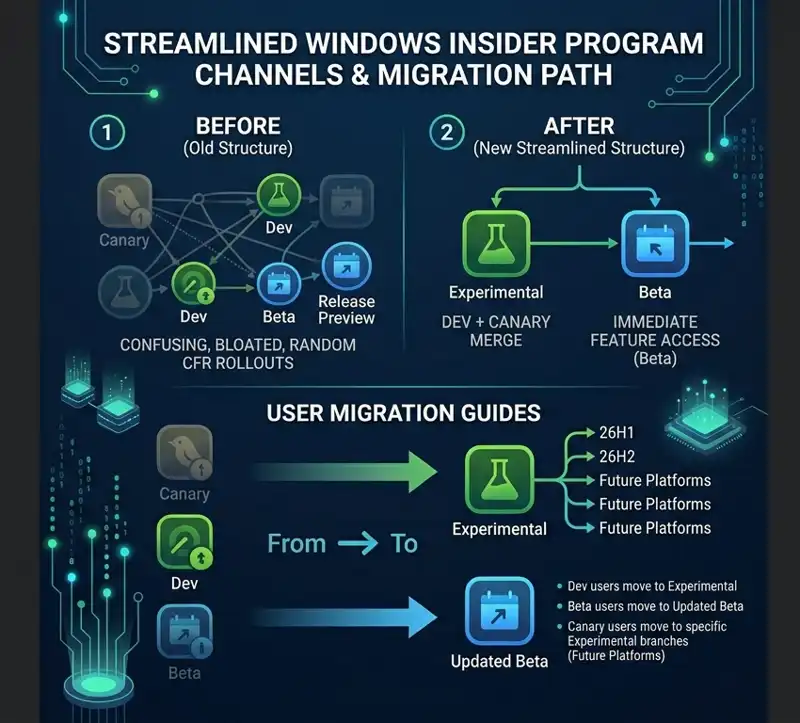
To further simplify the ecosystem, Microsoft is consolidating the notoriously confusing Dev and Canary channels into a single, straightforward tier aptly named the ‘Experimental’ channel. The name serves as a clear warning and invitation: this is the wild west of Windows development, where features are tested that may never actually see the light of day in a public release.
However, the most groundbreaking addition to the Experimental channel Windows Insider tier is the introduction of a native system to toggle Windows feature flags. Previously, power users had to rely on third-party utilities like ViveTool to force-enable hidden, experimental UI changes or system behaviors. Microsoft recognized that this was far from an ideal experience.
| Current Insider User | New Migration Destination |
|---|---|
| Dev Channel Users | Moving to Experimental |
| Canary 28000 Series Users | Moving to Experimental (26H1) |
| Canary 29500 Series Users | Moving to Experimental (Future Platforms) |
| Beta Channel Users | Remaining in updated Beta experience |
Now, if an experimental feature—such as new advanced haptic feedback for your mouse—is locked behind a gradual rollout in this tier, you can simply navigate to Settings > Windows Update > Windows Insider Program > Feature flags, and manually turn the feature on. This puts the power back into the hands of the testers, exactly where it belongs.
“By moving to a simpler two-channel system and granting direct access to feature flags, Microsoft is finally treating its beta testers like true development partners.”
A New Windows Update Experience
The transition to this new system is rolling out in phases. Dev Channel users are the first to be migrated to the Experimental tier. If you do not see the new UI immediately, you can force the change using the new Feature flags menu. Meanwhile, Canary users will be moved over the coming weeks into specific branches of the Experimental tier depending on their current build series (such as 26H1 or Future Platforms).
Alongside the structural overhaul, this rollout includes a completely new Windows Update experience designed to give users unprecedented control over their machines. This includes highly requested abilities, such as deeply pausing updates and entirely avoiding forced system reboots that interrupt workflow. You can read more about how to join the testing ecosystem on the official Microsoft Insider website.
| Channel Designation | Corresponding Rollout Build Number |
|---|---|
| Beta Channel | Build 26220.8283 |
| Experimental Channel (Standard) | Build 26300.8289 |
| Experimental 26H1 | Build 28020.1873 |
| Experimental Future Platforms | Build 29576.1000 |
As we navigate through 2026, it is evident that Microsoft is finally taking user feedback seriously. By stripping away the bloated, confusing channel designations and returning fundamental controls to the user, the revamped Insider Program is poised to foster a much healthier and more productive environment for the future of Windows development.
Frequently Asked Questions
What are the two new channels in the Windows Insider Program?
The program has been simplified into two main channels: the ‘Experimental’ channel (replacing Dev and Canary) and the updated ‘Beta’ channel.
What happens to the Dev and Canary channels?
Both the Dev and Canary channels are being retired and consolidated into the new ‘Experimental’ channel to simplify the testing process.
What does the end of Controlled Feature Rollout (CFR) mean for Beta users?
It means that any new feature mentioned in the official release notes for the Beta channel will be immediately available to all Beta testers upon updating, without random delays.
How can I manually turn on experimental features now?
You can natively toggle hidden features without third-party apps by navigating to Settings > Windows Update > Windows Insider Program > Feature flags.
Do I still need to use ViveTool?
No, the integration of a native Feature flags menu in Windows Settings eliminates the need to rely on third-party utilities like ViveTool to unlock experimental features.
What should I do if I want to keep my current experimental features before the migration?
Microsoft recommends that users currently in the Beta channel who wish to retain specific experimental tools should move to the Dev channel before it officially transitions into the new Experimental tier.
What is included in the new Windows Update experience?
The latest update provides users with enhanced controls, allowing them to easily pause updates as desired and completely avoid frustrating forced system reboots.
Disclaimer: This article is for informational purposes only. Details regarding software builds, channel migrations, and feature availability are based on Microsoft’s official announcements and are subject to change as the operating system continues active development.