hp eliteboard g1a review: In the ever-evolving landscape of personal computing in 2026, the lines between peripherals and processing units are blurring faster than ever. When I first laid hands on an early prototype of HP’s EliteBoard G1a, I was genuinely captivated by the audacity of the design. Now, with the finalized production model sitting on my desk, I am convinced that the keyboard PC concept is no longer just a nostalgic throwback to the era of the Commodore 64—it is a functional, albeit niche, reality. However, despite its technical brilliance, there is a very specific reason why this $1,499 machine is marketed toward enterprise sectors rather than your home office.
The Return of the Keyboard Computer: A Modern Nostalgia
For those of us old enough to remember the early 1980s, the form factor of the EliteBoard G1a feels like a high-tech “deja vu.” Back then, the computer *was* the keyboard. Devices like the ZX Spectrum or the Commodore 64 housed everything under the keys because it was the most efficient way to package hardware for home users. Over the decades, we moved to towers, then laptops, and eventually ultra-thin tablets. In 2026, HP is attempting to bring that all-in-one peripheral spirit back into the modern office with the EliteBoard G1a.
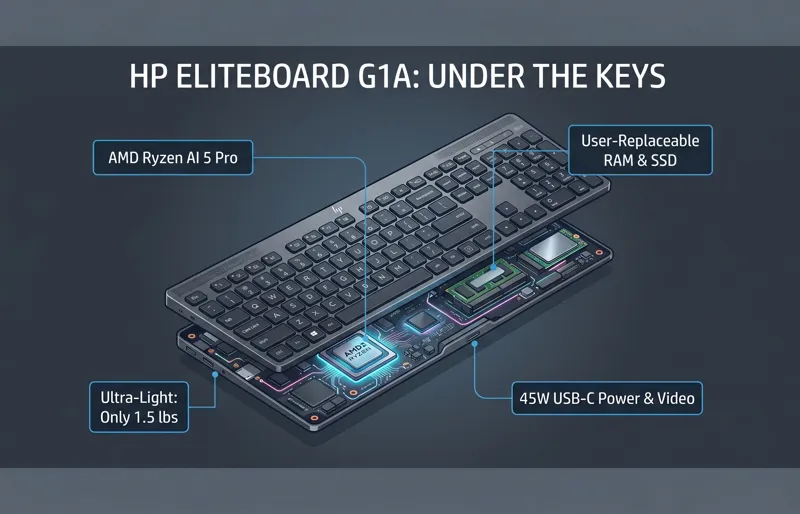
The EliteBoard G1a is essentially a fully-fledged miniature desktop computer alternative disguised as a standard corporate keyboard. It weighs a mere 1.5 pounds, making it lighter than almost any laptop currently on the market. For the modern IT professional, this represents a massive shift in how hardware can be deployed. Instead of dragging heavy towers or even “Tiny” PCs across a corporate campus, you simply carry a keyboard and a single cable.
| Feature | HP EliteBoard G1a Specifications |
|---|---|
| Processor | AMD Ryzen AI 5 Pro 340 (Zen 5 Architecture) |
| NPU Performance | 50+ TOPS (Dedicated AI Processing) |
| Memory | Up to 64GB LPDDR5x (User Replaceable) |
| Storage | M.2 2230 NVMe Gen4 SSD (Up to 2TB) |
| Weight | 1.5 lbs (Approx. 680 grams) |
| Battery | Optional Internal (3.5 hours mobility) |
Under the Keys: The Power of AMD Ryzen AI
Don’t let the unassuming plastic chassis fool you. Inside the EliteBoard G1a lies a sophisticated AMD Ryzen AI processor. In our testing unit, the Ryzen AI 5 Pro 340 provided more than enough power for heavy-duty multitasking, Excel spreadsheets with tens of thousands of rows, and even moderate creative tasks. The inclusion of a dedicated Neural Processing Unit (NPU) is the real star here. As we move deeper into 2026, Windows 11 (and the rumored Windows 12) relies heavily on AI for live translation, meeting summaries, and local LLM (Large Language Model) processing. The EliteBoard handles these without breaking a sweat.
“The EliteBoard G1a proves that the desktop of the future isn’t a box on the floor; it’s the tool right under your fingertips.”
One of the most impressive aspects of the internal design is the focus on enterprise IT hardware sustainability. HP has ensured that both the RAM and the SSD are user-replaceable. This is almost unheard of in ultra-compact designs in 2026. If a lab of computers needs a storage upgrade, an IT tech can swap out the M.2 drives in minutes without needing specialized heat guns or proprietary tools. This repairability is a massive selling point for large-scale organizations but often ignored by the average consumer.
The Graphics and Thermal Management
Equipped with Radeon 840M graphics, the EliteBoard G1a isn’t exactly a gaming rig, but it handles high-definition video conferencing and multiple 4K monitor outputs with ease. What’s truly remarkable is the thermal management. Shoving a high-performance CPU into a keyboard case usually results in “toasty” fingers. However, HP utilized a vapor chamber cooling system that vents heat out of the rear, away from the keys. Even under load, the “Home Row” remains cool to the touch, which is a significant engineering feat.
| Model Tier | Included Hardware | Target Price (USD) |
|---|---|---|
| Base Enterprise | 16GB RAM / 256GB SSD / No Battery | $1,499 |
| Pro Mobility | 32GB RAM / 512GB SSD / Internal Battery | $1,795 |
| Executive Admin | 64GB RAM / 1TB SSD / Full Hub Kit | $2,150 |
Setup and Connectivity: A Tale of Two Cables
The hot desking setup is where the EliteBoard G1a is supposed to shine, but the reality is slightly more complicated. Around the back, the device features two USB-C ports. One is a high-bandwidth 45W port capable of handling power and video signals simultaneously. If you have a modern USB-C monitor, the setup is magical: one cable from the screen to the keyboard, and you are up and running. Your desk looks immaculate.
However, if you are stuck with an older HDMI monitor, the experience becomes a “mess of wires.” HP includes an HDMI hub in the box, but the cable is notoriously short. During my hp eliteboard g1a review, I found that unless the hub was taped to the back of the monitor, it would dangle awkwardly, putting strain on the keyboard’s ports. For a device meant to simplify the workspace, it can ironically make it more cluttered if your peripherals aren’t as modern as the PC itself.
| Connectivity Feature | EliteBoard Capabilities | Consumer Expectations |
|---|---|---|
| Video Output | USB-C DP Alt Mode / HDMI via Hub | Native HDMI / DisplayPort |
| Power Supply | 45W USB-C PD | Internal AC or Standard Brick |
| Wireless | Wi-Fi 7 / BT 5.4 | Standard Wi-Fi 6E |
“The cable management is either a minimalist’s dream or a technician’s nightmare, depending entirely on your monitor’s age.”
Real-World Performance: Is It Really a Desktop?
Once you get past the novelty of the form factor, using the EliteBoard G1a feels… normal. And that is perhaps its greatest achievement. Running Windows 11, the system boots in less than 10 seconds. The built-in fingerprint reader, cleverly integrated into the power button, works flawlessly for Windows Hello logins. Whether I was browsing with 50+ Chrome tabs open or editing a 4K video for a quick social media clip, the AMD Ryzen AI processor never stuttered.
The typing experience is surprisingly premium. HP avoided the mistake of using cheap membrane switches. Instead, they’ve used a soft-touch mechanical-hybrid switch with generous key travel. It feels tactile without being loud—perfect for an open-office environment where “clicky” blue switches would lead to an HR complaint. However, HP bundles a wireless mouse that feels like an afterthought. It’s light, flimsy, and lacks the ergonomic support of something like a Logitech MX Master. If you’re spending $1,500 on a keyboard PC, you’ll definitely want to bring your own mouse.
The IT Manager’s Perspective
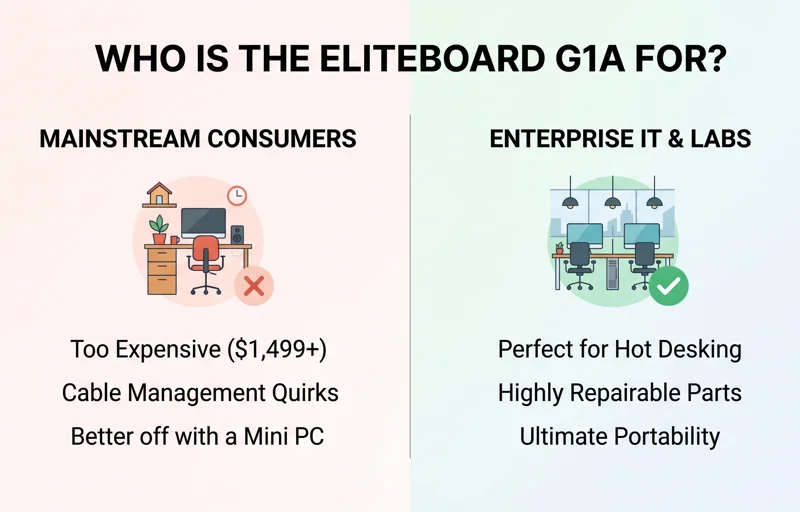
I spoke with several IT administrators during this review period. Their excitement for the EliteBoard G1a was palpable. In 2026, many companies are moving toward “floating” offices where employees don’t have assigned desks. The EliteBoard is perfect for this. An employee can keep their EliteBoard in a locker, walk to any empty monitor in the building, plug in one cable, and have their entire personalized workstation ready to go. No need to sync heavy cloud profiles or worry about the security of a shared terminal.
| Pros | Cons |
|---|---|
| Extreme portability (1.5 lbs) | Very high entry price ($1,499+) |
| Highly repairable (SSD/RAM) | Requires modern USB-C monitor for best use |
| Powerful AI-ready internals | Bundled mouse is low quality |
| Excellent typing feel | Niche form factor limits secondary uses |
Final Verdict: Why This Innovation is “Not For You”
The EliteBoard G1a is a masterpiece of engineering, but for 99% of consumers, it is a hard pass. If you are a gamer, the integrated graphics won’t satisfy you. If you are a home user, a $600 Mac Mini or a similar miniature desktop computer alternative combined with a high-end mechanical keyboard will give you more power and better ergonomics for half the price. The EliteBoard is priced for corporate budgets, where the value lies in deployment speed, repairability, and workspace flexibility.
HP has built a device for the “bored IT manager” and the “hot-desking corporate warrior.” It is a specialized tool for a specialized era of work. While we might see a consumer version in the future, for now, the EliteBoard G1a remains a fascinating glimpse into a world where the PC tower finally goes extinct. If you want to see HP’s official enterprise lineup, check the Official HP Enterprise Portal for current availability.
“Innovation is often expensive and exclusive before it becomes essential and affordable. The EliteBoard is currently in that expensive, exclusive phase.”
Frequently Asked Questions (FAQs)
Can I play modern games on the HP EliteBoard G1a?
While it features a modern AMD Ryzen chip, the Radeon 840M is designed for productivity. You can play casual titles or eSports games at low settings, but it is not a gaming machine.
Does it work if the power goes out?
Only if you purchase the “Pro Mobility” or “Executive” tiers which include the internal 3.5-hour battery. The base model requires a constant USB-C power connection.
Can I use it as a regular keyboard for another PC?
No. The EliteBoard G1a is a standalone computer. It does not have a “Keyboard Mode” to act as a peripheral for a separate laptop or desktop.
Is the RAM really upgradeable?
Yes! Unlike many laptops in 2026, HP has used standard SO-DIMM slots, allowing IT departments or tech-savvy users to upgrade the memory easily.
What monitors are compatible?
Any monitor with HDMI or DisplayPort (via the included hub) will work, but for the best experience, a monitor with USB-C Power Delivery and Video is highly recommended.
Is it loud under heavy use?
Surprisingly, no. The vapor chamber cooling and low-power Ryzen AI chip allow it to stay very quiet, even when processing complex AI tasks or high-res video.
Why is it so expensive compared to a laptop?
You are paying for the extreme miniaturization and the “Enterprise Pro” support and features, which include enhanced security and easily replaceable parts for corporate longevity.
Disclaimer: This article is for informational purposes only and based on product reviews and technical data available in 2026. Pricing and availability may vary by region and corporate contract.