Facing severe Google Search penalties is every webmaster’s worst nightmare, and a massive new enforcement wave is officially on the horizon. Starting June 15, Google is aggressively expanding its spam and security policies to crack down on websites that trap users through a highly deceptive tactic known as “back button hijacking.” If your website relies on browser navigation manipulation to retain traffic, force user engagement, or serve unsolicited advertisements, your organic visibility is in immediate danger. In the highly competitive search landscape of 2026, prioritizing genuine user experience over manipulative retention metrics is no longer optional; it is a strict requirement for survival.
The Threat to Chrome User Experience: What is Back Button Hijacking?
Back button hijacking occurs when a website deliberately interferes with a browser’s history and navigation functionality. Instead of returning to the previously visited page—which is what every user naturally expects—the back button either keeps them trapped on the current domain or redirects them to an entirely different, often unsolicited, page. This breaks the expected user journey, leading to immense frustration and severely degrading the overall Chrome user experience. Webmasters often achieve this by exploiting the window.history API, silently injecting manipulative pages into the user’s session history.
“Back button hijacking interferes with the browser’s functionality, breaks the expected user journey, and results in user frustration. People report feeling manipulated and eventually less willing to visit unfamiliar sites.”
From an E-E-A-T (Experience, Expertise, Authoritativeness, Trustworthiness) perspective, this tactic completely destroys the “Trust” pillar. When users feel manipulated, they immediately associate your brand with website malicious practices. Google’s algorithms are now heavily tuned to detect these exact behavioral signals, utilizing advanced machine learning models to identify when a user’s natural navigation path has been artificially restricted.
Understanding the Imminent Google Search Penalties
As of June 15, Google officially classifies back button hijacking as a “malicious practice.” Websites caught using these trapping techniques will face immediate consequences. The search engine giant has made it unequivocally clear that preserving user trust is their top priority. Sites that fail to comply will face severe search ranking demotion or outright removal from the search index.
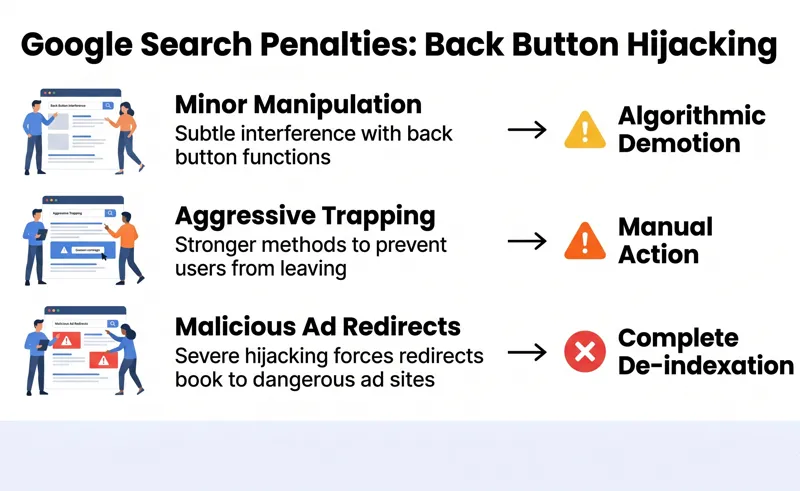
| Violation Type | Google’s Response | Impact on Traffic |
|---|---|---|
| Minor History Manipulation (Accidental) | Page-level algorithmic demotion | Moderate drop in specific keyword rankings |
| Aggressive Back Button Trapping | Domain-wide Manual Action | Severe loss of organic traffic across the site |
| Repeated Malicious Ad Redirects | Complete De-indexation | Total loss of Google Search visibility |
Identifying Website Malicious Practices
Site owners must thoroughly review their technical implementations immediately. Third-party advertising networks, aggressive pop-up managers, and poorly coded lead-generation overlays are often the primary culprits behind accidental browser navigation manipulation. To stay compliant, it is highly recommended to review the official documentation on what constitutes spam. You can read more directly via the Google Search Spam Policies.
Action Plan: How to Avoid Search Ranking Demotion
Auditing your site before the June 15 deadline is absolutely critical. You must ensure that no script on your website interferes with a user’s ability to navigate their browser history freely. This involves testing your website across different devices and monitoring how third-party plugins interact with the browser’s native features.
“Practices like back button hijacking undermine the basic user experience and break the expectations people have of how the web should work, so it’s understandable that Google views this as a harmful behaviour and is taking action.”
If your website is penalized, the road to recovery requires immediate action. You must completely strip the offending code or rogue advertising scripts from your infrastructure. Once you have verified that the back button functions normally, you must submit a detailed reconsideration request to Google, explaining how the issue was identified and the exact technical steps taken to resolve it permanently.
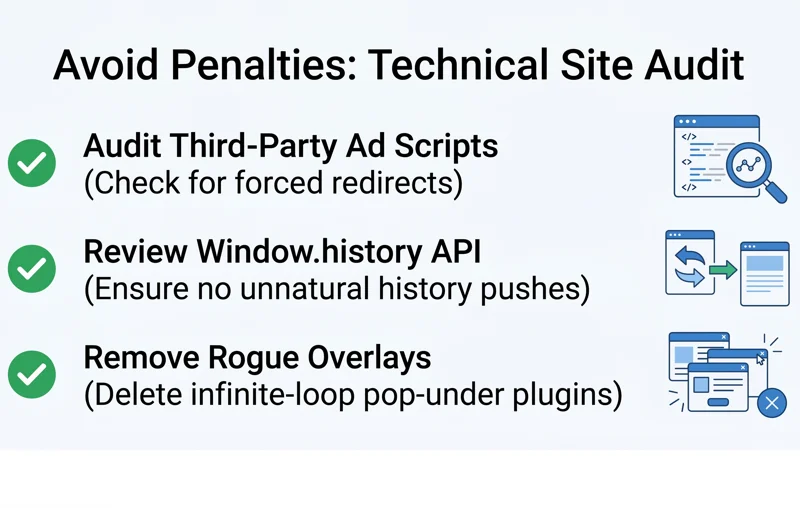
| Audit Area | What to Look For | Recommended Action |
|---|---|---|
| Third-Party Ad Scripts | Scripts forcing redirects upon clicking ‘Back’ | Remove the ad network or enforce strict script blocking |
| Window.history API usage | Unnatural pushes to the history state without user clicks | Refactor JavaScript to only trigger on genuine user intent |
| Pop-under/Overlay plugins | Overlays that trap the user in an infinite loop | Uninstall non-compliant plugins immediately |
Frequently Asked Questions (FAQs)
It is a deceptive practice where a website interferes with a browser’s functionality, preventing the back button from taking the user to their previous page, often trapping them on the current site instead.
When do these new Google Search penalties take effect?
Google will officially begin penalizing and down-ranking sites for this specific malicious practice starting on June 15.
You should manually test your site across multiple browsers. Click a link from a search engine to your site, then immediately click the browser’s back button. If you do not return to the search results, your site has an issue.
Can third-party ads cause a search ranking demotion?
Yes. As the site owner, you are responsible for all code executed on your domain. If a rogue ad network hijacks the back button, Google will penalize your site, not the ad network.
Is it possible to recover from these Google Search penalties?
Yes. If your site is penalized, you must identify and remove the manipulative code, ensure the site functions normally, and then submit a reconsideration request through Google Search Console.
Does this crackdown only apply to the Chrome browser?
No. While Google highlighted the Chrome user experience, this is a Google Search ranking update. If your site traps users on Safari, Firefox, or Edge, you will still face a search ranking demotion on Google.
How long does a reconsideration request take to process?
Reconsideration requests can take anywhere from a few days to several weeks to be reviewed by Google’s webspam team. It is crucial to fix the issue completely before submitting the request to avoid rejection.
Disclaimer: This article is for informational purposes only and does not constitute guaranteed SEO or legal advice. Website owners should consult Google’s official Webmaster Guidelines for the most up-to-date compliance requirements.