It is the update millions of people have been eagerly waiting for: google is now letting users in the us change their gmail address without having to start entirely from scratch. For nearly two decades, creating a Google account meant making a permanent commitment to a specific username. If you chose an embarrassing or unprofessional handle during your teenage years, your only option was to create a brand new account, meticulously forward all your old emails, and tragically leave behind years of accumulated data, Google Drive files, and digital purchases. In 2026, that frustrating era has finally come to an end.
The End of Permanent Usernames: Update Your Gmail Username Safely
This major shift in policy represents a fundamental change in how the tech giant manages user identities. Historically, Google’s infrastructure deeply tied a user’s primary email address to their core account ID, making seamless modifications nearly impossible. However, after successful limited testing in other global regions, the company has officially initiated a gradual rollout for the United States market.
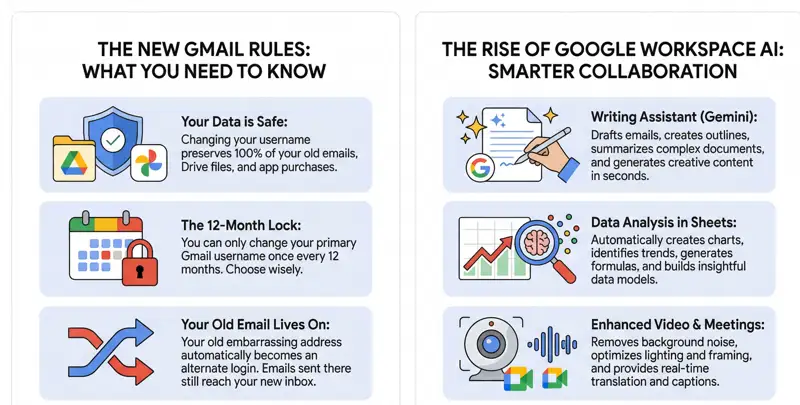
The beauty of this new feature is that you can update your professional identity while continuing to keep old Gmail messages perfectly intact. Your Google Photos, your saved YouTube playlists, your Google Play Store purchases, and your extensive Google Drive archives remain entirely unaffected by the transition. It is a strictly cosmetic change to your outward-facing digital identity, backed by a robust internal rerouting system.
“This highly anticipated update finally frees users from the permanence of outdated usernames while safely retaining years of essential digital history and purchased digital assets.”
How to Access Your Google Personal Info Settings
If you are ready to make the switch, the process has been designed to be as user-friendly as possible, though it is buried slightly deep within your account preferences. Because the feature is rolling out gradually across the US, you may need to check your settings periodically if the option is not immediately visible. When it does appear, it is handled entirely through your core Google personal info settings portal.
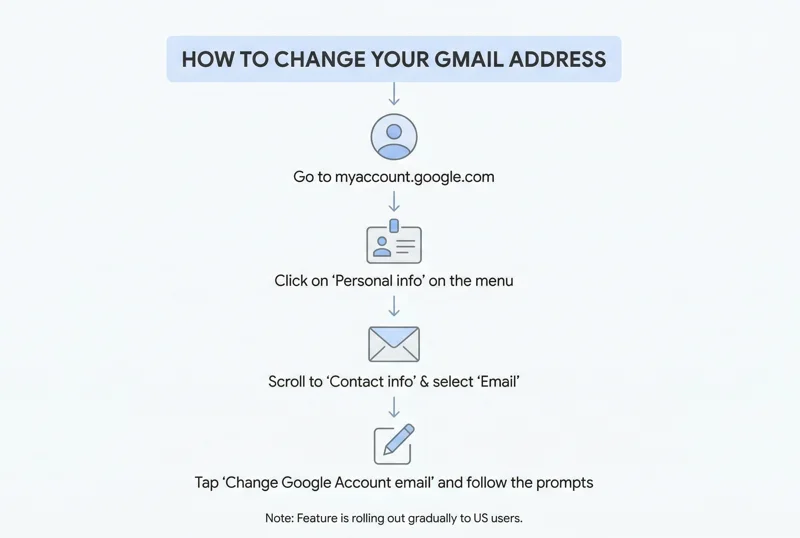
To begin, you will need to log into your account on a secure web browser. From there, you will navigate through a specific path to access the username modification tools. Below is a clear breakdown of the exact steps required to execute the change.
| Step Number | Action Required | Location / Menu |
|---|---|---|
| Step 1 | Log into your Google Account | myaccount.google.com |
| Step 2 | Navigate to personal details | Click on “Personal info” on the left sidebar |
| Step 3 | Access contact information | Scroll down to the “Contact info” section and click “Email” |
| Step 4 | Select your primary email | Click on “Google Account email” |
| Step 5 | Execute the change | Tap the new “Change Google Account email” button and follow the prompts |
Crucial Rules and the 12-Month Restriction
Before you rush to change your Google Account email, it is vital to understand the strict parameters Google has put in place to prevent abuse, spam, and system overload. The most important rule to remember is that this is not a feature you can use casually or frequently. Google restricts users to changing their username only once every 12 months. Furthermore, once you commit to a new username, you cannot delete that new email address during that same 12-month lock-in period.
Many users naturally worry about what will happen to emails sent to their previous address after the change is made. Fortunately, Google has engineered a brilliant failsafe. Your old email address will automatically convert into an alternate Google sign-in address. This means any messages sent to your old embarrassing handle will seamlessly arrive in your new, updated inbox. You will also retain the ability to log into Google services using either the old or the new address, ensuring you never find yourself locked out due to a forgotten new username.
| Policy / Feature | Google’s Official Stance |
|---|---|
| Change Frequency | Strictly limited to once every 12 months. |
| Data Retention | 100% preservation of Drive, Photos, Play, and old emails. |
| Old Email Status | Becomes a permanent alias; continues receiving mail. |
| Login Methods | Both the old and new usernames can be used to sign in. |
| Rollout Speed | Gradual rollout; not all US accounts have day-one access. |
For users who want to verify the technical details or troubleshoot any issues during the rollout phase, it is always recommended to consult the official documentation found within the Google Account Help Center.
Frequently Asked Questions
Will I lose my old emails if I change my Gmail address?
No, absolutely not. Google preserves all of your old emails, and any new messages sent to your old address will be automatically forwarded to your new inbox.
How often can I change my Google Account username?
Google currently restricts users from changing their primary Gmail username to only once every 12 months to prevent system abuse.
Can I still log in with my old email address?
Yes. Your old email address will serve as an alternate sign-in address, meaning you can use either your old or new username to access your account.
Will changing my email delete my Google Drive files or Photos?
No. Changing your email address only updates your username. All data, including Drive files, Photos, YouTube history, and purchases, remain perfectly intact.
Google has stated that this feature is rolling out gradually. It may take several weeks for the option to propagate to all eligible user accounts across the country.
Does it cost money to change my Gmail address?
No, changing your primary Gmail username is a completely free feature provided within your standard Google Account settings.
Can I change my email address back to the old one if I don’t like the new one?
Because of the 12-month restriction, you cannot immediately revert to your old primary address. You must wait a full year before making another modification to your primary username.
Disclaimer: This article is for informational purposes only. Features, rollout timelines, and account settings are subject to change by Google at any time.