The highly anticipated Fitbit 4.69 update has officially landed, bringing massive changes to the platform.
Google has rolled out version 4.69 of Fitbit for Android, serving as the final major update before the monumental Google Health rebrand. Users updating their devices are immediately greeted with a clear message: “The Fitbit app is becoming the Google Health app.”
This transition marks a significant shift in the wearable tech ecosystem. Along with a preview of the new app icon, the Fitbit 4.69 update introduces a redesigned interface that places the Fitbit Air front and center.
Introduction to Fitbit 4.69 and The Big Rebrand
The most shocking aspect of the Fitbit 4.69 update is how blatantly it signals the end of the traditional Fitbit app era. Google is heavily pushing its unified health ecosystem.
For years, users have relied on the classic interface, but Fitbit 4.69 prepares everyone for the inevitable shift. The branding is changing, and so is the core user experience.
The Fitbit app is becoming the Google Health app, marking a new era for Android users with the Fitbit 4.69 rollout.
Health enthusiasts need to adapt to these sweeping changes. The introduction of the new app icon is just the beginning of what Google Health will eventually offer to wearable tech fans.
Fitbit 4.69 Focus Stats Redesign: What Is New?
One of the best upgrades in Fitbit 4.69 is the focus stats redesign. You now have a larger set of selectable metrics right on your dashboard.
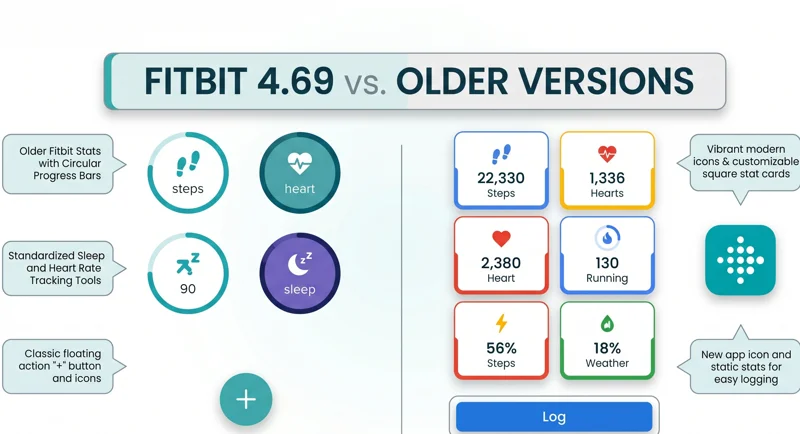
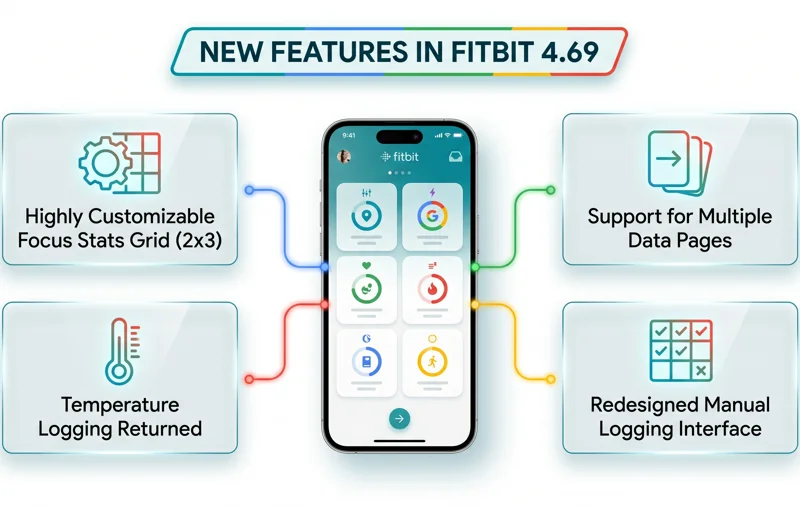
Users can finally remove the large circular Steps or Cardio load widgets. In their place, you can opt for a dense 2×3 grid layout, which is perfect for data lovers.
Furthermore, Fitbit 4.69 gives you the ability to have more than one page for your focus stats. This means you can swipe through different dashboards tailored to your morning workout or evening recovery.
Similarly, you can customize “Key metrics” in the Health tab. This new two-wide grid makes use of large square cards, making it much easier to read your data at a glance.
| Feature | Older Versions | Fitbit 4.69 |
|---|---|---|
| App Branding | Fitbit | Transitioning to Google Health |
| Focus Stats | Standard circles | Dense 2×3 grid option |
| Data Pages | Single page limit | Multiple pages available |
How Fitbit 4.69 Changes Manual Health Logging
Manual health logging has also seen a total revamp in the Fitbit 4.69 update. Instead of the traditional Floating Action Button (FAB) for non-Premium users, the design has shifted.
You now get a dedicated “Log” button located directly beneath the focus stats. Tapping this button slides up the “Log manually” sheet.
This sheet has been completely redesigned with a modern, grid-like interface. It is faster and more intuitive to use than ever before.
Temperature logging has surprisingly returned to the app in Fitbit 4.69. This is a massive win for users tracking their core metrics or utilizing cycle tracking features.
For Fitbit Premium subscribers, the logging experience is even better. You can now log your meals or activities with the Health Coach simply by using an image.
Feature Removals in the Fitbit 4.69 Update
Not every change in Fitbit 4.69 is an addition; some features have been permanently removed. Google is streamlining the app for the Google Health transition.
On the widgets front, your choices have been severely restricted. Your only choice now is the basic “Steps Widget.”
With Fitbit 4.69, customization is king for in-app stats, but the removal of classic home screen widgets leaves some users seeking alternatives.
If you relied on multiple specialized widgets on your Android home screen, you will need to adjust your workflow. This change has frustrated some long-time users.
Additionally, Fitbit 4.69 has completely removed the long-press app shortcuts. You can no longer press and hold the app icon to jump straight into specific logging menus.
Is Fitbit 4.69 Worth the Upgrade?
Despite the missing features, updating to Fitbit 4.69 is essential. It ensures your device remains compatible with Google’s evolving ecosystem.
The visual improvements to the focus stats and the refined logging experience outweigh the loss of shortcuts. It is a much cleaner interface overall.
To get the update, simply head over to the official Google Play Store and check for available downloads.
| Logging Feature | Fitbit 4.69 Updates |
|---|---|
| Action Button | Replaced by a static “Log” button |
| Temperature Tracking | Returned to the manual logging sheet |
| Premium Features | Image logging with Health Coach |
Frequently Asked Questions about Fitbit 4.69
What is the main change in the Fitbit 4.69 update?
The main change is the visual and structural transition of the app to prepare for the upcoming Google Health rebrand, alongside a major redesign of the focus stats.
Can I still use the old widgets in Fitbit 4.69?
No, the Fitbit 4.69 update removes most older widgets. Your only option now is the standard Steps Widget on your Android home screen.
How do I access manual health logging in Fitbit 4.69?
You can access it by tapping the new “Log” button located right below your redesigned focus stats grid.
Is temperature logging available in Fitbit 4.69?
Yes! The update has officially brought back temperature logging to the manual log sheet for all users.
What happened to the long-press app shortcuts in Fitbit 4.69?
Google has completely removed the long-press app shortcuts from the Android icon in this version to streamline the application.
What exclusive feature do Premium users get in Fitbit 4.69?
Premium subscribers can now log data using the Health Coach by simply uploading or taking an image.
When does the Fitbit app officially become Google Health?
While Fitbit 4.69 gives a preview and states the change is happening, Google has not announced the exact date for the final name and icon swap.
Disclaimer: This article is for informational purposes only. Features and updates regarding Fitbit 4.69 and Google Health are subject to change based on Google’s official software rollout schedules.