android passkey password transfer capabilities have finally arrived, transforming how mobile users migrate sensitive vault data in 2026.
For years, transitioning between digital credential managers was a frustrating, manual chore that involved exporting vulnerable files.
Furthermore, modern cryptographic passkeys lacked any native migration path, forcing users to recreate authentication credentials across dozens of websites.
Google has officially solved these security hurdles by introducing a robust, operating system-backed transfer framework built right into mobile core services.
Simplifying android passkey password transfer Workflows
Historically, moving encrypted vaults between competing apps required downloading credentials into an unencrypted plain text file.
Leaving sensitive passwords exposed inside plain text documents created massive security risks on personal smartphones and tablets.
With the new android passkey password transfer rollout, the operating system securely mediates the entire migration process behind the scenes.
Users no longer need to worry about intercepted text files or manual copy-pasting errors during app transitions.
“Android now offers a system-level way to transfer passwords and passkeys between credential managers securely.”
You can review detailed Android developer specifications on credential handling by visiting the Official Android Developers Portal.
This OS-level coordination ensures that biometric authentication gates every single byte of data moving between vaults.
Step-by-Step Guide for android passkey password transfer
Executing an android passkey password transfer takes only a few seconds thanks to an intuitive three-step automated wizard.
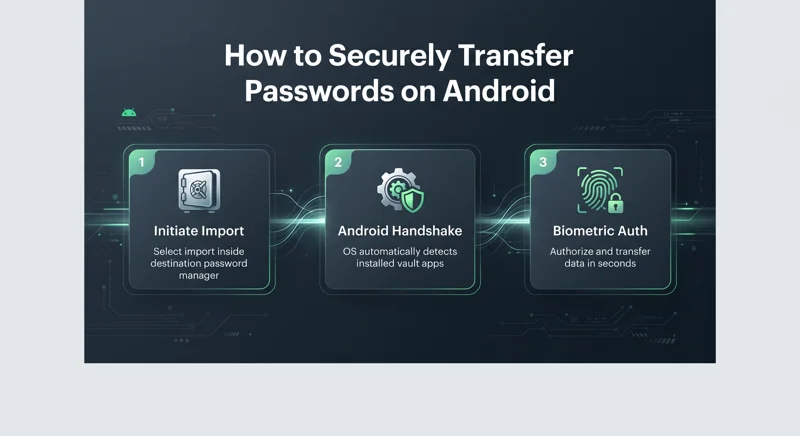
First, open your new destination password manager app and select the import or copy option from another provider.
Second, the destination app hands off the request to Android, which automatically detects all compatible vault apps installed on your device.
Third, once you authorize the prompt, Android executes the secure exchange instantly without exposing data to third parties.
| Migration Stage | Action Required | Security Verification |
|---|---|---|
| Step 1: Initiation | Select import inside new password app | App triggers system Credential Manager API |
| Step 2: Detection | Android detects installed vault providers | Operating system lists valid source apps |
| Step 3: Authorization | Tap Continue and confirm biometrics | Encrypted pipe transfers records in seconds |
Ecosystem Support for android passkey password transfer
A seamless android passkey password transfer experience requires close collaboration across the password management industry.
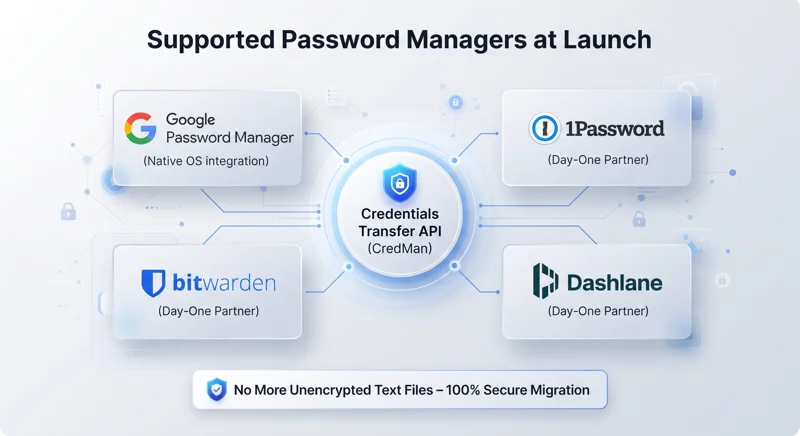
At launch, prominent credential providers have updated their platforms to support the underlying Credentials Transfer API.
This ensures cross-app compatibility right out of the box for millions of daily active mobile subscribers.
Users can freely migrate between ecosystems without fearing lock-in or data formatting incompatibilities.
“At launch, the transfer experience is supported by Google Password Manager, 1Password, Bitwarden, and Dashlane.”
As more developers adopt the protocol, moving secure records will become as frictionless as transferring files between folders.
| Password Manager | Support Status | API Integration |
|---|---|---|
| Google Password Manager | Fully Supported | Native OS Credential Manager API |
| 1Password | Day-One Partner | Credentials Transfer API |
| Bitwarden Password Manager | Day-One Partner | Credentials Transfer API |
| Dashlane | Day-One Partner | Credentials Transfer API |
Future Security Benefits of android passkey password transfer
Implementing a unified android passkey password transfer framework marks a monumental shift toward safer digital habits.
Because passkeys rely on complex public-key cryptography, manual recreation was tedious and discouraged everyday users from adopting them.
Now, users can embrace phishing-resistant passkeys knowing they can migrate their security credentials effortlessly whenever they change apps.
Google’s framework sets a new gold standard for mobile OS security and consumer data portability.
Frequently Asked Questions
What is android passkey password transfer?
It is a new system-level feature on Android that lets users securely transfer passwords and passkeys between different password manager apps without using unencrypted text files.
Why were previous password transfers considered risky?
Previously, users had to export credentials into unencrypted plain text files, leaving sensitive login data completely unprotected on their local device storage.
How do I initiate an android passkey password transfer?
Open your new password manager app, select the import or copy option from another provider, and let Android handle the automated secure handover.
Which password manager apps support this feature at launch?
Google Password Manager, 1Password, Bitwarden Password Manager, and Dashlane fully support the transfer experience at launch.
Can I transfer cryptographic passkeys as well as traditional passwords?
Yes! Unlike past methods that only handled text strings, this system successfully migrates modern passkeys without requiring manual website recreation.
Do I need root access or special developer tools to use this?
No. The feature is built directly into Android’s core Credential Manager API and is available automatically to all standard users.
How does Android protect my data during the transfer process?
Android uses operating system-backed encryption and requires user biometric authorization before moving credentials between vaults in seconds.
Disclaimer: This article is for informational purposes only and is based on official Google operating system updates. Credential availability and app-specific feature rollouts may vary depending on device software versions.