If you have recently received a text message from 456 tmobile, you are likely wondering whether it is a legitimate communication from your wireless carrier or the beginning of a sophisticated scam. In today’s digital landscape, where cybercriminals constantly invent new ways to compromise personal data, questioning unexpected messages is your best line of defense. The short answer is yes: the 456 short code is an official, verified channel used by T-Mobile to communicate critical account alerts, security updates, and verification codes to its subscribers. However, the legitimacy of the sender does not mean that every interaction surrounding that message is safe. Because consumers trust this specific code, fraudsters frequently exploit it to steal your credentials.
Understanding exactly how your carrier communicates with you is the cornerstone of mobile security. This comprehensive guide will decode everything you need to know about the 456 short code. We will explore why you are getting these messages, the types of alerts you can expect, how scammers try to use these official texts against you, and the actionable steps you can take to safeguard your account against unauthorized access.
Decoding the Source: What is the 456 Number?
When an unfamiliar string of digits pops up on your screen, it is natural to be suspicious. Many users immediately search online to find out what the 456 number is and why it bypasses standard ten-digit caller ID. Short codes are specialized, abbreviated phone numbers—usually five or six digits, though sometimes shorter, like three digits—that businesses and mobile carriers use to send high-volume text messages. They are highly regulated and strictly leased to specific organizations.
So, is 456 tmobile actually verified? Yes. It is officially registered and operated by T-Mobile. Unlike standard promotional numbers that blast you with marketing offers, the phone number 456 is typically reserved for transactional and operational communications. This means that when you get a message from this code, it is almost always directly related to your account status, a recent change, or an action required on your part.
Does T Mobile Text from 456? Understanding the 456 Text Message
One of the most common questions on carrier forums is, “does t mobile text from 456 directly?” The answer is a definitive yes. A 456 short code text message is generated by the carrier’s automated systems. Human customer service representatives do not sit at a desk typing these messages out; instead, they are triggered by specific events within T-Mobile’s backend infrastructure.
When an event occurs—such as a password reset request, a change in your billing address, or a modification to your SIM card—the system automatically dispatches a 456 text message to your device to ensure you are aware of the change. This provides an immediate layer of transparency and security, giving you the opportunity to stop unauthorized changes in their tracks if you were not the one who initiated them.
The Anatomy of a 456 Text Code and Legitimate Alerts
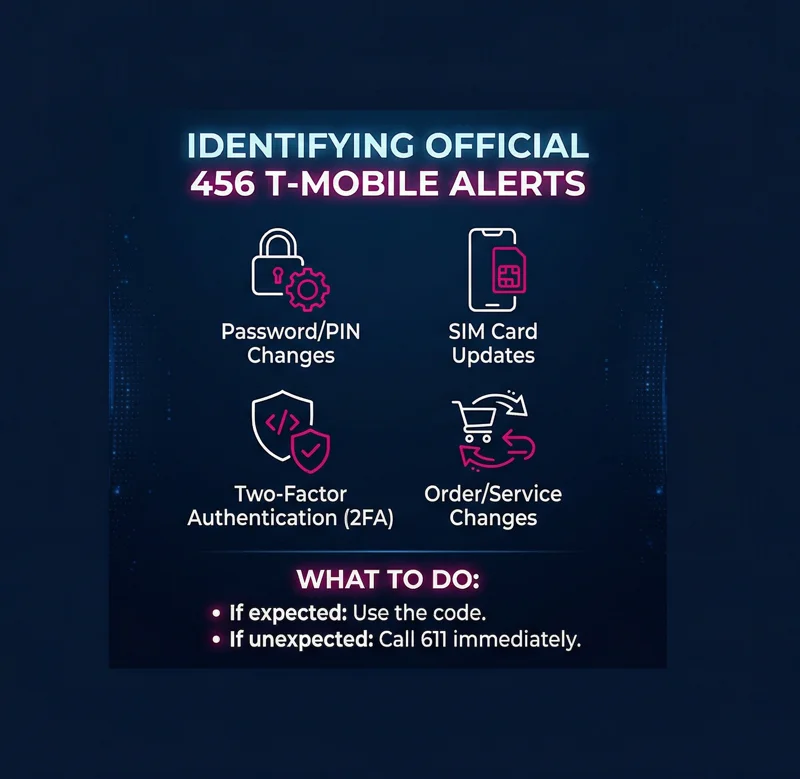
To help you better identify what is normal and what is not, let’s break down the typical reasons you might receive a 456 text message t mobile. These messages are designed to be brief, clear, and actionable. Below is a detailed look at the legitimate alerts you might encounter.
| Type of Alert | Description of the 456 Text Message | Required Action |
|---|---|---|
| Account Security Updates | Notifies you of a PIN, password, or security question change. | If you made the change, do nothing. If not, contact support immediately. |
| SIM Card Modifications | Alerts you that your SIM card has been updated or swapped. | Critical alert. A frequent indicator of a SIM swap scam if uninitiated. |
| Verification Codes (OTP) | A One-Time Password or 456 text code for login verification. | Input the code into the official site/app. Never share it over the phone. |
| Line/Number Status | Updates on a line cancellation, number porting, or status change. | Review the alert to ensure your lines are secure and intact. |
| T-Mobile DIGITS | Verification numbers used for managing the DIGITS multi-line service. | Use the code to log into the DIGITS application securely. |
As you can see, a 456 t mobile text message is primarily focused on administrative and security functions. If you receive one of these messages out of the blue, it demands your immediate attention.
The Dark Side: Scams Targeting the 456 Incoming Text
Because the short code is an official and trusted source, cybercriminals have designed elaborate schemes to leverage that trust. It is crucial to understand that the 456 incoming text itself is not fake, nor is the T-Mobile system hacked. Instead, the scammers are manipulating you into giving them the keys to your account. This is a classic form of social engineering.
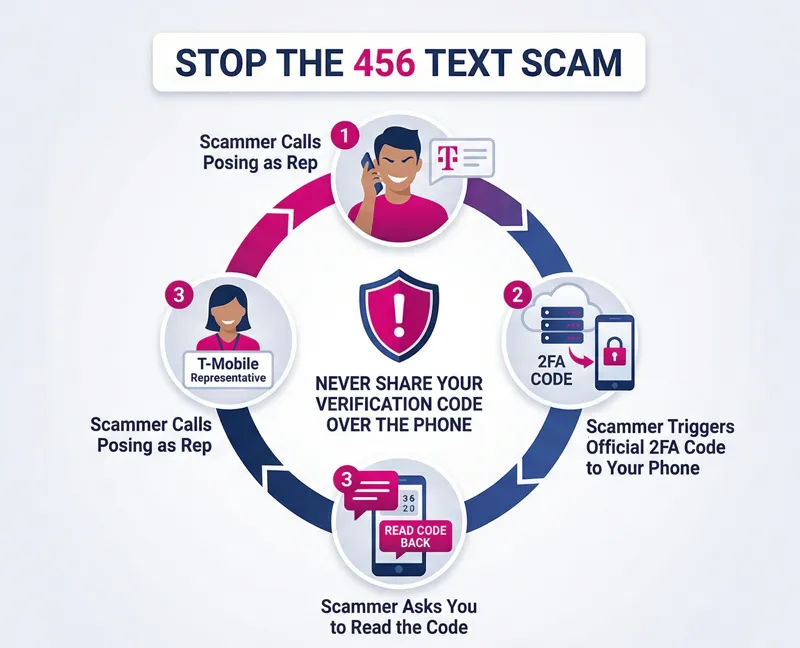
Here is how a typical attack involving an incoming text 456 operates:
First, the fraudster gathers some basic information about you, such as your phone number and perhaps your name. They then call your device, spoofing the caller ID to make it look like they are calling from T-Mobile Customer Support. They will invent an urgent scenario—perhaps claiming there is fraudulent activity on your account, an overdue balance, or an exclusive promotional upgrade.
While they have you on the phone and in a state of panic or excitement, the scammer opens the official T-Mobile website and clicks “Forgot Password” or attempts to log in using your phone number. The carrier’s security system does exactly what it is supposed to do: it sends a 456 incoming text t mobile to your device containing a verification code to prove you are the one trying to log in.
The scammer will then tell you something along the lines of, “To verify your identity and secure your account, I have just sent a secure code to your phone. Please read that code back to me.”
Remember: T-Mobile will NEVER call you and ask you to read a verification code back to them. Those codes are for your eyes only.
If you read the code aloud, the scammer types it into the website, gains full access to your account, changes your password, and effectively locks you out. From there, they can purchase expensive devices billed to your account, or worse, initiate a SIM swap to intercept your bank text messages and two-factor authentication codes.
How to Secure Your Account When You See a 456 Tmobile Text
Handling a 456 tmobile text correctly is your primary defense against account takeover. Whenever you receive a 456 text, you should pause and evaluate the context. Did you just try to log in? Did you just call customer service yourself? If the answer is yes, the message is expected and safe to use.
If the message arrives completely unprompted, you must treat it as a red flag. Do not reply to the message—short codes like this are unmonitored and automated, meaning replying “STOP” or asking questions will not connect you to a human. Instead, you need to verify the status of your account independently.
For official guidance on protecting yourself from these types of fraud, we highly recommend reading T-Mobile’s official scam protection resources. Educating yourself on current phishing trends is a proactive step toward digital safety.
Action Plan: Legitimate vs. Suspicious Texts
To make it incredibly clear how you should react in different situations involving this number, we have prepared the following quick-reference table.
| Scenario | Is it Legitimate? | What You Should Do |
|---|---|---|
| You are logging into the T-Mobile app and a 456 text arrives with a code. | Yes. This is standard Two-Factor Authentication (2FA). | Enter the code into the app. Do not share it elsewhere. |
| You receive a 456 code while a “representative” is on the phone asking for it. | The code is real, but the caller is a scammer. | Hang up immediately. Do not read the code. Call 611 from your phone to report it. |
| You wake up to a 456 message saying your SIM or Password was changed. | The alert is real; the change is likely fraudulent. | Contact T-Mobile fraud department urgently. Your account may be compromised. |
| You receive a text from a full 10-digit number claiming to be 456 support with a link. | No. This is a spoofing phishing attempt. | Do not click the link. Forward the message to 7726 (SPAM) to report it. |
By following these guidelines, you can ensure that the security measures put in place by your carrier actually work to protect you, rather than being used as a weapon against you.
Frequently Asked Questions
What is the 456 number t mobile uses?
The 456 number is a verified, automated SMS short code utilized by T-Mobile to send crucial security alerts, account updates, and verification codes directly to its customers.
I received a 456 text message tmobile alert about a password change, but I didn’t make one. What should I do?
This means someone is attempting to access your account. Do not ignore it. Dial 611 from your T-Mobile phone immediately to speak with customer care and secure your account.
Can I reply to a 456 t mobile message?
No. The 456 short code is a one-way communication channel. Replying to it will not reach a customer service agent and will likely result in an automated error message.
Is it possible for scammers to spoof the phone number 456?
While scammers can occasionally spoof short codes, the more common tactic is triggering the real T-Mobile system to send you a genuine code, which they then try to trick you into revealing over a phone call.
Will T-Mobile ever ask for the code sent in a 456 text?
No. Official representatives will never call you and ask you to verbally provide a verification code. These codes are strictly for you to enter into the official website or app.
How can I stop receiving 456 messages?
Because these messages are tied to essential account security (like Two-Factor Authentication) and administrative alerts, you generally cannot opt out of them without compromising your account’s safety.
What is a SIM swap, and how does the 456 code relate to it?
A SIM swap is when a scammer transfers your phone number to their device. You will typically receive a final 456 alert notifying you of a SIM change right before your phone loses service. If this happens unprompted, it is a severe security emergency.
Disclaimer: This article is for educational and informational purposes only. It is not affiliated with, sponsored by, or endorsed by T-Mobile or any of its subsidiaries. For official account support, security concerns, or to verify any alerts you receive, please contact your mobile carrier directly through their official channels or by dialing 611 from your mobile device.