Native Apple CarPlay messaging has officially entered a new era in 2026, moving far beyond the rudimentary voice command interfaces of the past. For years, millions of drivers who rely on WhatsApp for daily communication have been restricted by an integration that felt more like a bolted-on afterthought rather than a seamless automotive experience. If you wanted to send a message, you had to invoke the virtual assistant. If you wanted to check who messaged you, you had to wait for the assistant to read notifications aloud. Today, however, Meta is completely changing the landscape by introducing a fully dedicated, native interface for Apple’s in-car infotainment system.
The Evolution of In-Car Communication
To truly appreciate the magnitude of this update, we must look at how in-car messaging has functioned over the last decade. Historically, Apple has maintained strict guidelines regarding what applications can display on a vehicle’s dashboard. The primary goal has always been driver safety, minimizing visual elements that could distract the driver from the road. Because of these stringent rules, WhatsApp—despite being the world’s most popular messaging platform—was relegated to utilizing Siri’s API for basic, voice-only interactions.
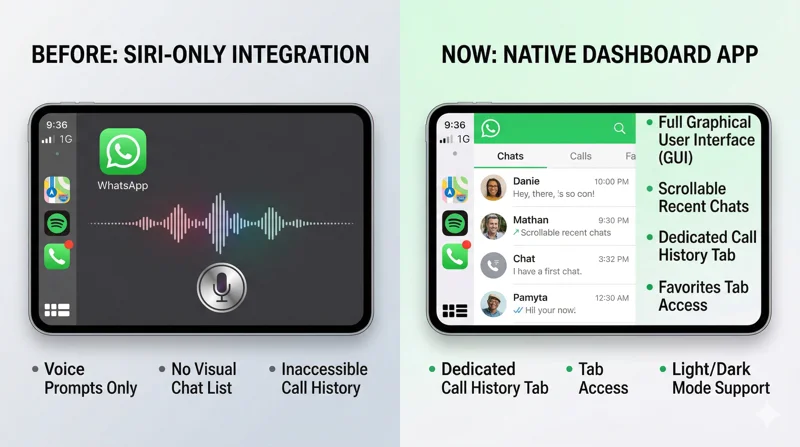
Tapping the WhatsApp icon on your dashboard would simply trigger the voice assistant, asking who you wanted to message or call. You could not browse your contacts, you could not see your recent chats, and you certainly could not navigate through your call history. While this hands-free approach ticked the boxes for safety compliance, it severely limited functionality and user experience. With the latest beta build available via TestFlight, WhatsApp is finally delivering a highly anticipated solution that balances utility with road safety protocols.
“The introduction of a native interface for WhatsApp on CarPlay represents a paradigm shift in how drivers stay connected without compromising safety or user experience.”
Moving Beyond Basic Siri Voice Commands
The new native interface acts as a standalone dashboard application that mirrors the core functionalities of the smartphone app, optimized heavily for a quick-glance environment. When users launch WhatsApp from their vehicle’s system launcher, they are no longer greeted by a blank screen and a voice prompt. Instead, they are presented with a thoughtfully designed graphical user interface that offers immediate context to their communications. This interface natively supports both light and dark modes, seamlessly adapting to the vehicle’s ambient light sensors or the driver’s system preferences to reduce eye strain during night driving.
| Feature | Previous Siri Integration | New Native CarPlay App (2026) |
|---|---|---|
| Visual Interface | None (Voice Prompt Only) | Full Dashboard UI (Light/Dark Mode) |
| Recent Chats | Inaccessible | Scrollable List (Last 20-25 days) |
| Call History | Inaccessible | Dedicated Tab (Incoming/Outgoing/Missed) |
| Contact Details | Audio Only | Visual Profiles & Icons |
Core Features of the WhatsApp CarPlay Dashboard
The architecture of the new application is built around simplicity and speed. The development team at Meta has categorized the most essential driving interactions into three distinct, easily navigable tabs. This multi-tab approach ensures that drivers spend less time tapping on their screens and more time focusing on their surroundings.
1. The Recent Chat List: Visual but Safe
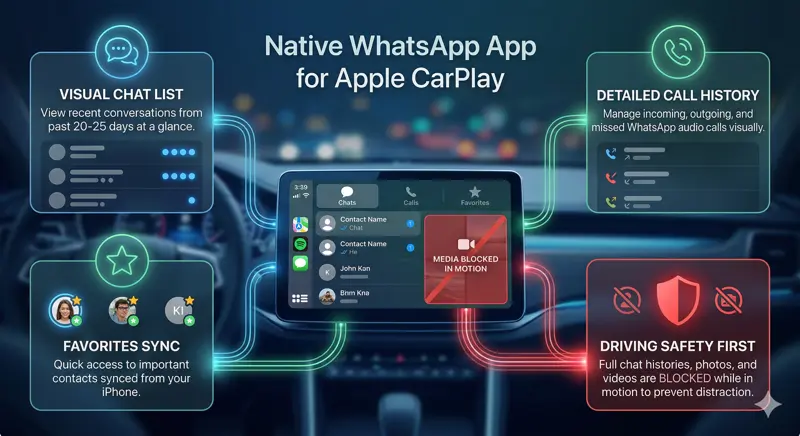
The moment the application is opened, the default screen is the “Chats” tab. This screen displays a chronological list of recent conversations, typically covering interactions from the past 20 to 25 days. The list is designed with large, easily readable text and prominent profile pictures, allowing drivers to quickly identify who they have been speaking with. Important UI indicators, such as a blue dot for unread messages or specific icons for pinned and muted chats, are clearly visible.
Crucially, tapping on a conversation does not open the chat history. Meta has wisely adhered to safety regulations to prevent drivers from reading long threads of text while driving. Instead, selecting a contact from the chat list brings up their profile information and presents straightforward options to either initiate a voice call or send a new message via dictation. If you need to message someone not on your recent list, a persistent “New Message” button sits at the top of the interface.
2. Call History and Management
Audio calls represent a massive portion of WhatsApp’s daily usage, especially for commuters. The second tab in the new interface is entirely dedicated to Call History. Previously, missing a WhatsApp call while driving meant you had to pull out your phone to see who it was. Now, drivers have a clean, organized ledger of their audio interactions.
| Call Type | Visual Indicator | Action Available |
|---|---|---|
| Incoming Calls | Green Arrow Pointing Down | One-tap Return Call |
| Outgoing Calls | Green Arrow Pointing Up | One-tap Redial |
| Missed Calls | Red Arrow / Highlighted Text | One-tap Return Call |
This tab displays the contact’s name, profile icon, and the date and time of the call. Returning a missed call is now a single-tap action, drastically reducing the cognitive load on the driver. For initiating new calls to individuals not in the recent history, a designated button allows the driver to trigger the voice assistant to search their full address book.
3. The Favorites Tab for Quick Access
Recognizing that most users communicate heavily with a small, select group of people, the third tab is dedicated to “Favorites.” These contacts are managed and selected within the main iOS application on the smartphone. By pulling these favorites into a dedicated CarPlay tab, drivers have instantaneous access to their spouse, family members, or key colleagues. This minimizes scrolling and searching, which is exactly the kind of streamlined user experience expected from modern automotive software.
Prioritizing Safety: What You Can and Cannot Do
It is vital to understand that while this update provides a visual interface, it is not a complete mirror of the smartphone app. The design philosophy is deeply rooted in minimizing driver distraction. Automotive safety experts have long warned about the dangers of complex infotainment systems. In response, Meta has intentionally restricted certain functionalities.
“Distraction-free driving remains the ultimate priority; hence, full chat histories and media viewing are intentionally locked out while the vehicle is in motion.”
Users cannot scroll through historical messages, view photos, watch videos, or listen to complex audio notes through a visual player while driving. The interface acts as a launchpad for communication rather than a consumption platform. When the driver is safely parked and off the road, they can pick up their smartphone to access the full, unrestricted chat history and media files. This careful balance ensures the app remains a tool for connectivity rather than a dangerous distraction.
How to Get the WhatsApp iOS Beta via TestFlight
As of right now, this revolutionary update is not available to the general public on the standard App Store. It is currently in a rollout phase exclusively for registered beta testers. If you want to experience the native interface early, you must be enrolled in the WhatsApp beta program via Apple’s TestFlight platform.
TestFlight allows developers to distribute pre-release builds of their applications to a limited pool of users for real-world testing and feedback. To join, users typically need to find an open invite link provided by WhatsApp, download the TestFlight app, and install the beta profile. However, it is worth noting that WhatsApp’s iOS beta slots are highly coveted and frequently full. Those lucky enough to be in the program are actively providing telemetry and bug reports to Meta.
| Testing Phase | Platform | Availability |
|---|---|---|
| Alpha/Internal | Meta Campus | Closed (Employees Only) |
| Public Beta | iOS TestFlight | Limited Slots (Currently Active) |
| General Release | Apple App Store | Coming Weeks/Months |
Because the software is still in beta, testers might encounter occasional bugs, interface glitches, or performance drops. Features may be tweaked, added, or removed entirely based on the data collected during this phase. You can track the progress and latest updates regarding this beta release through trusted ecosystem monitors like WABetaInfo.
The Future of WhatsApp in the Apple Ecosystem
This development is part of a much broader strategy by Meta to untether WhatsApp from the smartphone and expand it across multiple hardware ecosystems. Over the past few years, we have seen the platform launch dedicated, optimized applications for Mac, Windows, iPad, and various smartwatches, including official support for Garmin devices. The automotive space was the final, critical frontier. By establishing a native presence on the dashboard, WhatsApp is ensuring that its users remain seamlessly connected regardless of the device they are using or the environment they are in.
As we move further into 2026, the expectations for in-car software are higher than ever. Users demand fluid, intuitive, and visually appealing applications that integrate perfectly with their daily lives. The transition from a clunky voice-only integration to a fully-fledged dashboard application is not just an update; it is a fundamental upgrade to the daily commute of millions. We eagerly anticipate the stable public release of this feature on the App Store in the coming weeks.
Frequently Asked Questions (FAQ)
What is the biggest change in the new WhatsApp CarPlay update?
The biggest change is the shift from a voice-only interface to a fully visual, native dashboard application that includes a chat list, call history, and a favorites tab.
Can I read my past WhatsApp messages on the car screen?
No. To prevent driver distraction and maintain safety standards, you cannot open specific conversations to read the full text history while using the dashboard interface.
How do I know if I have unread messages in the new app?
The native interface features a visual filter and displays a prominent blue dot next to chats that contain unread messages, allowing for quick, at-a-glance identification.
Is the new native app available for everyone right now?
Not yet. The native app is currently in a limited rollout phase and is only available to registered iOS beta testers utilizing the TestFlight application.
Does the CarPlay interface support Dark Mode?
Yes, the new native dashboard application fully supports both light and dark modes, seamlessly integrating with your vehicle’s system settings.
Can I make a call to someone who is not in my recent call history?
Yes. While the call history tab shows recent interactions, you can tap a dedicated button at the top of the interface to invoke the voice assistant and call any contact in your address book.
Will Android Auto get a similar update soon?
While this specific TestFlight beta is for Apple ecosystems, Meta traditionally maintains feature parity across platforms, so a similar native experience for Android Auto is highly anticipated.
Disclaimer: This article is for informational purposes only…