It is becoming increasingly clear in 2026 that the macbook pro for linux users both copies and contrasts with apple in ways that are shaking up the premium laptop market. For years, developers and open-source enthusiasts have longed for a machine that pairs the flawless build quality of a flagship Apple device with the freedom of a fully modular, user-repairable system. Enter the new Framework Laptop 13 Pro. Described directly by Framework CEO Nirav Patel as the ultimate machine for Linux enthusiasts, this device manages to bridge the gap between high-end aesthetics and extreme hardware flexibility. Not only does it look the part, but it boldly claims to beat the 14-inch M5 MacBook Pro in raw battery life.
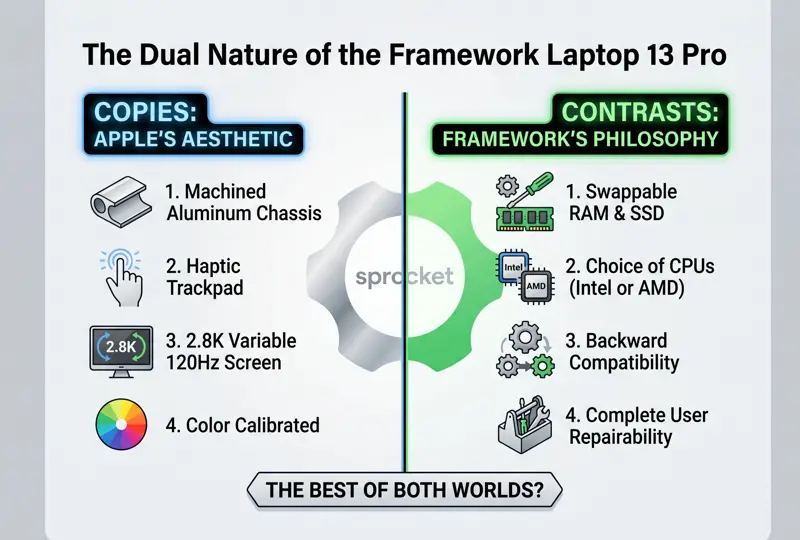
The Apple Aesthetic: Premium Fit and Finish
Historically, the price you paid for a modular, repairable laptop was a thick, plastic chassis that felt severely dated compared to modern ultrabooks. The Framework Laptop 13 Pro completely shatters that compromise. The company has aggressively copied some of Apple’s most beloved hardware features, transitioning from utilitarian designs to a fully premium experience.
This is the company’s first laptop to be fully machined out of solid blocks of 6000-series aluminum. It introduces a high-end haptic trackpad—a feature Apple has dominated for a decade—and boasts a stunning, fully custom 13.5-inch IPS display. This screen features a 3:2 aspect ratio, a crisp 2.8K resolution, and a variable refresh rate ranging from 30Hz to 120Hz. Furthermore, it comes color-calibrated right out of the box. Available in silver and a striking new anodized black, it genuinely feels like a device engineered in Cupertino.
“The Framework Laptop 13 Pro achieves the impossible: delivering a sleek, aluminum chassis and a haptic trackpad without sacrificing a single ounce of its signature modularity.”
| Display Feature | Framework Laptop 13 Pro | Industry Standard (Premium) |
|---|---|---|
| Resolution | 2.8K Custom IPS | Varies (Usually 2K – 3K) |
| Refresh Rate | Variable 30Hz – 120Hz | Variable up to 120Hz |
| Aspect Ratio | 3:2 (Productivity focused) | 16:10 or 16:9 |
The Anti-Apple Philosophy: Complete Repairability
While the exterior screams Apple, the underlying philosophy could not be more different. MacBooks are notoriously locked down; if you want more RAM or storage, you must pay exorbitant fees at the point of purchase, and if a component fails out of warranty, you are often looking at a total device replacement. The Framework 13 Pro represents a radical departure from this closed ecosystem.
Every single component in the Framework 13 Pro is designed to be accessible, repairable, and upgradable. Users can effortlessly swap out their RAM (including support for the new LPCAMM standard) and upgrade their SSDs in minutes. More impressively, the mainboard itself is modular. You can configure the Laptop 13 Pro with the latest Intel Core Ultra Series 3 processors, or, if you prefer a different architecture, you can opt for last year’s AMD Ryzen AI 300 boards.
“While the industry pushes consumers toward disposable electronics, Framework proves that a beautiful, premium machine can still belong entirely to the user who bought it.”
| Hardware Component | Apple MacBook Pro Strategy | Framework 13 Pro Strategy |
|---|---|---|
| Memory (RAM) | Soldered, non-upgradable | User swappable / Upgradable |
| Storage (SSD) | Soldered, non-upgradable | Standard NVMe, user swappable |
| Processor (CPU) | Integrated SoC, fixed | Modular Mainboard, swappable |
Backward Compatibility and Seamless Upgrades
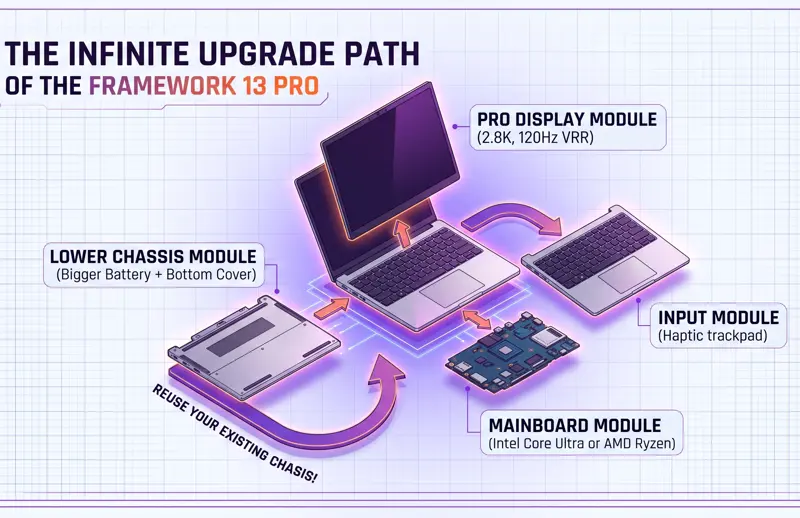
Perhaps the most pro-consumer aspect of the Framework Laptop 13 Pro is its backward compatibility. If you already own an older Framework Laptop 13, you do not need to buy a whole new machine to get the “Pro” experience. Because the Laptop 13 Pro shares the same dimensions (including the 15.85mm thickness, though it weighs slightly more at 1.4kg vs 1.3kg), older chassis can accept the new parts.
You can buy the new high-resolution 120Hz display and drop it into your old laptop. You can upgrade just the keyboard and haptic trackpad. You can even buy the new bottom cover and the larger battery to extend your old machine’s life. This piecemeal upgrade path is unprecedented in the premium ultrabook space. To see the full range of modular components, you can visit the Framework Official Website.
| Upgrade Path | Description |
|---|---|
| Full System Purchase | Buy the completely assembled Framework 13 Pro with the new aluminum chassis. |
| Mainboard Swap | Drop a new Intel Core Ultra Series 3 or AMD Ryzen board into an older Framework shell. |
| A La Carte Upgrades | Purchase only the new 120Hz display, haptic trackpad, or larger battery independently. |
For users who want top-tier performance, excellent battery life, and a premium chassis without being wedded to a closed ecosystem, the Framework 13 Pro offers an incredibly compelling alternative. It proves that you can have the best of both worlds: stunning aesthetics and absolute ownership of your hardware.
Frequently Asked Questions
Why is the Framework 13 Pro called the “MacBook Pro for Linux”?
It was dubbed this by the company’s CEO because it matches the premium build quality, haptic trackpad, and high-end display of an Apple device, while being perfectly optimized for Linux users and developers.
Can I run Windows on the Framework 13 Pro?
Yes. While it is highly praised by the Linux community, it is fully compatible with Windows operating systems.
How does the battery life compare to Apple?
Framework claims that the new 13 Pro model, equipped with its larger battery, can beat the 14-inch M5 MacBook Pro in battery life testing.
Can I upgrade the RAM and Storage?
Absolutely. Unlike MacBooks, the Framework 13 Pro allows users to easily open the chassis and upgrade the RAM and SSD at any time.
What processors are available for the new model?
Users can configure the laptop with the new Intel Core Ultra Series 3 processors or opt for AMD Ryzen AI 300 boards.
If I have an older Framework 13, do I need to buy a whole new laptop?
No. The parts are modular and backward compatible. You can upgrade just the screen, the trackpad, the battery, or the mainboard on your existing chassis.
Is the Framework 13 Pro heavier than the older model?
It is slightly heavier, weighing in at 1.4kg (3.08lb) compared to the older model’s 1.3kg (2.86lb), due to the denser 6000-series aluminum and new components.
Disclaimer: This article is for informational purposes only. Hardware specifications, battery life claims, and upgrade compatibility are based on manufacturer announcements and may vary based on real-world usage and configurations.