The highly anticipated rollout of the new spotify video controls music podcasts canvas has finally addressed one of the most persistent complaints from the streaming platform’s user base. For years, users seeking a purely audio experience have had to navigate an increasingly visual app interface. Now, in 2026, Spotify is officially handing the reins back to the listener, rolling out comprehensive toggles worldwide to stop any and all videos from playing inside the application.
The End of Unwanted Autoplay Visuals
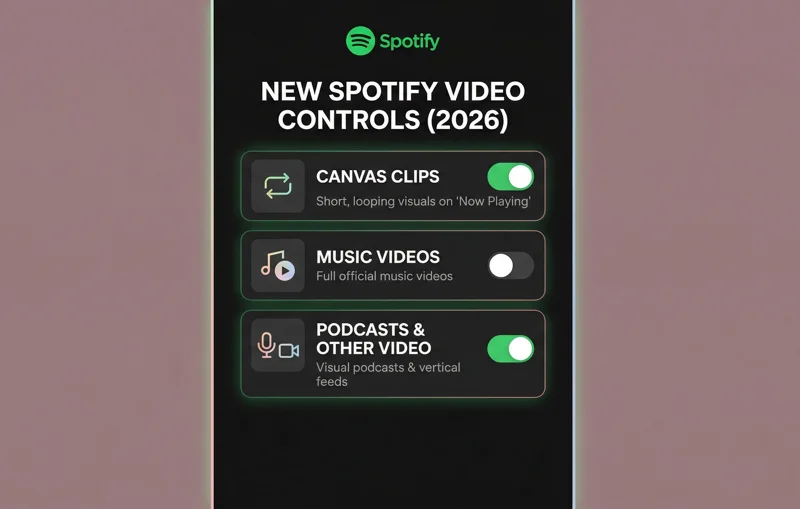
Historically, Spotify’s transition from a music streaming service to an all-encompassing audio and video platform brought a wave of visual features. It started with “Canvas”—the short, looping video clips that replace standard album artwork. Then came the integration of full music videos and, eventually, video podcasts. While some users appreciated the multimedia approach, many found it distracting, battery-draining, and completely unnecessary for a service fundamentally built on background listening.
By giving users the ultimate kill switch for visual content, Spotify is acknowledging that for many, music and podcasts remain a deeply personal, audio-first experience.
The new update introduces a consolidated settings menu where users can systematically shut down every visual element. According to recent tech reports, these features will live under the “Content and display” section on mobile devices (iOS and Android) and within the “Display” section on desktop clients.
Breaking Down the New Video Toggles
To fully understand the power of this 2026 update, it is important to know exactly what you are turning off. The platform has divided its visual content into three distinct categories, allowing users to customize their interface granularly or opt for a complete visual blackout.
| Toggle Feature | What It Disables | Best For |
|---|---|---|
| Canvas Clips | The 3-8 second looping, vertical videos that replace album art on the ‘Now Playing’ screen. | Reducing screen distraction and saving minor battery life. |
| Music Videos | Full-length official music videos that integrate with specific song tracks. | Preventing accidental data spikes when streaming off Wi-Fi. |
| All Other Videos | Video podcasts and any vertical video feeds within the app’s discovery hubs. | Creating a strict, 100% audio-only app environment. |
A Massive Win for Family Plan Managers
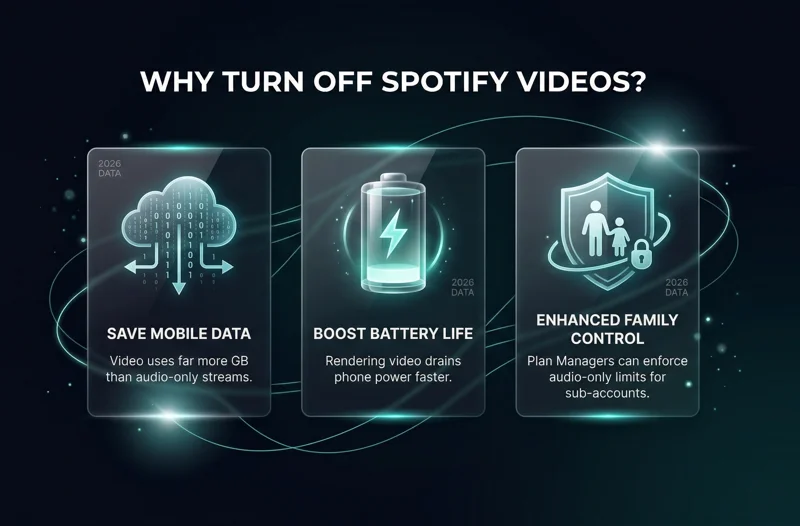
Perhaps the most powerful aspect of this update is how it integrates with Spotify Premium Family Plans. The master account holder now has administrative access to enforce these video restrictions across all sub-accounts. If you are a parent paying for the subscription, you can dive into your manager dashboard and toggle off video access for your children’s profiles.
Once disabled at the administrative plan level, those restricted users will not even see the option to switch to the video versions of songs or podcasts on their individual devices. This is a brilliant move for parents concerned about the unrated visual content sometimes present in music videos or the massive cellular data consumption that occurs when teenagers stream video podcasts away from home.
Why Disabling Video Matters in 2026
There are three primary reasons why this update is dominating tech headlines across the United States. First is the preservation of mobile data. Video files are exponentially larger than audio files. For users on tiered data plans, accidentally leaving a video podcast running in your pocket can quickly burn through monthly gigabyte allowances.
Your smartphone’s battery is a finite resource; streaming pure audio instead of rendering high-definition video loops can add hours to your daily screen time.
Second is battery life. Rendering video requires significantly more processing power and screen brightness than playing an MP3 or lossless audio file. Finally, there is the psychological aspect of digital minimalism. In an era where every app demands our visual attention, reclaiming Spotify as a screen-free sanctuary is a highly desirable feature. You can read more about app updates and features via Spotify’s official newsroom.
| User Priority | Impact of Disabling Video |
|---|---|
| Cellular Data Savings | High. Prevents massive data consumption from 1080p podcast streams. |
| Battery Optimization | Medium-High. Stops the GPU from constantly rendering visual loops. |
| Parental Control | High. Removes visual access to mature music videos for minors on Family Plans. |
Frequently Asked Questions
Where do I find the new video toggles on my phone?
Open the Spotify app, tap your profile icon, go to Settings and Privacy, and scroll down to the “Content and display” section to find the video toggles.
Does turning off video affect the audio quality?
No. Disabling the video feed forces the app to prioritize the high-quality audio stream. Your music and podcasts will sound exactly the same, if not load slightly faster.
Can I turn off videos for podcasts but keep Canvas on for music?
Yes. The new update provides separate toggles for Canvas clips, music videos, and podcast videos, allowing you to mix and match your preferences.
If a family plan manager disables video, can the child turn it back on?
No. If the main account holder disables video access at the plan level, the sub-account user cannot override the setting from their personal device.
Will this save battery life on my smartphone?
Yes. Playing video requires your phone’s screen to stay active and uses more processing power. Switching to audio-only will noticeably improve battery longevity during long listening sessions.
Is this feature available for free Spotify users or just Premium?
The display toggles are generally available for all users, though the Family Plan management features are exclusive to Premium Family subscribers.
Why did Spotify add these videos in the first place?
Spotify aimed to become a comprehensive multimedia platform to compete with YouTube and TikTok, hoping visuals would increase user engagement and time spent in the app.
Disclaimer: This article is for informational purposes only. App features, menu locations, and update availability may vary depending on your device’s operating system, geographic region, and the specific version of the application installed.