The recent announcement that Samsung Messages discontinued its primary support and development has sent ripples through the global Android community. As of July 2026, the South Korean tech giant is officially saying goodbye to its namesake texting application, urging impacted owners of Samsung smartphones and other smart gadgets to make the switch to Google Messages. This strategic shift is designed to maintain a consistent, unified, and highly secure messaging experience across the entire Android ecosystem. If you are holding a newer device, such as the latest Galaxy S26 lineup, you might have already noticed that the native Samsung app is no longer available for download from the Galaxy Store. In this comprehensive guide, we will explore the reasons behind this massive ecosystem shift, what it means for your daily communication, and how you can seamlessly migrate your data and habits to Google Messages.
The Official Announcement: Why the Shift?
For over a decade, Samsung Messages has been the default communication hub for hundreds of millions of Galaxy device users worldwide. It was deeply integrated into the One UI interface, offering a clean aesthetic and reliable SMS/MMS capabilities. However, as the digital communication landscape has evolved, so have the foundational technologies powering it. The primary catalyst for the Samsung Messages discontinued status is the industry-wide adoption of Rich Communication Services (RCS). Google has been the leading champion of RCS, effectively positioning Google Messages as the iMessage equivalent for Android. By stepping back from its proprietary app, Samsung is eliminating ecosystem fragmentation. The goal is simple: ensure that every Android user, regardless of their hardware manufacturer, can enjoy high-quality media sharing, read receipts, typing indicators, and end-to-end encryption without compatibility hiccups.
“The transition to Google Messages represents a monumental leap toward a unified Android messaging ecosystem, prioritizing security, artificial intelligence, and seamless interoperability.”
Understanding Rich Communication Services (RCS)
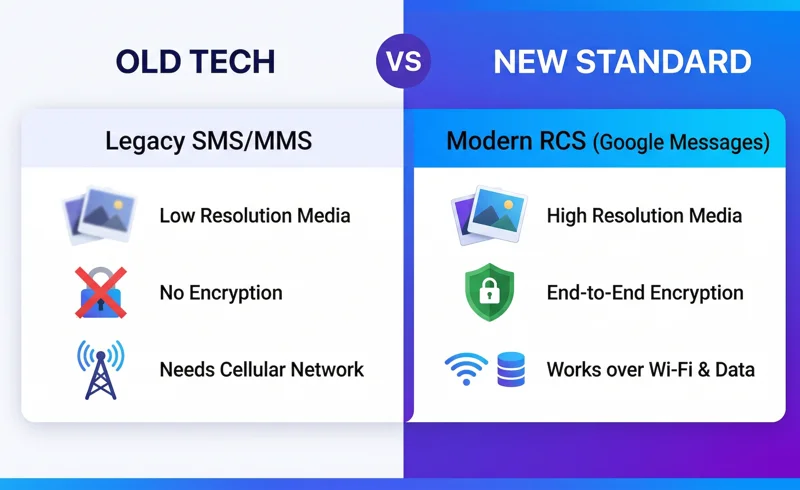
To truly grasp why this transition is a massive upgrade rather than a loss, one must understand RCS. Unlike traditional SMS (Short Message Service) and MMS (Multimedia Messaging Service), which rely on cellular network connections and offer limited file sizes and no encryption, RCS operates over Wi-Fi and mobile data. It transforms basic texting into a modern chat experience. With Google Messages as the default, Samsung users will now natively experience features they previously had to rely on third-party apps like WhatsApp or Telegram to utilize. You can now send uncompressed, high-resolution videos and photos directly to other Android devices, and crucially, enjoy improved interoperability with Apple iOS devices that have recently adopted RCS standards.
| Feature | Legacy SMS/MMS | RCS (Google Messages) |
|---|---|---|
| Media Quality | Highly compressed, low resolution | Original quality, high resolution |
| Read Receipts & Typing Indicators | Not supported natively | Fully supported |
| Security | No encryption | End-to-End Encryption (E2EE) |
| Network Requirement | Cellular network only | Wi-Fi or Mobile Data |
Enter Gemini: AI-Powered Conversations
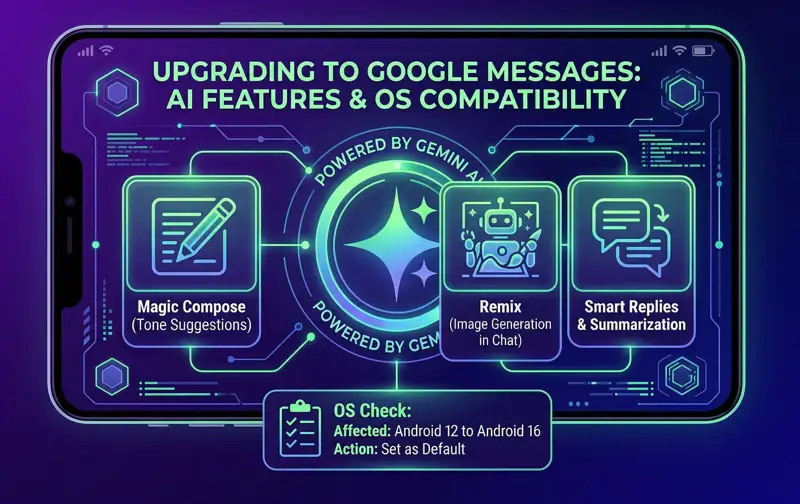
One of the most exciting prospects of the Samsung Messages discontinued era is the deep integration of Google’s advanced artificial intelligence, Gemini, right into your text conversations. Google Messages is not just a hub for receiving texts; it is becoming an intelligent assistant. Samsung specifically highlighted that switching to Google Messages will give users direct access to these cutting-edge updates. For instance, the experimental “Remix” feature allows users to dynamically generate images during conversations based on context or prompts. Furthermore, AI-powered reply suggestions analyze the tone and content of incoming messages to offer highly relevant, context-aware responses, saving you time and effort when messaging on the go.
| Gemini AI Feature | Description & Benefit |
|---|---|
| Magic Compose | Rewrites your drafted messages in different tones (e.g., professional, excited, lyrical). |
| Remix (Image Generation) | Generates custom, high-quality images directly in the chat window using text prompts. |
| Smart Replies 2.0 | Offers nuanced, context-aware conversational replies rather than simple one-word answers. |
| In-Chat Summarization | Summarizes long blocks of text or active group chats so you can catch up instantly. |
Who is Impacted? Operating System Requirements
Not every single Samsung device on the planet will lose access to Samsung Messages immediately. The company has clarified that users of older Android operating systems—specifically devices dating back to Android 11 or older—will not be forced into this transition right away. Their legacy Samsung Messages app will continue to function for basic SMS and MMS, though it will not receive any new feature updates or modern security patches. However, if you are running Android 12, 13, 14, 15, or the latest Android 16, it is highly recommended (and in many cases mandatory) to make the switch. To check what Android OS you currently have installed on your Samsung device, simply open your Settings app, scroll down and click on “Software Information,” and locate your “Android version.”
How to Switch to Google Messages
Making the transition is incredibly straightforward, and Samsung has designed the process to be as frictionless as possible. For users who purchase the new Galaxy 26 series, Google Messages is already pre-installed and set as the default, meaning no action is required. For existing users on compatible devices, you may receive an in-app notification within Samsung Messages guiding you through the migration. If you wish to switch proactively before the final cutoff date, follow these simple steps:
Step-by-Step Migration Guide
First, open the Google Play Store on your device and search for “Google Messages.” If it is not already installed, tap “Install.” Once downloaded, open the application. A prompt will immediately appear asking if you would like to set Google Messages as your default SMS app. Confirm this selection. The app will automatically sync your existing text history, contacts, and multimedia files from Samsung Messages, ensuring no data is lost during the transition. For a more detailed walkthrough and troubleshooting tips, you can refer to the official Google Messages Help Center.
| Device / OS Status | Impact & Required Action |
|---|---|
| Galaxy S26 & Newer Models | No action needed. Google Messages is the native default out of the box. |
| Android 12 to Android 16 | Must manually download Google Messages and set it as default before July. |
| Android 11 & Older | No immediate impact, but highly recommended to upgrade for security. |
“While saying goodbye to a familiar interface can be difficult, the integration of Gemini AI and universal RCS makes Google Messages the undisputed champion of Android communication.”
Global Impact and Future Outlook
While the initial end-of-service announcement was prominently featured on Samsung’s U.S. support website, the implications are undoubtedly global. Although Samsung has not released a comprehensive country-by-country breakdown, industry analysts confirm that maintaining two separate, competing messaging infrastructures is economically and technologically inefficient. Canadian users, European markets, and Asian territories are all expected to see similar phase-outs. Embracing Google Messages ensures that Samsung can focus its software development resources on enhancing the broader One UI experience, while leaving the complex messaging infrastructure and RCS server maintenance to Google’s specialized teams.
The timeline is clear. After July, all compatible devices will no longer be able to download the legacy app from official stores. Users are strongly encouraged to check their current application for in-app banners that will specify the exact offline date for their specific region and carrier. The era of fragmented text messaging on Android is coming to an end, paving the way for a more connected, secure, and intelligent future.
Frequently Asked Questions
Why is Samsung Messages discontinued?
Samsung is discontinuing its messaging app to unify the Android ecosystem under Google Messages, which offers superior support for Rich Communication Services (RCS), advanced encryption, and integrated Gemini AI features.
Will I lose my old text messages when I switch?
No. When you download and set Google Messages as your default app, it will automatically sync and display all your existing SMS and MMS history from your phone’s database.
Can I still use Samsung Messages on older phones?
Yes, users with devices running Android 11 or older will not be immediately impacted and can continue using the legacy app, though it will not receive new features.
Is Google Messages free to use?
Yes, the app is completely free to download from the Google Play Store. RCS messages sent over Wi-Fi are free, though standard mobile data rates apply if you are not on Wi-Fi.
What is the “Remix” feature mentioned in the announcement?
Remix is an experimental Gemini AI feature integrated into Google Messages that allows users to generate and share custom images directly within their chat conversations using text prompts.
Can I message iPhone users with Google Messages?
Yes. With Apple’s recent adoption of RCS standards, Google Messages allows for high-quality media sharing, typing indicators, and better group chat functionality between Android and iOS devices.
What happens if I don’t switch by the July deadline?
If you are on a modern OS and fail to switch, your Samsung Messages app will eventually go offline, preventing you from sending or receiving new texts until you select a new default messaging application like Google Messages.
Disclaimer: This article is for informational purposes only. The timeline, app features, and operating system requirements mentioned are based on current announcements and may be subject to change by Samsung or Google. Always refer to official manufacturer support pages for the most up-to-date technical instructions.