The continuous evolution of the pixel at a glance location tracking algorithms is actively changing how we interact with our smartphones in 2026. Instead of forcing users to dig through app drawers and digital wallets, the Google Pixel is becoming increasingly proactive. A recent APK teardown of the latest Android System Intelligence and Settings Services applications has revealed that Google is preparing to launch two highly anticipated, location-based features for the Pixel At a Glance widget: “Passes nearby” and “Restaurant insights.”
Stop Digging: The “Passes Nearby” Feature
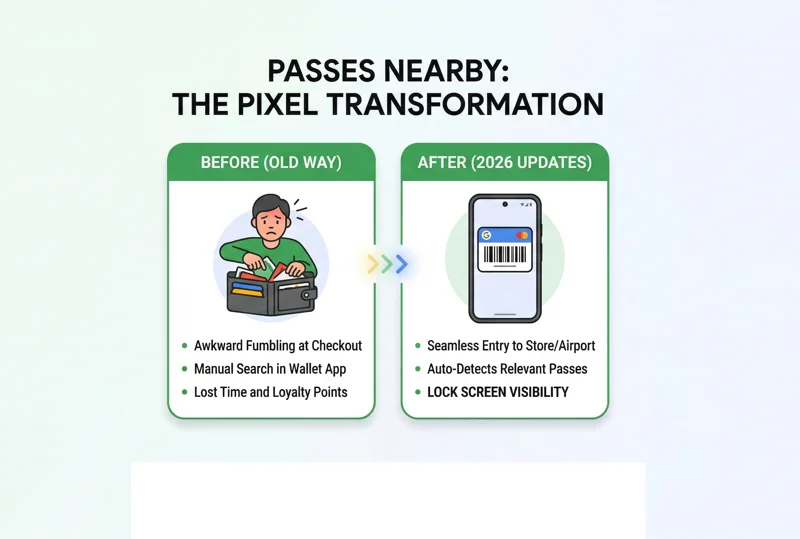
We have all experienced the awkward fumble at the checkout counter or boarding gate. You know you have the loyalty card, concert ticket, or boarding pass saved on your device, but finding it in the heat of the moment can be frustrating. The upcoming “Passes nearby” feature aims to eliminate this friction entirely by turning your home screen into a contextually aware assistant.
According to the decompiled code, this feature will allow users to quickly access passes from Google Wallet based directly on their physical location. This is not entirely a new concept; Google briefly teased a similar capability during the initial Android 12 Material You rollout. However, seeing it actively prepped in the code indicates a full-scale 2026 release. When you walk into a supermarket, your loyalty card will automatically surface at the top of your screen. When you arrive at the airport, your boarding pass will be waiting for you, requiring zero manual searching.
The ultimate goal of ambient computing is to provide the exact information you need, precisely when and where you need it, before you even have to ask.
| User Scenario | Previous Pixel Experience | New ‘At a Glance’ Experience |
|---|---|---|
| Supermarket Checkout | Manually opening Wallet app to find loyalty card. | Loyalty barcode appears on lock screen upon entry. |
| Airport Terminal | Relying on standard push notifications or email. | Boarding pass pinned to the top of the home screen. |
| Event Venue | Searching through inbox for the digital ticket link. | QR code for entry displayed via At a Glance widget. |
Dining Made Easy: “Restaurant Insights”
Beyond digital passes, the Pixel At a Glance widget updates are also targeting the culinary experience. The second feature discovered in the code is dubbed “Restaurant insights.” Imagine walking into a highly-rated, unfamiliar restaurant and immediately seeing personalized recommendations right on your lock screen.
Google intends to leverage its massive corpus of Google Maps restaurant insights and user reviews to power this feature. When the widget detects that you are at a dining establishment, it will automatically suggest popular menu items and offer insights based on your location. This deeply integrates the vast knowledge base of Maps directly into the Android system layer, providing a frictionless dining experience without requiring the user to open a separate application to read reviews.
By integrating location intelligence directly into the UI, the smartphone transitions from a passive tool into a proactive digital concierge.
Privacy and System Intelligence
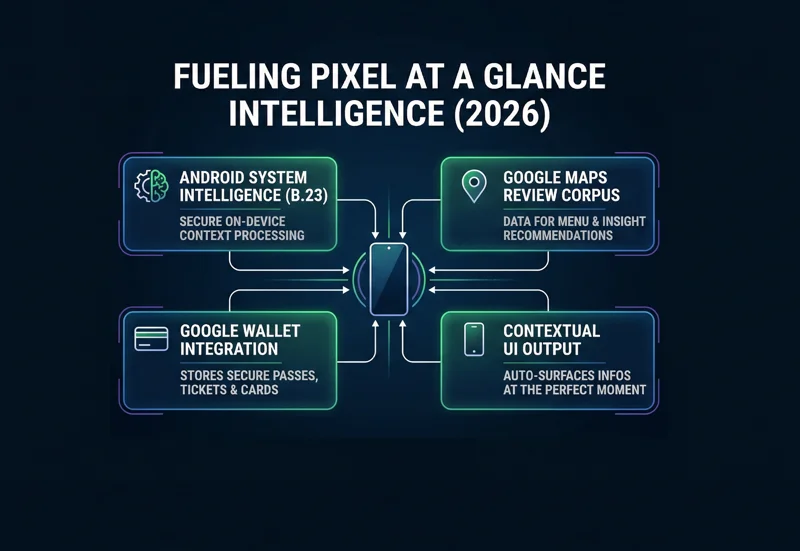
It is important to note that these smart home screen notifications rely heavily on Android System Intelligence. This means that much of the location processing and data matching is handled securely on the device itself, rather than constantly pinging external servers. This approach helps preserve battery life while maintaining user privacy. For official updates on device features and privacy standards, users can monitor the official Pixel blog.
| Under the Hood Component | Function in At a Glance |
|---|---|
| Android System Intelligence (B.23) | Processes local context securely to trigger relevant widgets. |
| Settings Services (1.1.0) | Manages user preferences and permissions for location features. |
| Google Wallet Integration | Supplies the secure passes, tickets, and membership barcodes. |
While the exact public release date remains unconfirmed by Google, the presence of these fully developed code strings indicates that Pixel users won’t have to wait long to experience this next level of smartphone automation.
Frequently Asked Questions
What is the Pixel At a Glance widget?
It is a proactive feature on the home and lock screens of Google Pixel phones that displays contextual information like weather, upcoming calendar events, flight statuses, and soon, location-based passes.
How does the “Passes nearby” feature work?
The feature uses your phone’s location data to detect when you are near a specific store or venue, automatically displaying the relevant loyalty card or ticket from your Google Wallet on your screen.
Do I need to open Google Maps for “Restaurant insights” to work?
No. The At a Glance widget will automatically pull data from Google Maps and display recommended menu items on your home screen when it detects you are at a restaurant.
Is my location data secure with these new features?
Yes. These features are processed through Android System Intelligence, meaning much of the contextual awareness is handled securely on-device to protect your privacy.
Will these features drain my Pixel’s battery?
Because the processing relies on optimized system-level intelligence rather than constant GPS polling by third-party apps, the battery impact is expected to be minimal.
Are these updates available on older Pixel models?
Typically, major At a Glance updates roll out to all supported Pixel generations, though exact compatibility will be confirmed by Google upon the official launch.
Can I disable these location-based notifications if I don’t want them?
Yes. Users have full control over the widget and can toggle specific features, like Wallet passes or restaurant insights, on or off through the At a Glance settings menu.
Disclaimer: This article is for informational purposes only. The features discussed are based on APK teardowns and preliminary code analysis. Google may alter, delay, or cancel these features before a final public release.