As tech enthusiasts eagerly download the latest updates, microsoft brings windows 11 fat32 2tb support fixes network data bug with new-builds, signaling a massive quality-of-life improvement for power users across the globe. Released today to the Windows 11 Beta channel and Dev channel Insider programs, these identical builds represent a turning point for legacy file system management and system stability in 2026. The Dev build is officially rolling out under KB5083632 (build 26300.8170), while the Beta build can be found under KB5083635 (build 26220.8165). These updates bring an end to a decades-old formatting limitation that has frustrated IT professionals and casual users alike.
The End of an Era: Formatting FAT32 up to 2TB
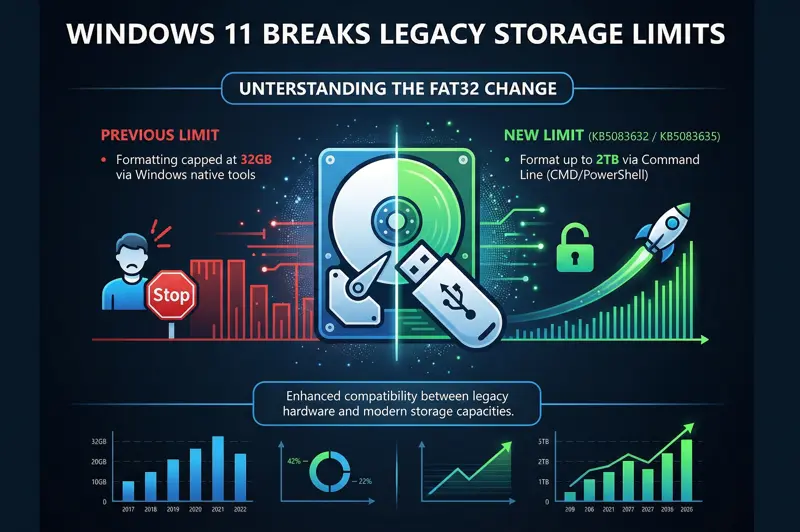
For nearly thirty years, Windows users attempting to format a large external hard drive or high-capacity USB flash drive into the FAT32 file system hit a frustrating roadblock. The Windows graphical user interface (GUI) and even standard command-line tools artificially capped FAT32 formatting at a mere 32GB. If you had a 1TB external drive that you wanted to use with a legacy gaming console, a smart TV, or an older digital camera that only recognized FAT32, you were forced to rely on third-party software to bypass Microsoft’s arbitrary limit.
With these new Insider builds, that era of relying on sketchy third-party formatting utilities is finally over. Microsoft has officially increased the size limit for formatting FAT32 volumes natively via the command line from 32GB to a staggering 2TB. While the standard File Explorer right-click format tool might still default to modern file systems like exFAT or NTFS for massive drives, power users can simply open Command Prompt or PowerShell and utilize the standard format commands to push FAT32 to its theoretical limits seamlessly.
“By unlocking the 2TB FAT32 formatting capability directly through the command line, Microsoft is granting power users the ultimate flexibility to bridge the gap between modern storage capacities and legacy hardware compatibility.”
This update is monumental for cross-platform compatibility. Many embedded systems, older macOS devices, Linux distributions, and specialized recording equipment still rely heavily on the FAT32 file system due to its universal nature and lack of restrictive file permissions. By supporting 2TB partitions, Windows 11 ensures that users can manage their massive media libraries without encountering the dreaded “volume too big for FAT32” error.
| Formatting Tool / Method | Previous Windows 11 Limit | New Limit (Build 26300.8170+) |
|---|---|---|
| Windows Command Line (CMD) | 32 GB | 2 TB |
| Windows PowerShell | 32 GB | 2 TB |
| Third-Party Utilities | Up to 2 TB | No longer necessary |
Crucial Network Data Bug Fixes
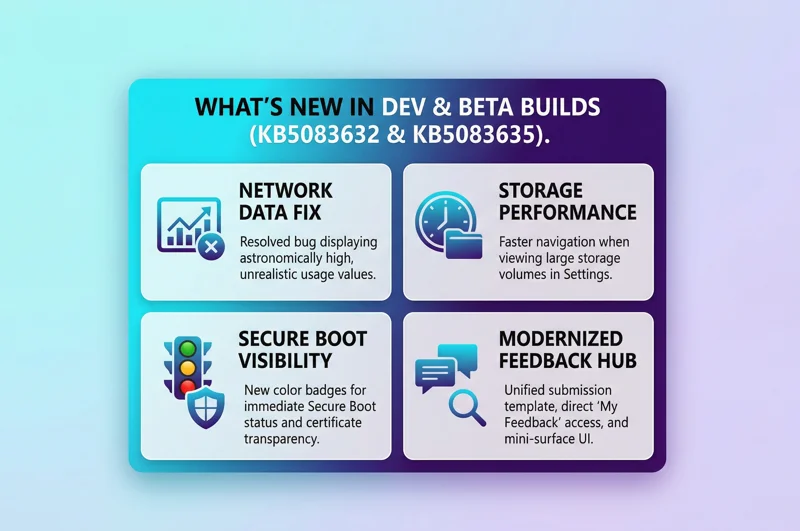
Aside from file system enhancements, these new builds tackle a highly irritating bug affecting network data usage monitoring. In recent Insider builds, users navigating to Settings > Network & Internet > Data Usage were greeted with astronomically large, entirely unrealistic data consumption values. For users on metered connections, mobile hotspots, or capped broadband plans, this visual glitch caused significant panic, as it falsely indicated that their devices had downloaded terabytes of background data overnight.
Microsoft has acknowledged and fully patched this network data bug. The telemetry tracking module within the network stack has been recalibrated to ensure that data usage reporting is highly accurate. This fix is critical for professionals working remotely in 2026 who rely on precise data metrics to manage their cellular tethering costs and ensure bandwidth is not being hijacked by rogue background processes.
Navigating through the intricate menus of modern operating systems should be a fluid, painless experience. Microsoft recognized that managing massive amounts of data across multiple partitions could cause the Settings application to lag or hang. With the deployment of KB5083632 and KB5083635, users will notice a distinct performance boost when navigating to see storage on large volumes via Settings > System > Storage > Advanced Storage Settings > Disks & Volumes. The indexing process has been optimized so that the UI populates instantly, even when scanning multi-terabyte arrays.
“Efficiency in system management is non-negotiable. The latest storage navigation refinements eliminate frustrating UI lag, making disk management on Windows 11 smoother than ever.”
Furthermore, Microsoft has refined the User Account Control (UAC) triggers within the storage settings. Previously, navigating to the main Storage page would immediately trigger an intrusive UAC prompt. With the new update, the UAC prompt has been logically deferred; you will only be asked for elevated permissions when explicitly clicking to view and delete temporary system files. This small but vital tweak significantly improves the daily user experience by reducing unnecessary security interruptions.
| Update Channel | Knowledge Base (KB) Article | OS Build Number |
|---|---|---|
| Dev Channel | KB5083632 | Build 26300.8170 |
| Beta Channel | KB5083635 | Build 26220.8165 |
Advanced Transparency in the Windows Security App
As cyber threats evolve, maintaining the integrity of the boot process is paramount. Microsoft has begun rolling out enhancements to the Windows Security app, specifically targeting the Device Security > Secure Boot experience. Users will now see highly visible green, yellow, and red icon badges, alongside dynamic text that accurately reflects the device’s Secure Boot state and certificate status.
Because Microsoft is currently in the process of actively updating Secure Boot certificates on consumer devices and specific business PCs, this transparency is crucial. Users can now manually verify if their certificates are up-to-date and providing the intended protection against rootkits and boot-level malware. It is worth noting that to prevent end-user confusion, this enhanced diagnostic experience is disabled by default on enterprise IT-managed devices and servers, leaving certificate management strictly in the hands of system administrators.
A Completely Modernized Feedback Hub
The core of the Windows Insider program is, unsurprisingly, feedback. To ensure that engineers receive the most accurate and actionable data possible, Microsoft has launched version 2.2604.101.0 of the Feedback Hub to the Dev and Canary channels. This isn’t just a fresh coat of paint; it is a structural overhaul based entirely on user requests.
The feedback submission flow has been drastically simplified. Users no longer have to navigate complex branching menus; instead, feedback is submitted using a single unified template with highly advanced category search capabilities. The form itself has been modernized on the backend, allowing Microsoft to iterate and improve the UI much faster in future builds.
“The completely overhauled Feedback Hub proves that Microsoft is heavily investing in the voice of the community, making it faster and easier for Insiders to shape the future of Windows.”
Key Feedback Hub Features and Refinements
Navigation within the app has been streamlined. ‘My Feedback’ now securely lives directly within the primary navigation pane. The section formerly known as ‘All feedback’ has been rebranded to ‘Community feedback,’ promoting better engagement and discovery of trending issues. To keep the interface clean, the ‘Announcements’ page has been removed entirely—users are now directed to check the Windows Insider Blog for official news, allowing the Hub to focus 100% on reporting and upvoting.
Other fantastic quality-of-life additions include the introduction of a “compliment” feedback type, allowing users to explicitly praise features that are working flawlessly. You can now also toggle whether your specific feedback is private or visible to the public community. For users looking to report an issue on the fly, a new focused, smaller Feedback Hub surface has been introduced for quick, in-the-moment reporting, which can be expanded to the full experience via a button in the upper right corner.
| Feedback Hub Improvement | How It Works | Benefit to User |
|---|---|---|
| Unified Template | Combines multiple reporting forms into one searchable interface. | Drastically reduces the time it takes to submit a bug report. |
| Compliment Tag | A new specific category for positive reinforcement. | Allows users to highlight features they love, ensuring they aren’t removed. |
| Mini-Surface UI | A compact widget mode for the Feedback app. | Lets you report glitches instantly without interrupting your workflow. |
Finally, version 2.2604.101.0 patches several annoying UI bugs. The application will now remember your window size across sessions, supports mouse back-button navigation, and addresses an issue where the community feedback feed appeared artificially sparse. International users will also be pleased to know that upvote buttons now display correctly for Insiders using the Chinese display language.
Looking Ahead to the Public Release
Features introduced in the Dev and Beta channels typically undergo several weeks of rigorous testing before making their way to the standard retail version of Windows 11. Given the stability of these specific builds and the high demand for features like the 2TB FAT32 command line format, users can likely expect these changes to roll out in the next major cumulative update later this year. By addressing long-standing technical limitations and polishing the user interface, Microsoft continues to refine Windows 11 into a highly adaptable, powerful operating system for modern computing.
Frequently Asked Questions
What is the new FAT32 limit in Windows 11?
With the latest Insider builds, Microsoft has increased the FAT32 formatting limit via the command line from 32GB up to 2TB.
Can I format a 2TB FAT32 drive using the standard Windows File Explorer?
Currently, the increased limit is primarily accessible via the command line (CMD or PowerShell). The standard GUI format tool may still default to limiting FAT32 options to encourage the use of exFAT or NTFS on large drives.
What network bug was fixed in these new builds?
Microsoft fixed a visual glitch in the Settings app where the “Data Usage” tracking screen displayed unrealistically large and inaccurate data consumption values.
Which Insider channels are receiving these specific updates?
These features are rolling out via identical builds to the Dev channel (KB5083632 / build 26300.8170) and the Beta channel (KB5083635 / build 26220.8165).
What do the new colors in the Windows Security app mean?
The green, yellow, and red badges indicate the health and status of your device’s Secure Boot state and certificate validity, helping users identify potential boot-level vulnerabilities.
Why did Microsoft remove the Announcements page from the Feedback Hub?
The Announcements page was removed to streamline the app’s interface, allowing it to focus entirely on submitting and exploring user feedback. Announcements are now exclusively hosted on the official Windows Insider Blog.
How do I access the new mini Feedback Hub interface?
You can launch the streamlined, quick-reporting experience by using the standard WIN + F keyboard shortcut and utilizing the new smaller surface mode designed for fast, in-the-moment submissions.
Disclaimer: This article is for informational purposes only. The features discussed are currently part of the Windows 11 Insider Preview program. Features, build numbers, and functionalities may be modified, delayed, or removed by Microsoft prior to the final public release. Proceed with caution when modifying file systems via the command line.