When searching for the ultimate MacBook Neo accessories in 2026, it is crucial to understand both the strengths and the limitations of Apple’s latest entry-level machine. The MacBook Neo has surprised the tech world with its incredibly aggressive pricing, making the macOS ecosystem more accessible than ever before. With its premium aluminum chassis, impressive processing performance, and solid baseline battery life, it is a fantastic machine for students, office workers, and casual creatives. However, achieving this lower price tag meant Apple had to make strategic compromises. Limited fixed RAM, restricted onboard storage, and a surprisingly sparse port selection can severely bottleneck your daily productivity. Fortunately, you do not have to live with these drawbacks forever.
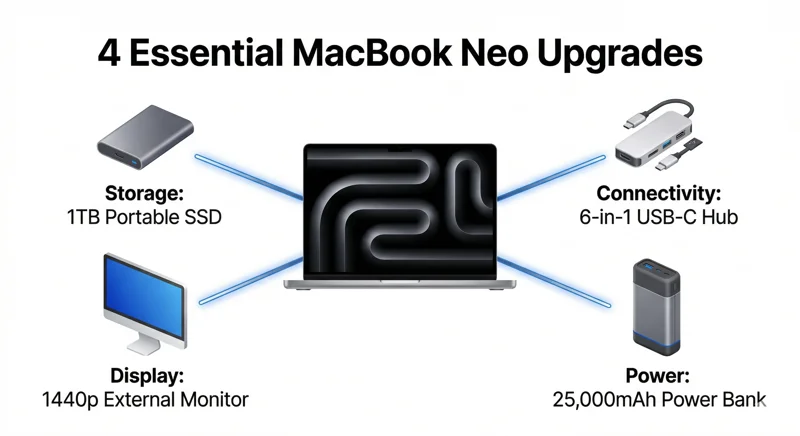
By leveraging the power of USB-C connectivity, you can instantly transform this budget-friendly laptop into a highly capable workstation. We have carefully selected four game-changing USB-C gadgets that specifically address the Neo’s biggest flaws. Whether you need to expand your digital storage, connect multiple peripherals, enhance your visual workspace, or keep your battery topped up during long flights, these carefully vetted solutions will drastically improve your everyday computing experience.
The MacBook Neo redefines budget computing, but its true power is unlocked only when paired with the right peripherals.
The Problem: Understanding the MacBook Neo’s Compromises
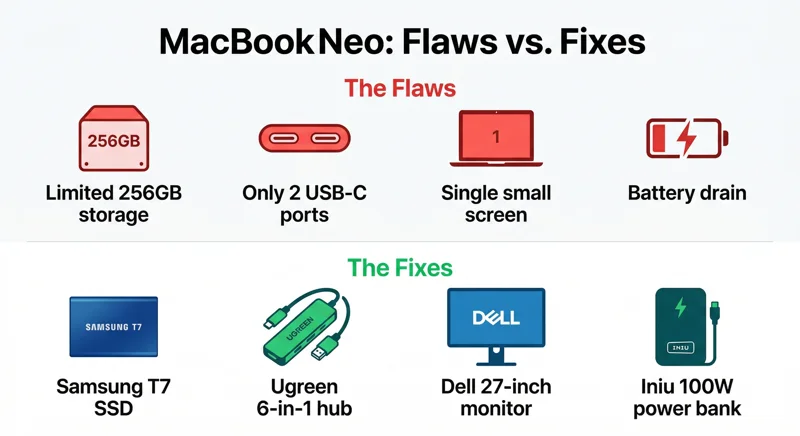
Before diving into the solutions, it is essential to outline exactly what needs fixing. The 2026 MacBook Neo is an engineering marvel in terms of cost-to-performance ratio, but power users will immediately notice the pinch. The base models often ship with a fixed 8 GB of RAM and 256 GB or 512 GB of internal storage. Because these components are soldered directly onto the motherboard, internal upgrades are physically impossible after purchase. If you run out of space for your applications, video projects, or photo libraries, you cannot simply crack open the case and install a new drive.
Furthermore, the port situation is famously restrictive. The MacBook Neo features only two USB-C ports, and to make matters worse, one of them is limited to legacy USB 2.0 speeds. This means you technically have only one high-speed multipurpose port available for charging, data transfer, and video output. For anyone who uses an external mouse, keyboard, SD card, or external monitor, this limitation is an immediate roadblock. That is why expanding your hardware capabilities through external accessories is not just an option; it is a necessity for anyone looking to do serious work.
1. Expand Your Storage: Samsung T7 Portable SSD
Even if you opt for the 512 GB variant of the MacBook Neo, modern applications, high-resolution media, and large system caches will eat through that space in a matter of months. Enter the Samsung T7 Portable SSD, arguably one of the most reliable and efficient external storage solutions on the market today. Unlike bulky mechanical hard drives of the past, the Samsung T7 utilizes NVMe solid-state technology packed into a sleek, pocket-sized aluminum enclosure that is built to withstand drops of up to two meters.
The T7 supports USB 3.2 Gen 2 speeds, which perfectly matches the maximum throughput of the faster USB-C port on your MacBook Neo. This means you can achieve sequential read and write speeds of up to 1,050 MB/s, making it fast enough to edit 4K video directly from the external drive without experiencing lag. To get the absolute best performance and seamless integration with macOS, experts highly recommend formatting this drive to the APFS (Apple File System) via the Disk Utility app upon unboxing.
Storage Options and Value
While the ongoing global chip shortages in 2026 have kept SSD prices slightly elevated, the $185 price tag for the 1 TB variant on Amazon is a worthwhile investment for the peace of mind it provides. It acts as a perfect substitute for expensive internal Apple storage upgrades.
| Feature | MacBook Neo Base Storage | Samsung T7 Portable SSD (1TB) |
|---|---|---|
| Capacity | 256GB / 512GB | 1000GB (1TB) |
| Speed Capability | Internal NVMe Speeds | Up to 1,050 MB/s (USB 3.2 Gen 2) |
| Portability | Fixed Internal | Pocket-sized, Drop-resistant Aluminum |
2. Fix the Port Shortage: Ugreen Revodok Pro 6-in-1 USB-C Hub
As mentioned earlier, the single high-speed port on the MacBook Neo is a significant bottleneck. You cannot plug in a charger, an external monitor, and a high-speed data drive simultaneously without some help. This is where a high-quality USB-C hub becomes the most critical accessory in your tech bag. The Ugreen Revodok Pro 6-in-1 USB-C Hub is an affordable, well-rated choice that magically multiplies your connectivity options.
With a simple plug-and-play setup, this compact hub connects to your high-speed USB-C port and instantly provides you with two USB 3.2 Gen 2 Type-A ports, two USB 3.2 Gen 2 Type-C ports, and an HDMI 2.0 port. Because the MacBook Neo only natively supports a single external display, the single HDMI 2.0 port on the Revodok Pro is perfectly matched to the laptop’s capabilities, allowing you to output sharp, clear video to a larger screen. It also features a dedicated USB PD (Power Delivery) Type-C port, which acts as a pass-through so you can keep your laptop charging while utilizing all the other connections.
Affordability and Reliability
At a standard price tag of $22 (frequently discounted to around $16), the value proposition here is unmatched. It prevents the need to buy multiple individual dongles and keeps your desk cable management tidy. Backed by a 2-year manufacturer’s warranty, it provides security against the occasional hardware failure reported by a small fraction of users.
| Port Type on Hub | Quantity | Primary Use Case |
|---|---|---|
| USB 3.2 Gen 2 Type-A | 2 | Legacy flash drives, mice, keyboards |
| USB 3.2 Gen 2 Type-C | 2 | High-speed data transfer, modern peripherals |
| HDMI 2.0 | 1 | External monitor or projector connectivity |
| USB-C Power Delivery | 1 | Pass-through charging for the MacBook Neo |
3. Enhance Your Visual Workspace: Dell S2725DC USB-C Monitor
Staring at a compact laptop screen for eight hours a day can lead to eye strain and reduced productivity. An external display is a phenomenal upgrade, giving you the screen real estate necessary for a dual-display setup. When you combine the MacBook’s screen with a larger monitor, multitasking becomes significantly easier. You can keep your research or reference materials open on the laptop while doing your main writing, coding, or designing on the big screen.
For the Neo, the Dell S2725DC is an exceptional pairing. It is a budget-friendly 27-inch monitor featuring a crisp 1440p panel. What makes it truly special for Mac users is its native USB-C video input. Instead of routing an HDMI cable through a hub, you can connect a single USB-C cable straight from the monitor to your laptop. This single cable transmits the video signal while simultaneously sending up to 65W of power back to your MacBook Neo, keeping it fully charged at top speed without needing the Apple wall adapter.
Investing in high-quality USB-C gadgets is not just about adding ports; it is about future-proofing your entire digital workspace.
Built-in Hub and Color Accuracy
Beyond video and power, the Dell S2725DC effectively acts as a secondary hub. It features three downstream USB ports (including two USB 3.2 Gen 1 Type-A ports) located on the monitor itself. You can leave your desktop webcam or wired keyboard permanently plugged into the monitor, so they instantly connect to your Mac the moment you plug in the USB-C display cable. With nearly complete coverage of the sRGB color space, it offers excellent color accuracy out of the box for web browsing and standard content creation. While it lacks HDR and high contrast—which is standard for its $250 price tier—it remains the most practical desktop companion for this laptop.
4. Unplug and Go Anywhere: Iniu 25,000mAh Power Bank
Apple silicon is famous for its efficiency, and the MacBook Neo proudly claims to deliver nearly 11 hours of web browsing on a single charge. However, real-world usage—like keeping dozens of browser tabs open, running background applications, and maintaining high screen brightness—can drain the battery much faster. If your work takes you away from wall outlets, whether you are commuting, working in a coffee shop, or traveling internationally, a robust portable charger is essential.
The Iniu 25,000mAh power bank is an absolute powerhouse. Featuring a rated capacity of 80Wh (16,000mAh effective output), it holds enough energy to completely charge the MacBook Neo’s 49.9Wh battery from 0% to 100%, with plenty of juice left over to top up your smartphone or wireless earbuds. Crucially, it supports up to 100W fast charging via the USB Power Delivery (PD) standard, ensuring your laptop charges just as fast on the go as it does when plugged into the wall.
Travel-Friendly Design
Despite its massive capacity, the Iniu power bank strictly adheres to the TSA regulations for lithium-ion batteries in carry-on luggage (which must be under 100Wh). It features a highly convenient digital display that shows the exact battery percentage remaining, removing the guesswork associated with standard indicator lights. While it is undeniably bulky, the $67 investment ensures you never suffer the anxiety of a dead laptop in the middle of a crucial project.
| Specification | Iniu 25,000mAh Power Bank Details |
|---|---|
| Total Capacity | 25,000mAh (Rated 80Wh) |
| Max Output Speed | 100W (USB-C PD) |
| Max Input Speed (Recharging) | 65W |
| TSA Carry-On Compliant | Yes (Under 100Wh limit) |
Conclusion: Maximizing the MacBook Neo Experience
The MacBook Neo is an exceptional device that proves you do not need to spend a fortune to access the official Apple ecosystem. However, its out-of-the-box limitations are undeniable. By strategically investing in these four USB-C accessories—a high-speed Samsung T7 SSD for limitless storage, a Ugreen Revodok Pro hub for comprehensive connectivity, a Dell S2725DC monitor for an expansive desktop experience, and an Iniu power bank for endless mobility—you completely eliminate those bottlenecks. You are no longer just using a budget laptop; you are commanding a fully modular, highly versatile workstation perfectly adapted to modern digital demands.
Frequently Asked Questions (FAQs)
Do I really need to format the Samsung T7 SSD for my Mac?
Yes. While it will work out of the box formatted as ExFAT, reformatting the drive to APFS (Apple File System) via Disk Utility will ensure the fastest data transfer speeds and best reliability specifically for macOS.
Will connecting a USB-C hub slow down my MacBook Neo’s performance?
No, a quality hub like the Ugreen Revodok Pro manages data bandwidth efficiently. However, be sure to plug the hub into the high-speed USB-C port on the Neo, not the port limited to USB 2.0 speeds, to ensure maximum performance.
Can the MacBook Neo support two external monitors?
Natively, the base model MacBook Neo only supports a single external display. You can connect one monitor (like the Dell S2725DC) via USB-C or HDMI through a hub, but you cannot extend your desktop across two external screens without specialized DisplayLink software and hardware.
Is the 65W power delivery from the Dell monitor safe for my laptop battery?
Absolutely. The MacBook Neo features smart power management that will only draw the amount of wattage it safely needs. The 65W output is perfectly matched to keep the laptop charged even under heavy workloads.
Can I bring the Iniu 25,000mAh power bank on an airplane?
Yes. The FAA and TSA allow lithium-ion batteries up to 100 Watt-hours (Wh) in carry-on baggage. The Iniu power bank is rated at 80Wh, making it completely safe and legal for air travel.
Are third-party accessories safe to use with Apple products?
Yes, as long as you purchase from reputable brands. Brands like Samsung, Dell, Ugreen, and Iniu adhere to strict USB-C and Power Delivery industry standards, ensuring they will not damage your MacBook.
Why does the MacBook Neo have a USB 2.0 port in 2026?
Apple included one high-speed port and one slower legacy port as a cost-saving measure to keep the retail price of the Neo exceptionally low. The slower port is best utilized for basic charging or connecting low-bandwidth devices like a wired mouse.
Disclaimer: This article is for informational purposes only. Prices, product availability, and technical specifications are subject to change based on the manufacturer and market conditions. Always verify compatibility before making a purchase.