Stop wasting your iPad’s Port on simple charging tasks when a hidden, dedicated power solution is sitting right in front of you.
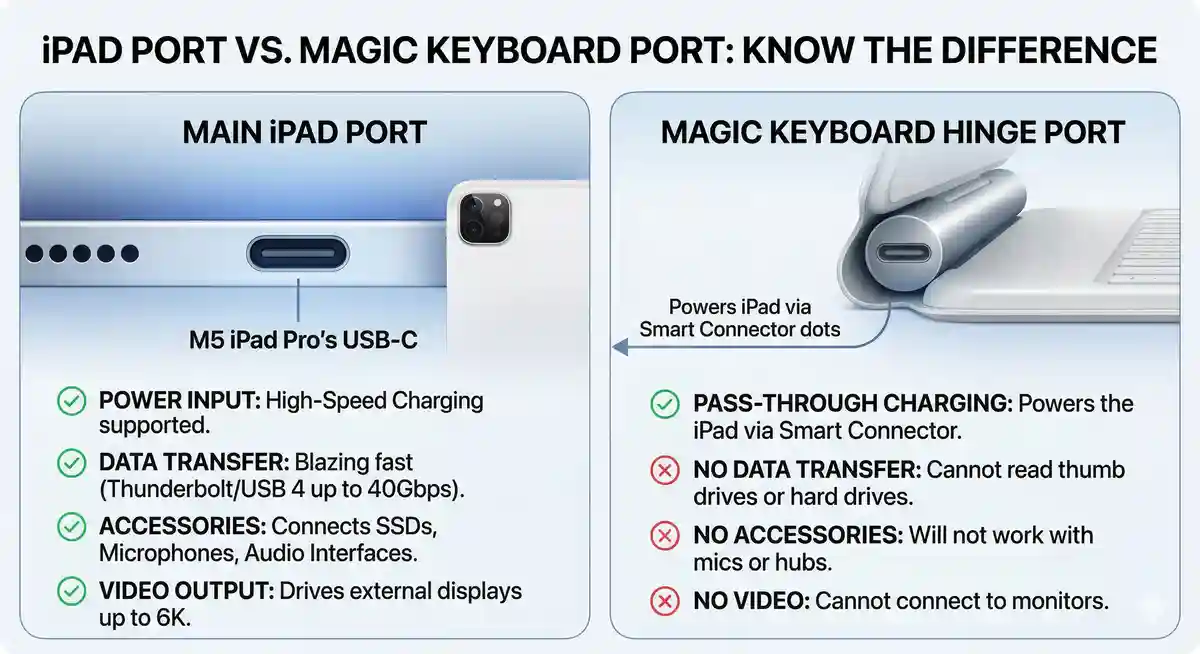
When Apple introduced the redesigned Magic Keyboard, it fundamentally changed how professionals interact with their tablets. Beyond the premium aluminum finish, the tactile backlit keys, and the floating cantilever design, there lies a highly misunderstood piece of hardware: the integrated USB-C connector. This secondary input is engineered specifically for pass-through charging, a feature that channels power directly to your M4 or M5 iPad Pro, or compatible iPad Air, leaving the main high-bandwidth connection entirely free for demanding peripherals.
The Evolution of iPad Multitasking and Connectivity
To understand the sheer brilliance of the secondary charging input, we must first look at how the iPad has evolved. Originally envisioned as a media consumption device, modern tablets are now formidable computing powerhouses. With the integration of desktop-class Apple Silicon, from the M2 to the cutting-edge M5 chips in 2026, the demand for peripheral connectivity has skyrocketed. Creative professionals, students, and mobile workers require external storage drives, audio interfaces, SD card readers, and high-resolution external monitors.
However, an iPad only has one built-in physical connection point. If you need to charge your device during a long video editing session, that single lifeline is occupied. This forces users to rely on clunky third-party dongles and multi-port hubs, which drain battery life and ruin the minimalist aesthetic that Apple users cherish. This is where the magic of the keyboard’s hidden connector comes into play. By offloading the power delivery to the keyboard hinge, you completely liberate the main device interface.
The Magic Keyboard’s hidden USB-C port isn’t just a convenience; it is a workflow multiplier that transforms the iPad from a simple tablet into a true modular workstation.
How Pass-Through Charging Works via the Smart Connector
Apple rarely dives deep into the technical schematics of their accessories in their marketing materials, simply noting that the keyboard features a USB-C connector for pass-through charging. But how does power actually get from the base of the keyboard into the tablet without a direct cable connection to the device itself?
The secret lies in the magnetic Smart Connector. If you look at the back of your tablet, you will notice three small metallic dots. These are proprietary contact points designed to transfer both data (for the keystrokes and trackpad inputs) and electrical current. When you plug your USB-C cable into the cylindrical hinge of the Magic Keyboard, the electricity travels through the internal wiring of the accessory, up the magnetic backplate, and directly into the tablet through those three metallic dots.
It is crucial to understand the limitations of this engineering marvel. The port on the keyboard is not designed for data transfer. If you attempt to plug in an external hard drive, a microphone, or a monitor into the keyboard’s hinge, absolutely nothing will happen. It is strictly a one-way street for electricity.
| Feature Capability | Main iPad Port | Magic Keyboard Port |
|---|---|---|
| Power Charging | Yes (Fast Charging Supported) | Yes (Pass-Through via Smart Connector) |
| Data Transfer (External SSDs) | Yes (Up to Thunderbolt speeds on Pro models) | No |
| External Display Output | Yes (Up to 6K resolution) | No |
| Audio Accessories / Microphones | Yes | No |
Understanding Magic Keyboard Compatibility
Not all accessories are created equal, and Apple’s lineup has become increasingly fragmented. Understanding which keyboard works with which tablet is essential before making a significant investment. The standard Folio version, for instance, lacks this pass-through capability entirely. You must opt for the premium Magic Keyboard tier to unlock this feature.
Starting at $269 for the iPad Air version and $299 for the iPad Pro version, these accessories are major investments. The newest iterations of the keyboard, featuring a sleek aluminum palm rest and an expanded haptic trackpad, are strictly locked to specific generations of silicon.
The Compatibility Matrix for 2026
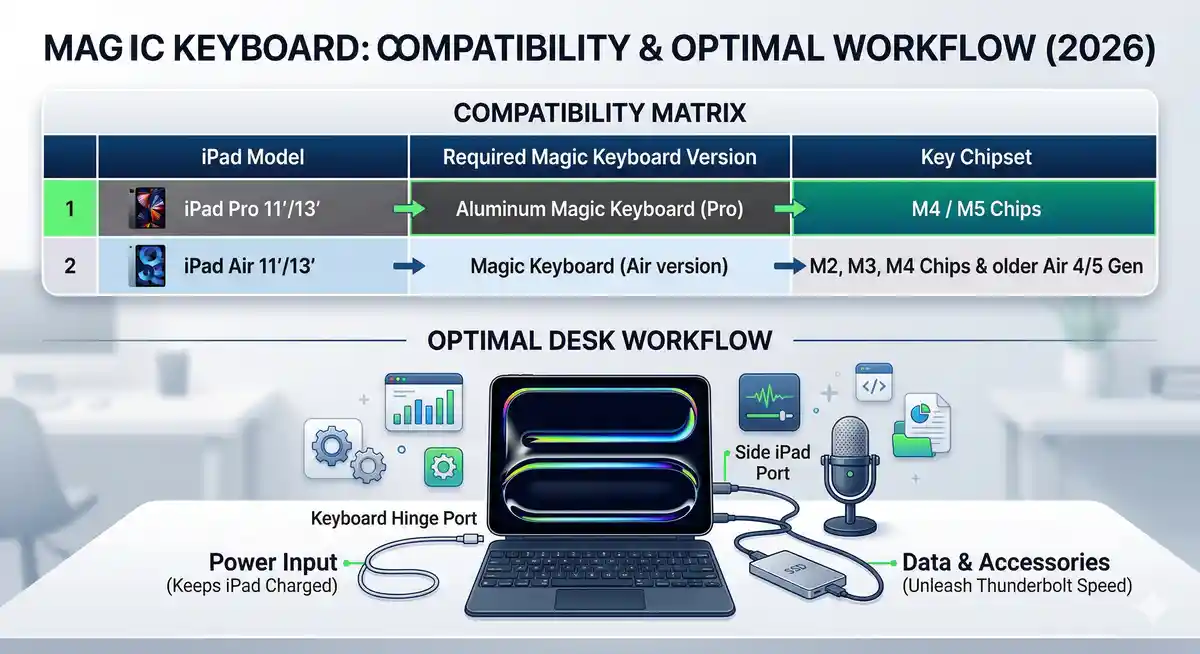
If you are planning to upgrade your setup, you must ensure that your tablet’s internal architecture matches the accessory’s physical footprint and magnetic alignment. The transition to thinner chassis designs in recent years means older keyboards will not properly align with the newer magnetic arrays.
| Tablet Model | Supported Magic Keyboard Version | Pass-Through Charging? |
|---|---|---|
| iPad Pro (M5, 2026) | Magic Keyboard for iPad Pro (Aluminum, 2024/2026) | Yes |
| iPad Pro (M4) | Magic Keyboard for iPad Pro (Aluminum, 2024) | Yes |
| iPad Air (M2, M3, M4) | Magic Keyboard for iPad Air | Yes |
| Older iPad Air (4th/5th Gen) | Magic Keyboard for iPad Air | Yes |
The Great Charging Speed Mystery
One of the most debated topics among tech enthusiasts is exactly how much power the Smart Connector can handle. When Apple updated the accessory lineup alongside the incredibly thin M4 models, they completely redesigned the power delivery pathways to prevent the device from overheating while drawing current through the backplate.
Apple officially states that the Pro lineup is fast-charge capable, theoretically adding a 50% charge in roughly 30 minutes when connected directly to a high-wattage (60W or higher) adapter. However, they conspicuously do not publish the exact wattage specifications for the pass-through mechanism.
Independent testing has yielded conflicting results. Some hardware reviewers claim that the new Smart Connector array can handle up to a robust 60W of power delivery, making it nearly identical to plugging directly into the device. Others, utilizing hardware power meters, have measured the intake peaking closer to 35W or 40W. This discrepancy likely comes down to thermal throttling. If the tablet is running a heavy 3D rendering application, the system may intentionally reduce the intake from the backplate to prevent battery degradation.
| Charging Method | Estimated Wattage | Best Use Case |
|---|---|---|
| Direct connection to iPad (100W Brick) | Up to 35W – 40W (Maximum device limit) | Rapid battery replenishment from 0% |
| Pass-Through via Magic Keyboard | Estimated 25W – 35W (Varies by thermal load) | Maintaining 100% battery during heavy desk use |
| Standard 20W Inbox Charger | 20W | Overnight, slow charging |
Why Freeing Up the Main Interface Changes Everything
You might wonder why it matters so much to have an extra input simply for power. The answer lies in the sheer bandwidth capabilities of modern Apple Silicon. The primary input on the Pro models is not just a standard USB-C; it is a Thunderbolt / USB 4 interface capable of transferring data at a staggering 40Gbps.
By routing your power cable through the keyboard hinge, you can now build a true desktop replacement setup. For photographers, this means plugging in an SD card reader to import massive RAW files while the device remains at full battery. For video editors, it means connecting directly to a blazing-fast external SSD to edit 4K or 8K ProRes footage without transferring it to the internal storage.
Freeing up the main interface fundamentally changes how creative professionals approach mobile workstations, allowing simultaneous external display support and high-speed charging without the need for bulky, overheating dongles.
Furthermore, musicians can connect complex MIDI controllers and audio interfaces directly to the tablet without worrying about the power draw draining their battery mid-performance. This level of modularity is highly sought after, and utilizing the keyboard’s charging feature is the cleanest, most efficient way to achieve it. If you want to dive deeper into optimizing your setup, you should look into a comprehensive `[Internal Link: Apple accessories guide]`.
Best Practices for Battery Health and Desk Setups
Leaving your device plugged in continuously via the keyboard while at your desk might raise concerns about long-term battery degradation. Fortunately, modern iPadOS software includes advanced battery management features. When the system detects that it has been connected to power for extended periods, it may pause charging at around 80% to reduce stress on the internal lithium-ion cells.
When designing your workspace, the pass-through design also offers significant cable management benefits. Because the input is located on the hinge, the charging cable can run straight back across your desk, rather than hanging awkwardly off the side of the tablet in the air. This creates a much cleaner, distraction-free environment. Pairing this clean setup with the `[Internal Link: best USB-C hubs for iPad]` can further elevate your productivity.
For more technical specifications directly from the manufacturer regarding accessory compatibility, you can always visit Official Apple Support.
Maximizing Your Mobile Workflow
At the end of the day, understanding the hardware capabilities of your premium accessories ensures you are getting the full value out of your purchase. The Magic Keyboard is incredibly expensive, but features like the aluminum palm rest, superior trackpad, and the vital pass-through charging port justify the cost for power users.
Whether you are rendering video, writing a novel, or managing complex spreadsheets, maintaining a fully charged device while simultaneously connecting to external ecosystems is the pinnacle of modern mobile computing. If you are struggling with battery longevity during these heavy tasks, discovering new ways to `[Internal Link: maximize iPad battery life]` is a great next step.
Frequently Asked Questions
Can I plug a USB flash drive into the Magic Keyboard’s USB-C port?
No. The port built into the hinge of the keyboard is strictly designed for power delivery (pass-through charging). It does not support any form of data transfer, audio, or video output.
Will charging through the keyboard charge my iPad slower than plugging it in directly?
Generally, yes. While Apple does not release exact figures, the electrical transfer through the Smart Connector’s magnetic pins is slightly less efficient and may be thermally throttled compared to a direct cable connection to the main port.
Does the Magic Keyboard drain the iPad’s battery when not plugged into the wall?
Yes, slightly. The keyboard relies entirely on the tablet for its power to operate the backlit keys and trackpad. However, the battery drain is minimal during normal typing.
Can I charge the Magic Keyboard itself? Does it have an internal battery?
The accessory does not have its own internal battery. The port on the keyboard is only meant to act as a bridge to send power to the tablet’s battery.
Is the new aluminum Magic Keyboard compatible with older iPads?
The compatibility is very strict. The newest iPad Pro versions (designed for M4/M5) will only fit those specific, thinner models. However, the Air versions have slightly broader backward compatibility with 4th and 5th generation models.
Do I need a specific charging brick to use the pass-through charging feature?
Any standard USB-C charger will work, including the one that came in the box with your tablet. However, for the best performance while using the device, a 30W to 60W power adapter is recommended.
Why are there three dots on the back of my iPad?
Those three metallic dots are the Smart Connector. They magnetically align with accessories like the Magic Keyboard to transfer both power and data securely without needing Bluetooth or a traditional plug.
Disclaimer: This article is for informational purposes only. Charging speeds, hardware compatibility, and device performance are based on available industry data and independent testing as of 2026. Always consult the manufacturer’s official documentation before purchasing high-value electronics.