It is crucial to take a moment to think before you click “accept” on your smartphone today, because google starts scanning all your photos as new update goes live across the United States. The tech giant has recently confirmed that its latest artificial intelligence upgrade can actively scan your entire personal media library. The goal? To use actual images of you, your family, and your loved ones to generate hyper-personalized AI content. This means that Gemini, Google’s flagship AI, is now capable of seeing exactly who you know, what you do, and where you travel. If you have tens or hundreds of thousands of memories backed up to the cloud, they are all exposed if you blindly agree to this massive system update.
The Dawn of Google Personal Intelligence AI
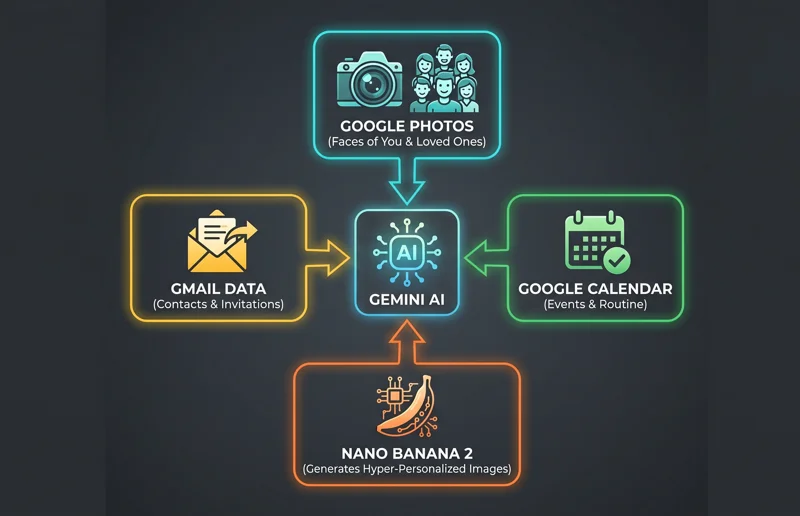
We are officially entering the era of Personal Intelligence, Google’s latest AI upgrade path that allows users to opt-in to connecting their entire ecosystem of Google apps directly to Gemini. The corporate logic is built entirely on maximum convenience. Why manually search for a doctor’s appointment when the AI already has access to all your calendar events? Why dig through your inbox for a party invite when Gemini reads all your emails? And most importantly, why search for a specific reference photo of you and your loved ones to create an AI-generated image when the system can simply see and analyze all your photos at once?
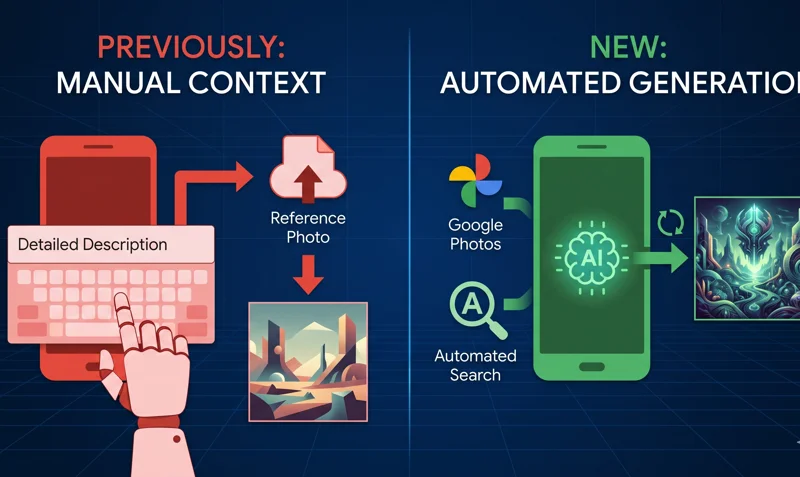
“Previously, to get a result that felt truly personal, you had to write long, detailed descriptions and manually upload a reference photo just to give Gemini the right context.”
With this new update, manual prompting is becoming a thing of the past. Personal Intelligence gives Gemini an inherent, deep-level understanding of your preferences, relationships, and routines right from the start. By integrating this massive wealth of personal context directly with the Nano Banana 2 image generation model, Gemini can automatically fill in the visual blanks without you needing to explain what your spouse, children, or pets look like. A vast majority of your most significant life moments live exclusively in your Google Photos library. By connecting this library to Personal Intelligence, the AI goes a massive step further than just understanding your general interests—it effectively maps your reality.
| AI Feature | Previous Methodology | New “Personal Intelligence” Method |
|---|---|---|
| Image Generation | Manual upload of reference photos | Automatic scanning of Google Photos via Nano Banana 2 |
| Context Gathering | Lengthy, descriptive text prompts | Inherent understanding from Gmail and Calendar data |
The Ongoing Battle: Convenience vs. Privacy
This sweeping update represents the latest iteration in the ongoing battle between ultimate convenience and digital privacy playing out on our smartphones and personal computers. While the ability to have an AI instantly generate an image of you attending a fantasy event using your real face sounds incredibly futuristic, it requires handing over the keys to your most private digital vaults. Google’s AI can now scan everything to form its own views of you and everyone in your social circle.
However, the company insists that security measures are in place. Google notes that they train their underlying models on limited information, such as specific prompts in Gemini and the model’s responses, to improve general functionality over time. Because the implications of Google apps data scanning are so vast, connecting your accounts to Gemini remains an opt-in experience. You can adjust your Opt-in AI privacy settings at any time, but users are urged to be proactive rather than reactive. For more details on how these models are trained, users can review documentation on the Official Google AI Blog.
“There’s a lot going on in AI these days. Sometimes it might even feel overwhelming. Don’t jump into this until you’re very sure.”
| Privacy Setting Status | Impact on Gemini AI | User Action Required |
|---|---|---|
| Opt-In (Enabled) | Full access to scan Photos, Gmail, and Calendar | Accept the new prompt upon opening the app |
| Opt-Out (Disabled) | Limited to standard text inputs and manual uploads | Decline the prompt or disable in account settings |
The advice from cybersecurity experts in 2026 is simple: take a moment to think before you dive in. Gmail executives have acknowledged that the sheer volume of AI features dropping right now can feel overwhelming to the average consumer. Therefore, you should not opt into the Gemini Google Photos integration unless you fully understand and are comfortable with a machine learning model analyzing the faces, locations, and contexts of every picture you have ever taken.
Frequently Asked Questions
Does the new Google update automatically scan my photos?
No, the Personal Intelligence update is an opt-in feature, meaning you must give explicit permission for Gemini to access your Google Photos library.
Why does Gemini want to scan my photos?
By scanning your photos, the AI gains context about your life, allowing it to use actual images of you and your loved ones to generate highly personalized content using the Nano Banana 2 image model.
Can I turn this feature off if I change my mind?
Yes, connecting your Google apps to Gemini is completely adjustable, and you can revoke the AI’s access in your privacy settings at any time.
Does this update only affect Google Photos?
No, the Personal Intelligence update can also connect to and scan your Gmail and Google Calendar to gather comprehensive context about your life.
What is Nano Banana 2?
Nano Banana 2 is the advanced AI image generation model integrated with Gemini that utilizes your personal photos to create customized visual outputs.
Will Google use my personal photos to train public AI models?
Google states that they train on limited info, like specific prompts and responses, but claim your private photos are used for your personalized experience, not public model training.
Is it safe to opt into the Personal Intelligence update?
It depends on your personal comfort level with data privacy. While it offers high convenience, it involves exposing your entire digital life to AI scanning.
Disclaimer: This article is for informational purposes only. Privacy policies and software features are subject to change by the manufacturer. Always review the terms of service and privacy settings within your own applications to ensure your data is handled according to your personal preferences.