The highly anticipated rollout of the google messages trash folder wide release has finally arrived for Android users in 2026, putting an end to the nightmare of accidentally swiping away important conversations. For years, Android device owners have clamored for a native way to handle accidental conversation deletion without relying on complex third-party backup software. Following an initial announcement last month, Google Messages has now officially deployed this crucial safety net across the globe, bringing peace of mind to millions of users who rely on the platform for daily communication, two-factor authentication codes, and essential updates.
The End of Accidental Deletions: Your New Safety Net
Before this monumental update, hitting the delete button on a text thread was a permanent and often devastating action. One wrong tap could wipe out years of cherished memories, crucial business communications, or essential data. The new Trash folder acts as a dedicated buffer zone, functioning similarly to the recycle bin on your personal computer or the recently deleted album in your photo gallery. Now, when you delete a conversation, it no longer vanishes into the digital void immediately. Instead, it is safely relocated to a hidden directory where it waits for a designated grace period.
“For years, a simple accidental tap meant your crucial texts were gone forever. Today, that anxiety is officially a thing of the past with the introduction of a built-in recovery system.”
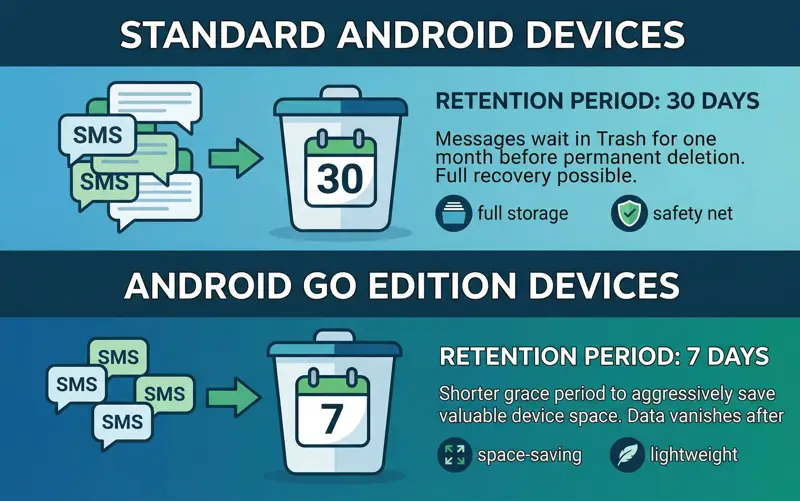
When you first interact with this feature, the application provides a helpful prompt explaining the new mechanics. It clearly states that any chat moved to this folder will be permanently deleted after 30 days. This generously long grace period ensures that if you delete a thread by mistake, or if you simply change your mind about needing that old promotional code or address, you have an entire month to execute a deleted text messages recovery operation. For users operating on Android Go devices—which are specifically optimized for lower memory and storage capacities—the grace period is shortened to 7 days to help conserve valuable device space.
| Device Type | Retention Period | Primary Reason |
|---|---|---|
| Standard Android Devices | 30 Days | Maximum user flexibility and safety net duration. |
| Android Go Edition | 7 Days | Aggressive space-saving and memory management. |
How to Find and Use the New Trash Folder
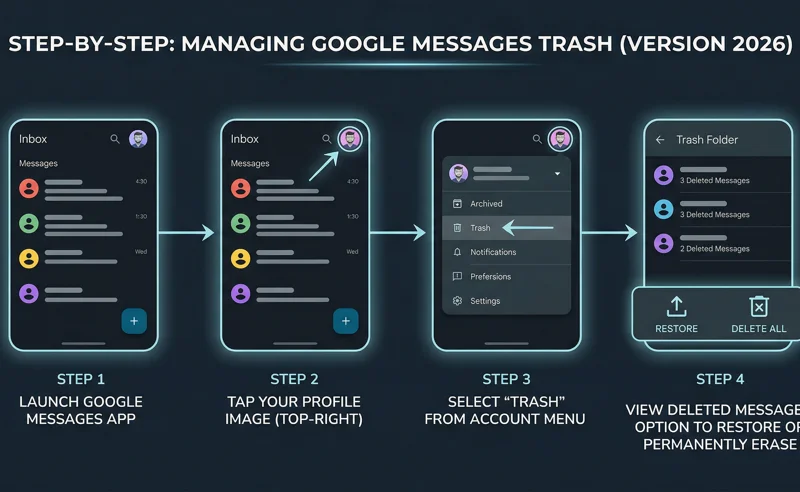
Navigating to this new utility is incredibly straightforward. With the Google Messages version 2026 update (specifically noted as stable version 20260327_00_RC00), the Trash directory has been seamlessly integrated into your account menu. To access it, simply launch the app and tap on your Google profile image located in the top-right corner of the screen. In the dropdown menu, you will see “Trash” conveniently positioned right underneath the “Archived” option, which remains unchanged in its functionality.
Once inside the Trash folder, you will be presented with a list of all your recently deleted threads. The interface is clean and informative, showing exactly how many messages are contained within each discarded conversation. From here, you have total control. If you want to clear out space immediately, you can select the “Delete all” option. Alternatively, if you are looking to restore deleted SMS threads, you can select individual conversations or restore them all in bulk. With a single tap, the rescued messages will instantly reappear on your main chat screen, completely intact.
“Chat will be deleted after 30 days. This grace period provides the perfect balance between keeping your main inbox clean and protecting your data.”
An interesting edge case that developers anticipated is what happens when a contact sends you a new text while your previous history with them is sitting in the Trash. Google has handled this elegantly. If a trashed thread receives a new incoming text, a brand-new thread containing only that newly received message will pop up in your main inbox. The historical messages you previously deleted will remain securely in the Trash folder until their 30-day timer expires, keeping your current inbox uncluttered by old context you purposely tried to remove.
| Action Performed | Previous App Behavior | New 2026 App Behavior |
|---|---|---|
| Deleting a Thread | Permanent, immediate deletion | Moves to Trash for 30 (or 7) days |
| Incoming Text from Trashed Contact | Starts a fresh thread | Starts a new thread; old history stays in Trash |
For users who want to dive deeper into all the latest Android texting app updates or learn more about managing their device storage efficiently, checking the official Google Messages help center is always highly recommended.
Frequently Asked Questions
Where can I find the new Trash folder in Google Messages?
You can find it by tapping your profile picture in the top-right corner of the app. The “Trash” option is located just below the “Archived” folder in the menu.
How long do my messages stay in the Trash folder?
On standard Android devices, messages remain in the Trash for 30 days. If you are using an Android Go device, they will remain there for 7 days to save space.
Can I restore deleted SMS threads back to my main inbox?
Yes. Open the Trash folder, select the conversation you want to recover, and choose the restore option to instantly move it back to your primary chat list.
What happens if someone texts me while our old chat is in the Trash?
A new conversation thread will appear in your main inbox containing only the new message. Your older, deleted messages will remain in the Trash folder.
Is it possible to empty the Trash manually before the 30 days are up?
Yes. You can navigate to the Trash folder and use the “Delete all” function to permanently erase the contents immediately and free up device storage.
Do I need to download a separate app to get this feature?
No, this is a native feature included in the stable version 20260327_00_RC00 of the Google Messages application. Just ensure your app is fully updated via the Google Play Store.
Will deleting a message in Google Messages also delete it from my carrier’s servers?
Deleting a message via the app removes it from your local device storage. Carrier retention policies vary, but this feature specifically manages local on-device message data.
Disclaimer: This article is for informational purposes only. App features and interfaces are subject to change based on future software updates and regional rollouts by Google.