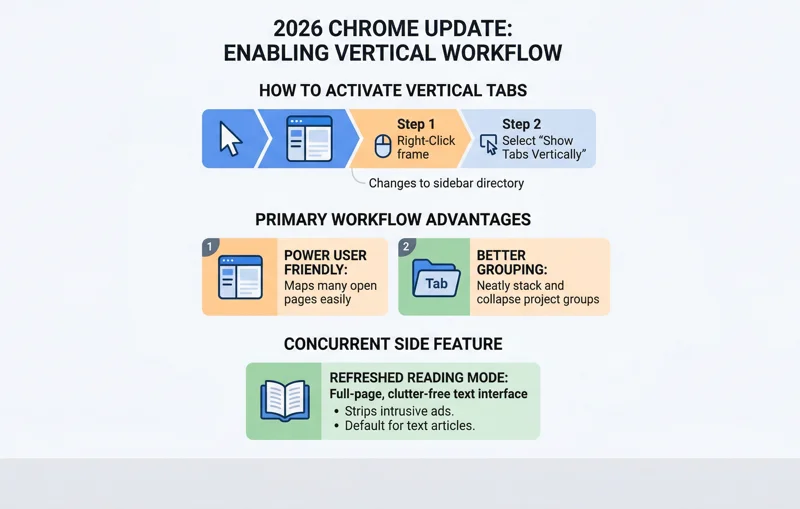
Power users and heavy researchers can finally breathe a sigh of relief because chrome is finally getting vertical tabs in its latest major 2026 update. For years, Google resisted this fundamental user interface shift, sticking strictly to the traditional horizontal tab bar that stretches across the top of the screen. However, as browsing habits have evolved, users frequently find themselves drowning in dozens—if not hundreds—of open pages. Finding the right page becomes a nightmare when horizontal tabs shrink down to mere favicons. Recognizing this massive usability issue, Google announced on Tuesday that users will now have the native option to move their tabs to the side of the browser window.
Why Vertical Tabs Change the Browsing Game
People who prefer vertical layouts tend to be power users who regularly keep many open tabs and struggle to navigate their workspace when things become overly crowded. This pain point is especially pronounced if you tend to open multiple tabs from the exact same website. In a horizontal layout, these tabs shrink until only the site’s identical favicon is visible, making it impossible to distinguish between a dozen different articles or document pages. By moving the tabs to the left or right side of the screen, the browser can display the full page titles in a neat, scrollable list.
“Vertical tabs transform browser chaos into a highly readable, organized vertical directory, allowing users to instantly read full page titles regardless of how many tabs are open.”
The company notes that the new layout works exactly like the traditional one. You can still have different Chrome windows with their own set of independent tabs, and the highly popular Tab Groups feature remains fully functional, allowing you to color-code and collapse specific projects on the sidebar. Furthermore, Google confirmed there is no hard limit on the number of tabs you can open in this mode, restricted only by the constraints of your computer’s hardware and memory capacity.
| Feature / Layout Type | Horizontal Tabs (Classic) | Vertical Tabs (New 2026) |
|---|---|---|
| Title Visibility | Shrinks and disappears with many tabs | Full titles remain readable in a list |
| Screen Space Utilization | Takes up vertical screen real estate | Utilizes wider, modern monitor ratios |
| Tab Group Management | Cluttered when multiple groups are expanded | Neatly stacks and collapses like folders |
The Arc Browser Influence and Rival Competition
This massive UI overhaul indicates how growing competition from modern-day browsers has heavily influenced Chrome’s recent development roadmap. Niche browsers like Arc, a predecessor to the AI-focused browser Dia, popularized the vertical layout and began luring power users away from Google’s ecosystem. By adopting this highly requested feature, Google is effectively limiting the pull of these rivals who aim to differentiate themselves with workflow tools that Chrome previously lacked.
Interestingly, this is not the first time Google has experimented with putting tabs on the side. The company actually tested the feature in a prior decade, but it was abruptly shelved and never made it out of beta testing. This time, however, development has progressed to full deployment. Savvy early adopters had already managed to turn on the option by enabling a hidden flag in recent developer builds, but now it is rolling out gradually to all users across all global markets. For more information on official rollout dates, users can check the Google Chrome release blog.
Introducing the Refreshed Reading Mode
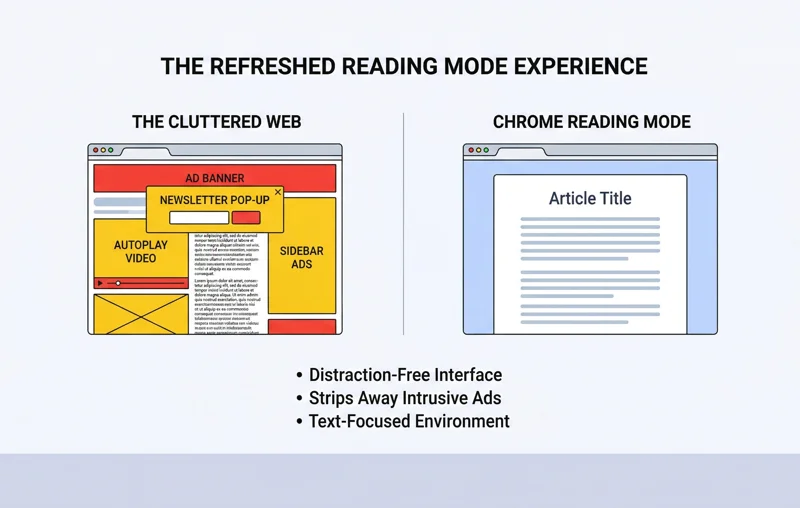
Alongside the highly anticipated launch of vertical tabs, Chrome is also rolling out a significantly refreshed version of its Reading Mode. This tool offers a full-page, distraction-free interface designed to make it even easier to reduce on-screen clutter and focus solely on the primary text. This feature arrives at a critical time when web pages, particularly on major news and media sites, have become incredibly cluttered with intrusive advertisements, auto-playing videos, and aggressive prompts to subscribe to newsletters.
“The refreshed Reading Mode acts as a digital sanctuary, instantly stripping away the overwhelming ad overload that plagues modern media websites to deliver pure, uninterrupted text.”
The irony of this situation is not lost on industry analysts. The financial problems facing the media industry that necessitated this massive ad overload are partially impacted by the fact that Google itself is driving less organic search traffic to publishers as AI-generated overviews take root. Nonetheless, for the end user, this Reading Mode will be the new default text experience, drastically improving digital readability.
| Recent Chrome Update | Primary User Benefit |
|---|---|
| Vertical Tabs Integration | Improves navigation for users with dozens of open pages |
| Refreshed Reading Mode | Strips away heavy ad clutter for distraction-free reading |
| Gemini AI Integration | Assists with drafting text and intelligent search summaries |
| Split View Mode | Allows comparing two tabs side-by-side in one window |
Frequently Asked Questions
How do I turn on vertical tabs in Google Chrome?
You can enable them at any time by simply right-clicking on an empty space on the Chrome window frame and selecting “Show Tabs Vertically.”
Can I switch back to normal horizontal tabs?
Yes. Once enabled, the vertical layout remains your default setting until you right-click and choose to revert back to the classic horizontal layout.
Is there a limit to how many vertical tabs I can open?
Google states there is no hard limit on the software side; you are only limited by your computer’s RAM and hardware performance.
Do Tab Groups still work in the vertical layout?
Yes, Tab Groups work seamlessly on the side panel, allowing you to color-code and collapse groups of tabs just like you could horizontally.
Why did Google decide to add this feature now?
The decision was heavily influenced by rising competition from alternative, modern browsers like Arc, which popularized the sidebar tab layout among power users.
What is the newly refreshed Reading Mode?
It is a distraction-free, full-page interface that strips away ads, sidebars, and pop-ups to help you focus entirely on the article’s text.
Are these features available globally?
Yes, Google has confirmed that vertical tabs and the new Reading Mode are rolling out gradually to all users in all markets in 2026.
Disclaimer: This article is for informational purposes only. Features, rollout schedules, and software capabilities are subject to change based on Google’s official updates and regional availability.