If you are looking for your att transfer pin, you are taking the critical first step toward moving your mobile phone number to a new cellular service provider. Also known as a port-out code or Number Transfer PIN (NTP), this special security code is required by the Federal Communications Commission (FCC) and all major wireless carriers to authorize the transfer of your phone number from one company to another. Whether you type in variations like transfer pin at&t, at & t transfer pin, at and t transfer pin, at t transfer pin, or even the hurried at$t transfer pin into a search engine, you are looking for the exact same 6-digit code.
In recent years, the telecommunications industry has cracked down heavily on unauthorized number porting, commonly known as SIM swapping fraud. To protect your identity, carriers no longer simply accept your billing password to move a number. Instead, you must generate a temporary at&t number transfer pin that proves you are the authorized account holder making the request. This comprehensive guide will walk you through exactly how to obtain this pin, what you need to prepare for your new carrier, and how to avoid common pitfalls during an at&t phone number transfer.
What Exactly is the AT&T Number Transfer PIN?
The Number Transfer PIN is a system-generated, temporary 6-digit code. When you provide your new carrier with your account number and transfer pin att requires, it sends an automated digital handshake to AT&T’s servers, verifying that the number release is legitimate. It is important to note that this PIN is highly time-sensitive.
For standard consumer wireless accounts, the Number Transfer PIN is valid for exactly four days (96 hours) from the exact moment it is generated. If you are dealing with a corporate or enterprise account and need the at&t business port out pin, the validity period is generally extended to 14 days, giving corporate IT administrators more time to handle bulk line transfers.
Before you begin the porting process, you need to gather specific information. Your new carrier cannot pull your number over using just the PIN; they require a complete package of credentials. Let’s look at exactly what you need to provide to your new mobile provider.
| Required Information | Where to Find It | Purpose |
|---|---|---|
| 10-Digit Mobile Number | Your device settings or your memory. | Identifies the exact line of service you are moving. |
| AT&T Account Number | Top right corner of your bill, or inside the myAT&T app under Profile. | Directs the new carrier to the correct billing account. |
| 6-Digit Transfer PIN | Generated via app, website, or dialing *PORT. | The security key that unlocks the number for release. |
| Billing ZIP Code | Your AT&T billing statement. | Secondary identity verification for the port request. |
Method 1: The Quickest Way (Dialing *PORT)
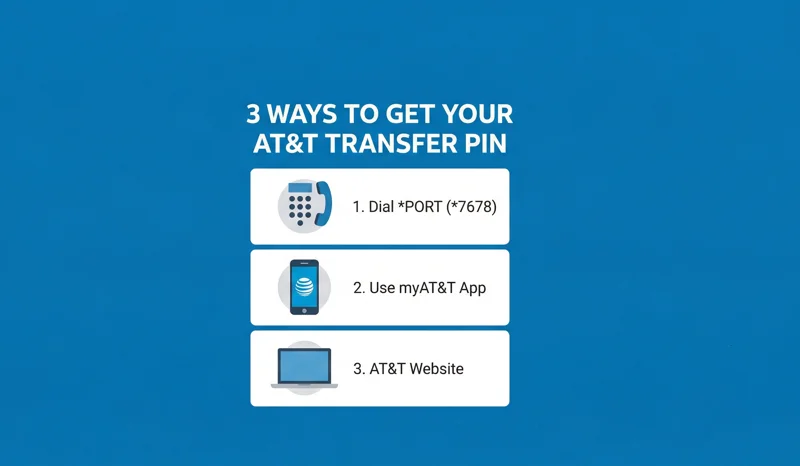
For most users, the absolute fastest way to get an account transfer pin att issues is directly from the mobile phone that is associated with the account. You do not need to log into any websites or remember complex passwords. You simply use the dial pad.
This method involves dialing *7678 att (which spells *PORT on your keypad). Many users colloquially refer to this as the 7678 att method or the at port code.
Here is the step-by-step process:
- Unlock the AT&T mobile phone containing the number you wish to transfer.
- Open your default Phone app and bring up the dial pad.
- Dial *PORT (which corresponds to *7678) and press the call button.
- You will be connected to an automated voice system. The system will ask you to verify your identity by entering your standard 4-digit to 8-digit account pin att (this is your normal security passcode, not the transfer PIN).
- Once verified, the automated system will confirm your request.
- Within seconds, you will receive a free text message from AT&T containing your new 6-digit Number Transfer PIN.
Method 2: Using the myAT&T Mobile App
If you prefer a visual interface, or if your phone screen is damaged and you are doing this from a tablet, the myAT&T application is an excellent alternative. Generating your at&t pin code through the app is straightforward.
Follow these steps within the app:
- Launch the myAT&T app on your device and log in using your primary User ID and password. You must be logged in as the Account Owner or have secondary authorized access.
- Tap on the More menu (often represented by three lines at the bottom or top of the screen).
- Navigate to Manage Profile.
- Select the People & Permissions tab.
- Scroll down until you find the section labeled Transfer phone number.
- Tap on Request a new PIN. The 6-digit code will immediately display on your screen, and you can take a screenshot or write it down.
Method 3: Generating the PIN via the AT&T Website
If you are setting up your new service on a computer and want to copy and paste your details easily, using the AT&T website is the best method to secure your at&t number transfer authorization.
Here is how to get the PIN from your desktop browser:
- Go to the official AT&T website and log in to your account.
- Click on your name or the Profile icon located at the top right of the homepage.
- Navigate to Profile & Settings.
- Click on People & permissions, then select the Wireless tab.
- Scroll down to find the Transfer phone number option.
- Click on Request a new PIN. The website will generate the PIN and display it on the page.
Crucial Warning: Do not cancel your current AT&T service before the porting process is fully completed by your new carrier, or you risk losing your phone number forever.
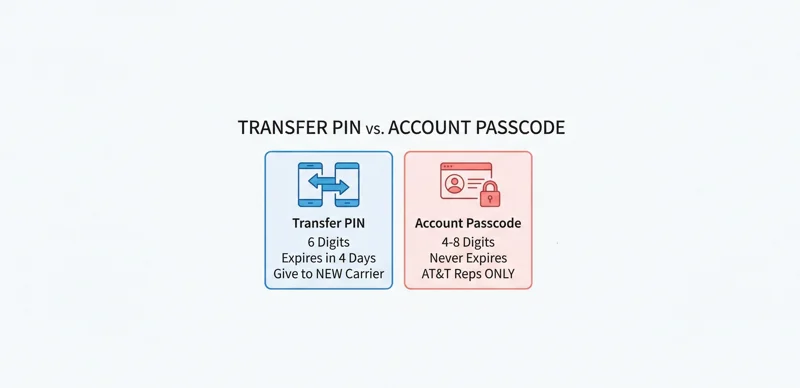
Understanding the Difference: Account Passcode vs. Transfer PIN
One of the most common reasons an at&t phone number transfer fails is that customers confuse their standard security passcode with their transfer PIN. Giving your new carrier the wrong number will result in an immediate rejection of the port request. It is vital to understand the distinction between the at&t account number and transfer pin versus your regular security credentials.
| Feature | Account Passcode (Security PIN) | Number Transfer PIN (NTP) |
|---|---|---|
| Length & Format | 4 to 8 digits (created by you). | Exactly 6 digits (generated by AT&T). |
| Primary Use | Verifying your identity when calling AT&T customer service or logging into your account. | Authorizing a new wireless carrier to take control of your phone number. |
| Expiration | Never expires (unless you manually change it). | Expires automatically after 4 days (14 days for business). |
| Who to Share With | AT&T Representatives ONLY. | Your NEW Carrier ONLY. |
Special Exception: AT&T Prepaid Accounts
If you are an AT&T Prepaid customer (formerly known as GoPhone), the rules for porting out are entirely different. The advanced Number Transfer PIN system was built primarily for postpaid (contract/billed) accounts.
For prepaid users, you do not need to generate a temporary 6-digit PIN. Instead, your at&t pin number—specifically, the 4-digit security PIN you use to log into your prepaid account or speak with customer service—acts as your port-out authorization code. When your new carrier asks for your transfer PIN, you simply provide your 4-digit prepaid account pin att. Ensure you also provide your correct prepaid account number, which is usually not displayed online and may require you to contact prepaid customer service to obtain.
| Account Type | Port-Out Code Required | How to Obtain |
|---|---|---|
| Postpaid (Standard Monthly Bill) | 6-Digit Number Transfer PIN | Dial *PORT, use the myAT&T app, or log into the website. |
| Prepaid (Pay as you go) | 4-Digit Account Security PIN | You created this when you set up the account. Call 611 if forgotten. |
| Business Accounts | 6-Digit Number Transfer PIN | Generated by the Telecom Admin via Premier or Business Center portals. |
Troubleshooting and AT&T Customer Service Transfer PIN Issues
Occasionally, you might run into issues where the app throws an error, or the *PORT feature says it cannot process your request at this time. This usually happens if there is a fraud lock on your account, if you recently changed your primary password, or if the account is past due in a way that restricts self-service features.
If you absolutely cannot generate the PIN yourself, you must engage the at&t customer service transfer pin process. You can dial 611 from your AT&T phone or call 1-800-331-0500. However, be aware that customer service agents are trained to push you toward the self-service methods for security reasons. They will typically send a one-time link to your phone that allows you to bypass the error and generate the PIN, rather than reading the PIN to you over the phone.
For more official details on the policies regarding porting, you can review the AT&T official Number Transfer Support Page to ensure you are following the latest security protocols.
Frequently Asked Questions
Does the AT&T Transfer PIN expire?
Yes. For standard consumer accounts, the Number Transfer PIN expires 4 days (96 hours) after it is generated. If it expires before your new carrier completes the port, you must generate a new one.
How do I find my AT&T account number?
Your account number is located at the top right corner of your paper or PDF billing statement. You can also find it by logging into the myAT&T app and viewing your account overview.
Can I use the same Transfer PIN for multiple lines on my account?
Yes. If you are moving a family plan or multiple numbers from the exact same AT&T billing account to the new carrier at the same time, the single 6-digit PIN you generate will authorize the transfer for all numbers under that account.
Do AT&T Prepaid accounts need
digit Transfer PIN?
Answer: No. AT&T Prepaid accounts use the standard 4-digit account security PIN as the transfer authorization code. You do not need to dial *PORT.
What should I do if my number transfer fails?
Port failures usually happen due to mismatched information (wrong zip code, wrong account number, or wrong PIN). Double-check your details, generate a new AT&T Transfer PIN, and provide the updated information to your *new* carrier so they can resubmit the request.
Is the Transfer PIN the same as my account passcode?
No. Your account passcode is a 4 to 8-digit number you created to verify your identity with customer service. The Transfer PIN is a 6-digit system-generated code used exclusively for switching carriers.
Can an AT&T customer service agent give me the PIN over the phone?
For security reasons, agents generally cannot view or read the PIN to you. They can, however, help troubleshoot the system and send a secure SMS to your device to force the system to generate and text you the PIN.
Disclaimer: The information provided in this article is for educational and informational purposes only. Telecommunications policies, including PIN generation processes and expiration timelines, are subject to change by the carrier. Always consult AT&T’s official documentation or customer service for the most current procedures regarding account security and number porting.