Drivers who regularly consume podcasts and video essays on their commute will be thrilled to know that native Android Auto media controls are finally rolling out for the main YouTube application. For years, users have had to rely on convoluted workarounds or switch to dedicated apps like YouTube Music to get a seamless audio experience in their vehicles. However, a recent 2026 update has changed the landscape of in-car audio streaming. Google is officially bridging the gap, allowing the standard YouTube app to interface directly with your car’s infotainment system. Before you get too excited and expect a mobile theater experience on your dashboard, it is crucial to understand the specific functionalities, the strict safety limitations, and the subscription requirements attached to this highly anticipated update.
The Discover Targeting Hook: A Long-Awaited Arrival
If you have ever tried listening to a long-form YouTube documentary while navigating the highway, you know the frustration of relying solely on your phone screen to pause or skip ahead. The integration of YouTube into the Android Auto ecosystem has been one of the most requested features on forums and user feedback boards. Now, whether you are running the beta track or the stable release, users across Reddit and official Google support communities are confirming that YouTube finally appears in the Android Auto dashboard media widget. This update solidifies Google’s commitment to creating a unified, safer driving environment where essential controls are placed right at the driver’s fingertips—or directly on the steering wheel.
The New Update & How It Works
So, what exactly happens when you connect your phone to your car following this recent update? When a YouTube video is actively playing on your mobile device and you plug it into an Android Auto-compatible head unit (or connect wirelessly), the audio will automatically route through your car’s stereo system, just as it always has. The critical difference is the presence of the Android Auto dashboard widget. Previously, the audio would play, but the dashboard screen would remain blank regarding media controls, forcing the driver to interact with the phone to pause the audio—a major safety hazard.
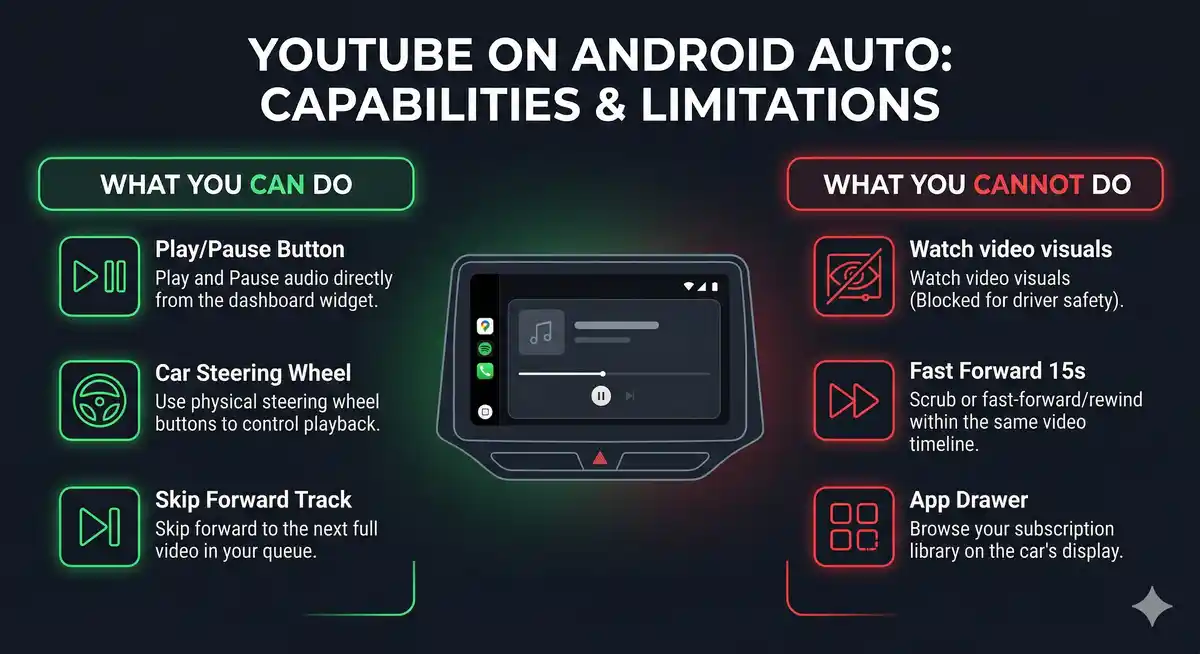
With the new rollout, a dedicated YouTube media widget appears on your display. This widget provides a clean, distraction-free interface tailored specifically for driving. You are granted the ability to play and pause the current content seamlessly. Furthermore, the integration extends to the physical hardware of your vehicle. The steering wheel controls—which traditionally manage radio stations or Spotify tracks—now actively communicate with the YouTube app. Pressing the “next” button on your steering wheel will execute a full video skip, taking you to the next video in your queue or the algorithm’s suggested auto-play list. It is important to note that this is a full track skip, not a fast-forward or rewind within the current video timeline.
| Feature / Functionality | Status on Android Auto (2026) | User Interface Element |
|---|---|---|
| Play / Pause Content | Fully Supported | Dashboard Widget & Steering Wheel |
| Skip to Next Video | Fully Supported | Dashboard Widget & Steering Wheel |
| Fast Forward / Rewind | Not Supported | N/A |
| Video Playback (Visuals) | Strictly Blocked | Black screen / Audio only |
| Library Browsing | Not Supported | Must queue from phone before driving |
The Catch & Limitations: Safety First
While the addition of the widget is a massive improvement, expectations must be managed. This is absolutely not a full “YouTube for Android Auto” application. You cannot open an app drawer on your car’s screen, tap a YouTube icon, and start browsing your subscription feed. Furthermore, you cannot watch videos on your infotainment screen. For obvious legal and safety reasons designed to prevent distracted driving, the visual feed of the video is entirely disabled while connected to Android Auto. The system operates strictly as an audio pipeline with basic remote control functionalities.
If you are parked and waiting in your car, you might wonder if the video feed unlocks. Currently, under the standard Android Auto framework, it does not. The capability to watch full YouTube videos while parked is a feature reserved for vehicles equipped with Android Automotive OS (the standalone operating system built into the car itself, found in newer Volvo, Polestar, and GM vehicles), rather than the phone-projection system of standard Android Auto.
“This is not the full ‘YouTube for Android Auto’ release many have been hoping for, but having basic playback options integrated into the dashboard is a massive step forward for daily commuters.”
Subscription Requirements: YouTube Premium and Premium Lite
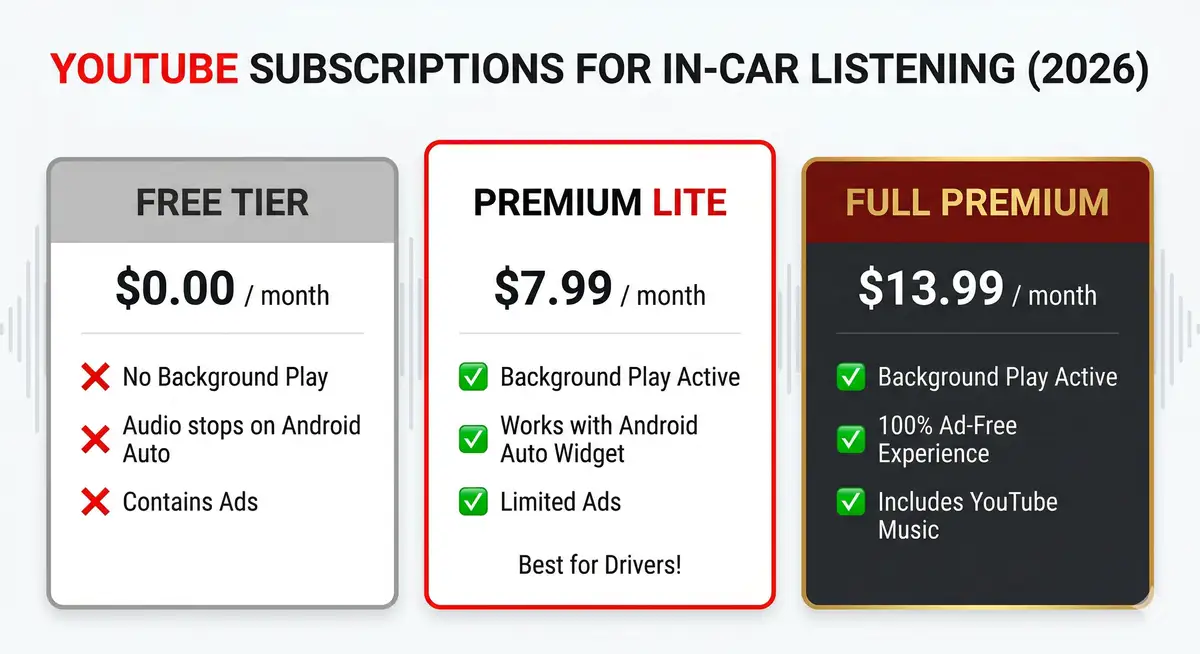
The most significant caveat to this new functionality is that it is entirely dependent on background play capabilities. By default, the free version of YouTube immediately pauses playback the moment you turn off your phone screen or switch to another app, including the Android Auto projection interface. Therefore, to utilize the new dashboard media controls, an active subscription is mandatory.
Historically, this meant shelling out for a full YouTube Premium subscription. However, the landscape changed favorably for consumers in February 2026. Google officially rolled out the highly requested YouTube Premium Lite plan in the United States, priced at a very accessible $7.99 per month. While the original iteration of Premium Lite (tested in parts of Europe years ago) only removed ads, the newly revamped 2026 version specifically includes background play as a core feature. This makes the Premium Lite tier the perfect, cost-effective companion for drivers who rely on YouTube for their daily commute listening but don’t care about offline downloads or bundled YouTube Music access.
| Subscription Tier | Monthly Cost (US) | Background Play (Android Auto) | Ad-Free Experience |
|---|---|---|---|
| Free Tier | $0.00 | No (Playback pauses) | No |
| Premium Lite (New 2026) | $7.99 | Yes (Fully Supported) | Yes (Limited ad interruptions) |
| YouTube Premium (Full) | $13.99 | Yes (Fully Supported) | Yes (Completely Ad-Free) |
The Rise of In-Car Audio Streaming and Podcasts
The push to bring YouTube integration to the car dashboard is largely driven by shifting media consumption habits. YouTube is no longer just a platform for short viral clips or music videos. It has become the premier destination for long-form content, video podcasts, investigative journalism, and deep-dive video essays. Many of these formats do not require visual engagement to be enjoyed. Creators are increasingly optimizing their content to function equally well as an audio-only experience, knowing that a massive portion of their audience is listening while commuting, working out, or doing household chores.
By securing a seamless connection between the YouTube app and Android Auto, Google is protecting its dominance in the podcasting space. With Google Podcasts having been sunset in favor of YouTube Music and the main YouTube app, ensuring a frictionless experience in the vehicle is critical to retaining listeners who might otherwise migrate to Spotify or Apple Podcasts for their daily drives.
Future Prospects: What Is Next for Google Infotainment?
Will we ever see a fully functional YouTube app on Android Auto that allows browsing and parked viewing? According to Google’s development roadmap, the door is not completely closed. However, the company is clearly prioritizing Android Automotive OS for deeper, screen-dependent integrations. As more car manufacturers adopt Google’s native operating system over the next few years, the reliance on phone-projection systems like Android Auto may slowly diminish.
Until then, the current update represents an excellent middle ground. It provides the essential, safe controls drivers need without compromising the strict anti-distraction guidelines set by transportation authorities. For more details on official app compatibility and dashboard safety guidelines, you can visit the Official Android Auto Website.
In conclusion, the addition of Android Auto support for YouTube is a definitive win for commuters. While it requires a Premium or Premium Lite subscription to function, the convenience of steering wheel controls and dashboard widgets for your favorite video podcasts is well worth the price of entry. Just remember to queue up your playlist before you put the car in drive, keep your eyes on the road, and enjoy the ride with your favorite creators providing the soundtrack.
Frequently Asked Questions
Can I watch YouTube videos on my car screen with this update?
No. For safety reasons, the integration only supports audio playback and basic media controls. Video playback on the car’s display is strictly blocked while driving.
Do I need a subscription to use YouTube on Android Auto?
Yes. Because the feature relies on background play, you must have an active YouTube Premium or YouTube Premium Lite subscription for the audio to continue playing when connected to the dashboard.
What controls are available on the Android Auto screen?
The dashboard media widget allows you to play, pause, and skip to the next video. You cannot fast-forward or rewind within the specific video you are currently listening to.
Yes. If your car has steering wheel media controls, you can use them to pause the audio or skip to the next full video in your queue.
Can I browse my YouTube subscriptions on the car screen?
No. There is no full app interface to browse your library. You must start a video or playlist on your phone before driving; the car interface only acts as a remote control.
What is the YouTube Premium Lite plan mentioned?
Introduced widely in February 2026, the Premium Lite plan costs $7.99/month and includes the background play feature necessary for Android Auto to work, without bundling extras like YouTube Music.
Does this work on Apple CarPlay as well?
This specific update and rollout are detailed for Android Auto. While iOS users have background play with Premium, the native widget integration varies depending on Apple’s CarPlay API updates.
Disclaimer: This article is for informational purposes only. Features, subscription prices, and app availability are based on the February 2026 rollout and may be subject to change by Google or local safety regulations. Always prioritize safe driving and avoid interacting with mobile devices while operating a vehicle.