Android 17 Beta 3 is LIVE on Pixel devices, bringing a massive wave of refinements, new features, and crucial system stability to Google’s flagship smartphone lineup. As we push deeper into the 2026 software cycle, the stable build of the operating system is still a few weeks away, but this latest beta release offers an experience that is incredibly close to the final product. For tech enthusiasts, developers, and everyday users who love staying on the cutting edge, this update is a monumental milestone that sets the stage for the future of mobile computing.
The Milestone: Android 17 Platform Stability
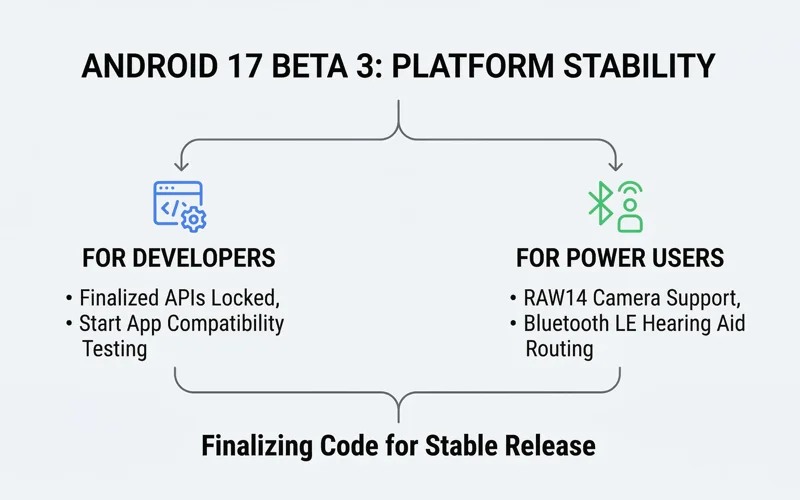
Google just began rolling out Android 17 Beta 3, and as indicated in its comprehensive developer roadmap earlier this year, this specific beta has finally reached the highly anticipated “Platform Stability” phase. But what exactly does this mean for the ecosystem? In the world of software development, reaching Platform Stability signifies that the underlying code and application programming interfaces (APIs) of the operating system are now finalized and locked in. There will be no more structural changes to how apps interact with the system.
For developers around the globe, this is the ultimate green light. It means they can confidently begin their final compatibility testing without fear of Google changing the rules at the last minute. Developers can now start compiling their software against the final Android 17 SDK and begin pushing their Android 17-targeted applications directly to the Google Play Store. This ensures that on day one of the official public release, the most popular apps will already be optimized for the new Google Pixel OS update.
| Release Phase | Primary Focus | Target Audience |
|---|---|---|
| Developer Previews | Core architectural changes and new APIs | Software Engineers only |
| Beta 1 & 2 | UI tweaks, feature introductions, bug hunting | Early adopters and testers |
| Beta 3 (Platform Stability) | Finalized APIs, app compatibility testing | Developers and general public |
| Final Release | Polished, bug-free consumer rollout | All global Pixel users |
How to Initiate Your Android Beta Program Download
On the other hand, for general users, the beta brings a host of exciting new capabilities for you to try out right now. Getting your hands on the software is surprisingly straightforward, provided you own an eligible Google Pixel device. The safest and most convenient method is to enroll your device in the official testing track. By doing this, you will receive the update “over the air” (OTA), exactly like a standard monthly security patch.
To begin, simply navigate to the official portal and opt-in your eligible smartphone. You can manage your enrolled devices by visiting the Android Beta Program official website. Once enrolled, navigate to your phone’s Settings > System > System update, and tap “Check for update.” Within minutes, the Android 17 Beta 3 package should appear, ready for download and installation. For advanced users who prefer a clean slate, you also have the option to go the system images route, which involves manually flashing the OS via a computer using the Android Flash Tool.
“Reaching Platform Stability is the green light for developers. It bridges the gap between experimental coding and consumer-ready software, ensuring the Google Play ecosystem is prepared for the next generation of smartphones.”
Top User-Facing Features: Visual and UI Changes
Once you have successfully updated your device, you will immediately notice several new bells and whistles that enhance the day-to-day user experience. Google has focused heavily on minimalism and seamless utility in this iteration of the OS.
Hide App Labels on the Home Screen
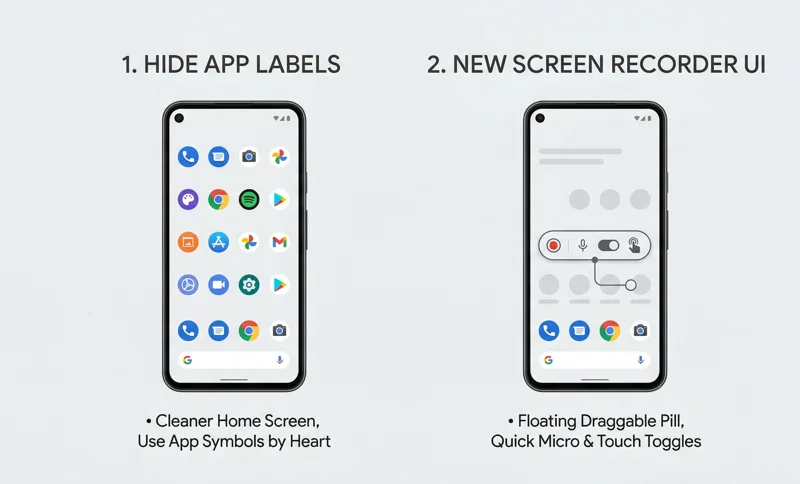
One of the most requested customization features has finally arrived: you will now be able to hide app names from showing up on the home screen. For years, Android users have relied on third-party custom launchers to achieve this minimalist aesthetic. Now, it is baked directly into the native Pixel Launcher. By removing the text beneath the icons, the home screen achieves a significantly cleaner, less cluttered look. This feature relies heavily on the user’s muscle memory and visual recognition, provided you know each app’s specific symbol by heart. It allows your custom wallpapers to shine through without text obstruction, bringing a sleek, modern vibe to your device.
The Redesigned Android 17 Screen Recording Toolbar
Content creators and power users will be thrilled to see the heavily anticipated UI update to the screen capturing utility. We have seen this one before; the redesigned UI showed up in various code leaks over the past few months, and it is finally going live with the third Android 17 beta. The new Android 17 screen recording toolbar is no longer a bulky notification shade element. Instead, it is a sleek, floating pill-shaped interface that provides instant access to microphone toggles, touch-indicator settings, and a prominent stop button. It can be easily dragged out of the way, ensuring your screen recordings remain professional and uncluttered.
| Screen Record Feature | Old Android Versions | Android 17 Beta 3 |
|---|---|---|
| UI Location | Stuck in the notification shade | Floating, draggable pill-shaped toolbar |
| Quick Toggles | Required pulling down the menu | Accessible directly on the floating UI |
| Visual Intrusion | High (often caught in the final video) | Low (minimalist and easily hidden) |
Deep Dive: Under-the-Hood API and System Upgrades
While hiding app labels and a new screen recorder are the major user-facing changes, the true power of Android 17 Beta 3 lies beneath the surface. For a deeper dive, Google’s full developer changelog offers detailed information on systemic changes designed to improve photography, audio accessibility, and battery endurance.
Advanced Photography and Camera APIs
Mobile photographers have a lot to look forward to. The new beta introduces native support for the RAW14 image format. This allows third-party camera applications to capture much more light and color data directly from the camera sensor, providing professional editors with vastly superior dynamic range in post-production. Furthermore, the introduction of vendor-defined camera extensions and new camera device type APIs means that apps like Instagram and Snapchat can finally utilize the specific proprietary camera hardware (like specialized night modes or optical zoom lenses) built into different Android devices, rather than relying on a basic, compressed viewfinder feed.
Accessibility: Bluetooth LE Audio Hearing Aid Support
Perhaps one of the most important silent upgrades is the profound improvement to accessibility. Android 17 introduces robust Bluetooth LE (Low Energy) Audio hearing aid support alongside granular audio routing for hearing aids. This means users with compatible medical audio devices can now experience high-fidelity sound streaming directly from their phones with minimal battery drain. The granular routing allows users to specifically choose which audio sources (e.g., phone calls vs. media playback) are sent directly to the hearing aids and which are played through the device speakers.
“The inclusion of granular audio routing for Bluetooth LE hearing aids is not just a technical upgrade; it is a life-changing accessibility feature that empowers users with seamless, personalized auditory control.”
Performance, Privacy, and Multitasking
Beyond media, the OS update brings critical performance and battery enhancements utilizing smarter background task management. Privacy updates continue to be a priority, giving users even more transparent control over what data applications can access. Multitasking power users will appreciate the better support for widgets on external displays, making desktop-mode setups much more viable. The addition of Desktop Interactive Picture-in-Picture allows for seamless video viewing while working across multiple windows. Finally, new VPN app exclusion settings give users granular control over which specific applications bypass their active Virtual Private Network, perfect for banking apps that block VPN traffic.
| System Category | New Android 17 Feature | Primary Benefit |
|---|---|---|
| Photography | RAW14 format & Vendor API support | Better dynamic range for third-party camera apps. |
| Accessibility | Bluetooth LE Hearing Aid routing | Low-latency, battery-efficient medical device streaming. |
| Productivity | Desktop Interactive PIP & Widget support | Enhanced external monitor multitasking workflows. |
Frequently Asked Questions
What does Android 17 Platform Stability actually mean?
Platform Stability means that the internal coding and APIs for Android 17 are completely finalized. Developers can now update their apps without worrying about Google making system-breaking changes before the final release.
How can I download the Android 17 Beta 3 update?
You can download the update by enrolling your eligible Pixel device in the official Android Beta Program online. Once enrolled, the update will appear in your system settings as a standard over-the-air (OTA) download.
How do I hide app labels on Android 17?
In the new beta, you can long-press on your home screen, navigate to the Pixel Launcher’s Home Settings, and toggle the option to hide app names, leaving only the minimalist app icons visible.
What is new with the Android 17 screen recording toolbar?
The screen recorder UI has been completely redesigned from a drop-down notification menu into a sleek, floating, draggable pill on the screen, allowing for easier access to controls without cluttering your captured video.
Does this update improve camera quality?
Yes, the update includes new APIs like RAW14 support and vendor-defined camera extensions, which allow third-party apps like Instagram to utilize the phone’s native camera hardware much more effectively.
Is it safe to install Beta 3 on my daily driver phone?
While Beta 3 is much more stable than previous versions because it has reached Platform Stability, it is still pre-release software. You may encounter minor bugs, so backing up your data beforehand is highly recommended.
What are the new accessibility features in this update?
Android 17 Beta 3 introduces advanced Bluetooth LE Audio support specifically for hearing aids, alongside granular audio routing that lets users control exactly which sounds are beamed directly to their medical devices.
Disclaimer: This article is for informational purposes only. Beta software is subject to bugs and performance issues. Always ensure your device data is fully backed up before participating in any beta testing programs.